Skip to content

15 Email Deliverability Mistakes Killing Your Cold Outreach
Quick Answer
The biggest email deliverability mistakes killing cold outreach are using unauthenticated domains, sending from a new or primary company domain, increasing volume too quickly,
contacting unverified leads, ignoring spam complaints, and sending generic emails with excessive links or tracking.
These mistakes damage sender reputation and cause emails to land in spam instead of the primary inbox.
Even strong offers and persuasive cold email copy cannot generate replies when prospects never see the message.
Successful cold outreach begins with reliable inbox placement, clean prospect data, controlled sending behaviour, and relevant messaging.
This guide explains 15 common cold email deliverability mistakes, how they affect your campaigns, and what you can do to fix them.
Table of Contents
- Skipping SPF, DKIM, and DMARC authentication
- Sending from your primary company domain
- Using a brand-new domain immediately
- Increasing sending volume too quickly
- Sending to unverified email addresses
- Treating catch-all emails as verified contacts
- Ignoring bounce rates
- Targeting an overly broad audience
- Using identical email copy at scale
- Adding too many links and images
- Relying heavily on open tracking
- Hiding or removing unsubscribe options
- Sending too many follow-ups
- Ignoring sender reputation
- Measuring success through open rates alone
- Step-by-step deliverability process
- Practical campaign example
- Frequently asked questions
Cold Email Deliverability Mistakes at a Glance
| Mistake | Deliverability Risk | Recommended Fix |
|---|---|---|
| Missing email authentication | Messages appear untrustworthy | Configure SPF, DKIM, and DMARC |
| Using the main company domain | Risks the company’s regular email | Use a separate outreach domain |
| Sending from a new domain | Creates suspicious sending behaviour | Age and gradually warm the domain |
| Sudden volume increases | Triggers spam filters | Increase sending volume gradually |
| Unverified prospect data | Produces hard bounces | Verify every list before sending |
| Excessive links and images | Makes emails appear promotional | Use simple, text-focused emails |
| Generic mass messaging | Generates low engagement and complaints | Segment and personalise campaigns |
1. Skipping SPF, DKIM, and DMARC Authentication
Sending cold emails without proper authentication is one of the most damaging email deliverability mistakes.
SPF identifies which servers are authorised to send email for your domain. DKIM adds a digital signature that helps receiving providers confirm the message has not been altered.
DMARC tells receiving servers how to handle messages that fail authentication and checks whether the visible sender domain aligns with SPF or DKIM.
Google requires senders to use email authentication and advises bulk senders to implement SPF, DKIM, and DMARC. It also requires direct messages to achieve domain alignment.
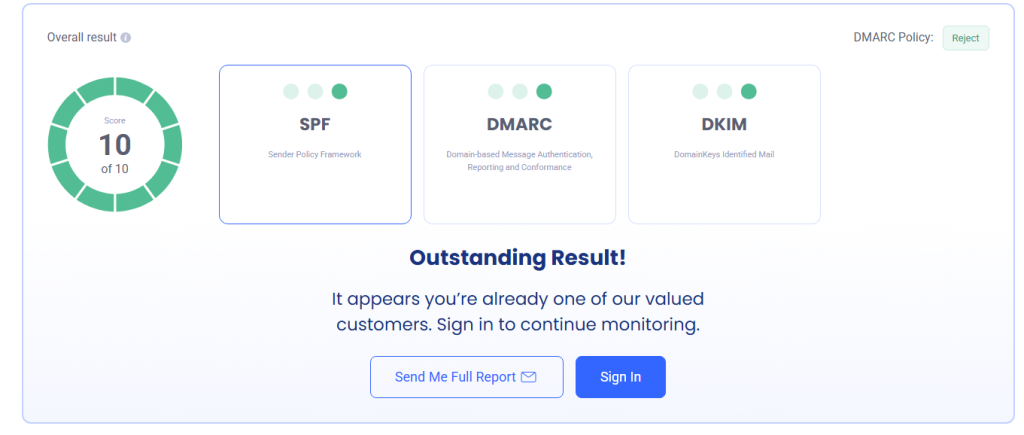
How to fix it: Configure all three records, check them after DNS propagation, and inspect message headers to confirm that SPF, DKIM, and DMARC return a “pass” result.
2. Sending Cold Emails From Your Primary Company Domain
Your main company domain supports normal communication with customers, employees, suppliers, and partners.
Using it for high-volume cold outreach exposes the entire organisation to reputation damage.
A sudden increase in spam complaints or bounces could affect regular business emails as well as prospecting campaigns.
Apollo also recommends separating prospecting activity from the primary domain to provide additional protection for the main business identity.
How to fix it: Register closely related secondary domains exclusively for outbound prospecting. Keep your main domain reserved for normal business communication.
3. Using a Brand-New Domain Immediately
A recently registered domain has little or no sending history. Sending hundreds of cold emails from it immediately creates a pattern associated with spam operations.
Domain age alone does not guarantee inbox placement, but a new domain combined with high volume, weak engagement, and repetitive messaging creates unnecessary risk.
How to fix it: Set up authentication, create real mailboxes, allow the domain to establish normal activity, and gradually introduce prospecting campaigns.
4. Increasing Sending Volume Too Quickly
Sudden volume spikes are a major warning signal for mailbox providers.
A mailbox that sends a few emails one day and hundreds the next does not demonstrate natural behaviour.
Rapid scaling can increase temporary deferrals, spam placement, and account restrictions.
How to fix it: Begin with a conservative daily volume and increase it gradually.
Spread leads across multiple properly configured mailboxes rather than forcing one mailbox to handle an excessive workload.
5. Sending to Unverified Email Addresses
Poor prospect data damages cold email deliverability before your copy has a chance to perform.
Outdated contacts, misspelled addresses, inactive employees, role-based inboxes, and fabricated data can increase hard bounces.
Repeatedly sending to invalid addresses signals weak list management.
How to fix it: Verify email addresses before every major campaign. Remove invalid, duplicate, disposable, and clearly risky contacts.
Reverify older lists because people frequently change jobs and companies.
LeadCanal helps businesses build targeted prospect lists around relevant industries,
locations, company characteristics, and decision-maker roles, reducing dependence on broad, unqualified databases.
6. Treating Catch-All Emails Like Fully Verified Contacts
Catch-all domains accept messages sent to almost any address at that domain, making individual mailbox verification difficult.
A catch-all result does not automatically mean the contact is invalid.
However, treating every catch-all address as safe can increase bounces, low engagement, and uncertain delivery outcomes.
How to fix it: Place catch-all contacts in a separate segment.
Send to them at a controlled volume, prioritise contacts supported by additional data, and monitor results independently from fully verified addresses.
7. Ignoring Your Bounce Rate
A bounce is not merely a failed delivery. It is feedback about the quality of your database and sending process.
Hard bounces normally indicate permanent issues, such as an invalid mailbox or non-existent domain.
Soft bounces may be caused by temporary server problems, mailbox limits, or rate restrictions.
How to fix it: Remove hard bounces immediately. Investigate patterns by list source, domain, provider, and campaign.
Pause a campaign when bounce rates rise unexpectedly instead of continuing to send.
8. Targeting an Overly Broad Audience
Deliverability is closely connected to relevance. When targeting is too broad, fewer recipients engage and more recipients ignore, delete, or report the message.
For example, sending the same offer to every “business owner” is unlikely to produce the same engagement as a campaign aimed at a defined industry, company size, location, and operational challenge.
How to fix it: Build smaller segments based on a clear ideal customer profile. Personalise the problem, value proposition, proof, and call to action for each segment.
9. Sending Identical Email Copy at Scale
Sending the same subject line and body to thousands of recipients creates repetitive message patterns. It also usually produces weak engagement because the message does not reflect the recipient’s situation.
Personalisation does not mean adding only a first name. Effective personalisation connects your offer to the prospect’s role, company, industry, recent activity, or relevant business problem.
How to fix it: Create meaningful variations for each audience segment.
Change the opening context, pain point, evidence, and call to action while maintaining a consistent offer.
10. Adding Too Many Links, Images, and Attachments
Cold emails filled with buttons, banners, tracking links, images, and attachments can resemble promotional bulk email.
Every additional element creates friction. It may also distract recipients from the main action you want them to take.
How to fix it: Use concise, text-focused emails. Include one clear call to action.
Avoid attachments in the first message and use links only when they are genuinely necessary.
11. Relying Too Heavily on Open Tracking
Open tracking normally uses an invisible tracking pixel. Privacy protections, image blocking, automated security scans, and mailbox-provider behaviour can make open data unreliable.
Tracking technology may also add unnecessary technical complexity to a simple cold email.
How to fix it: Test campaigns with open tracking disabled.
Prioritise positive replies, meetings, qualified conversations, and opportunities instead of optimising campaigns around opens alone.
12. Hiding or Removing the Unsubscribe Option
Making it difficult for recipients to opt out often pushes them toward the spam button. Spam complaints can cause far more damage than a normal unsubscribe.
Google requires qualifying marketing and subscription messages from high-volume senders to support one-click unsubscribe and advises all senders to make opting out easy.
It also instructs senders to keep spam rates reported in Postmaster Tools below 0.3%.
How to fix it: Provide a simple, visible opt-out method and process removal requests promptly.
Maintain a suppression list so opted-out contacts are not accidentally added to future campaigns.
13. Sending Too Many Follow-Ups
Follow-ups can improve response rates, but excessive follow-ups can frustrate prospects and increase complaints.
Sending repeated messages without providing new context or value makes the sequence feel automated and persistent rather than useful.
How to fix it: Use a limited sequence and give each follow-up a purpose.
Add a useful observation, short case example, different question, or relevant resource. Stop contacting recipients who unsubscribe, respond negatively, or show clear disinterest.
14. Ignoring Sender Reputation
Sender reputation is influenced by domain configuration, IP history, sending consistency, bounces, complaints, engagement, blocklists, and message patterns.
Many teams notice a deliverability problem only after replies suddenly decline.
By that stage, the domain or mailbox may already require investigation.
How to fix it: Monitor authentication results, bounce trends, provider-level performance, complaint rates, domain reputation, and blacklist status.
Google Postmaster Tools can provide useful information when sufficient Gmail sending data is available.
15. Measuring Campaign Success Through Open Rates Alone
Open rates do not show whether your cold outreach is producing business results.
An email may be recorded as opened by a security scanner, while a genuine reader may not register because images were blocked.
High open rates with no replies can create false confidence.
How to fix it: Focus on:
- Positive reply rate
- Qualified reply rate
- Meetings booked
- Opportunities created
- Conversion rate
- Bounce rate
- Unsubscribe and complaint trends
A campaign with a lower recorded open rate but more qualified conversations is generally more valuable than one producing many opens and no pipeline.
Pros and Cons of Cold Email Outreach
| Pros | Cons |
|---|---|
| Provides direct access to decision-makers | Poor setup can damage sender reputation |
| Can be scaled across defined markets | Unverified lists create bounce risks |
| Supports measurable sales outreach | Generic automation produces low engagement |
| Allows precise audience segmentation | Requires continuous technical monitoring |
| Can generate predictable pipeline | Results depend heavily on data quality |
Step-by-Step Process to Improve Cold Email Deliverability
Step 1: Protect your main domain
Register secondary outreach domains that remain clearly connected to your brand.
Step 2: Configure authentication
Set up SPF, DKIM, and DMARC. Confirm that messages pass authentication and domain alignment.
Step 3: Prepare your mailboxes
Create professional sender identities, complete mailbox profiles, and establish normal email activity.
Step 4: Build a focused prospect list
Define the industry, location, company size, role, and business problem you want to target.
Step 5: Verify the data
Remove invalid, duplicate, disposable, and high-risk addresses. Separate catch-all contacts.
Step 6: Start with controlled volume
Introduce campaigns gradually and avoid sudden changes in daily sending activity.
Step 7: Keep emails concise
Use a relevant opening, one clear benefit, credible proof, and a low-friction call to action.
Step 8: Monitor performance
Track bounces, positive replies, complaints, opt-outs, provider-level delivery, and mailbox health.
Step 9: Scale carefully
Increase volume only when the data remains clean and campaign performance is stable.

Practical Campaign Example
Consider a company targeting operations directors at mid-sized logistics businesses.
The first campaign uses a broad business database, generic copy, several links, and 200 daily emails from a newly created mailbox.
It produces high bounce rates and almost no replies.
The revised campaign uses:
- A verified list of relevant logistics companies
- Separate segments based on company size
- Properly authenticated outreach domains
- Lower daily mailbox volume
- Short, role-specific emails
- One simple question as the call to action
- Immediate removal of bounces and opt-outs
The second approach reaches fewer people per day, but it creates a healthier sending pattern and more relevant conversations.
This illustrates an important principle: cold outreach quality should be scaled before volume is scaled.
Suggested Real Screenshots
To strengthen credibility, add original screenshots showing:
- SPF, DKIM, and DMARC passing in your domain-checking tool
- An anonymised email-verification report
- A campaign dashboard showing bounce and positive reply rates
- A sending-volume graph demonstrating gradual scaling
Remove client names, email addresses, and confidential campaign information before publishing screenshots.

Frequently Asked Questions
What is cold email deliverability?
Cold email deliverability is the ability of an outreach email to reach the recipient’s inbox rather than being rejected, blocked, or routed to spam.
Why are my cold emails going to spam?
Common causes include missing authentication, damaged sender reputation, excessive volume, poor-quality contact data, high complaint rates, repetitive copy, and overly promotional email content.
Do I need SPF, DKIM, and DMARC for cold outreach?
Yes. These authentication standards help mailbox providers verify the sender and protect the domain against spoofing.
They are now fundamental components of responsible email infrastructure.
Should I use my main domain for cold email?
Using a separate outreach domain is generally safer because it reduces the risk to your company’s primary domain and normal business communication.
How long should I warm up a new email domain?
There is no universal period that guarantees inbox placement.
The appropriate process depends on domain history, mailbox provider, engagement, sending volume, data quality, and campaign behaviour.
Are catch-all emails safe to contact?
Some catch-all contacts are valid, but they carry more uncertainty than fully verified addresses. They should be segmented and contacted cautiously.
Do open rates measure email deliverability accurately?
Not completely. Open tracking can be affected by privacy features, security scanners, image blocking, and automated systems.
Replies and business outcomes provide stronger performance signals.
How can I reduce cold email bounce rates?
Use recently verified data, remove invalid contacts, suppress previous bounces, separate catch-all addresses, and monitor the reliability of each lead source.
How many follow-ups should a cold email sequence include?
There is no perfect number for every campaign. Use a limited sequence, avoid repetitive messages, and stop contacting anyone who opts out or expresses disinterest.
How does LeadCanal support cold outreach?
LeadCanal helps businesses develop targeted prospect data and structured outreach campaigns based on relevant industries, locations, company profiles, and decision-maker roles.
Better targeting and cleaner data help businesses reduce wasted sends and focus on prospects who are more likely to match their offer.
Conclusion
Cold email deliverability is not controlled by one setting or tool
It is the combined result of domain authentication, sender reputation, list quality, targeting, copy, sending volume, recipient engagement, and ongoing monitoring.
Avoiding these 15 email deliverability mistakes can help protect your domains, reduce bounces, improve inbox placement, and create more qualified sales conversations.
Instead of sending more emails to compensate for poor results, improve your infrastructure, data, targeting, and messaging first.
Build Better Cold Outreach With LeadCanal
LeadCanal helps businesses reach relevant prospects through targeted B2B data and structured cold email outreach strategies.
Whether you need to identify decision-makers, build an industry-specific prospect list, improve audience segmentation, or prepare data for a new outbound campaign,
LeadCanal can help you create a more focused foundation for outreach.
Contact LeadCanal to build a targeted prospect list and turn cold outreach into qualified sales opportunities.