Email Deliverability Guide 2026: Improve Inbox Placement and Avoid Spam

On this page
- Direct Answer
- Table of Contents
- What Email Deliverability Means
- Why Email Deliverability Matters for LeadCanal
- The Main Factors That Affect Email Deliverability
- Email Deliverability Comparison Table
- Step-by-Step Process to Improve Email Deliverability
- Pros and Cons of Focusing on Deliverability
- Practical Case Study Example
- Real Screenshot Placements
- Frequently Asked Questions
- Conclusion
- Call to Action
Email Deliverability Guide
Direct Answer
Email deliverability is the ability of your emails to reach the recipient’s inbox instead of landing in spam, being rejected, or getting blocked by the mailbox provider.
Google recommends that senders configure SPF, DKIM, and DMARC, and warns that messages without proper authentication may be marked as spam or rejected.
Gmail also advises keeping spam rates in Postmaster Tools below 0.3%.
For businesses that send cold outreach or marketing emails, deliverability is not just a technical issue.
It is the foundation of opens, replies, meetings, and revenue. If your emails do not reach the inbox, your campaign performance cannot improve.
Twilio SendGrid, Validity, Google, and Microsoft all emphasize authentication, sender reputation, and responsible sending practices as core parts of inbox success.
Table of Contents
- What email deliverability means
- Why deliverability matters for LeadCanal
- The main factors that affect inbox placement
- Email deliverability comparison table
- Step-by-step process to improve deliverability
- Pros and cons of deliverability optimization
- Practical case study example
- Real screenshot placements
- Frequently asked questions
- Conclusion and call to action
What Email Deliverability Means
Email deliverability is more than simply “sending an email.” A message can be accepted by a server and still fail to reach the primary inbox.
Microsoft notes that sender reputation and IP reputation affect whether Outlook.com users receive your messages successfully,
while Google says unauthenticated messages may be treated as suspicious or rejected.
In practical terms, deliverability depends on three layers:
- Technical authentication: SPF, DKIM, and DMARC
- Sender reputation: domain reputation, IP reputation, complaint history, and sending behaviour
- Engagement quality: whether recipients open, reply, move, ignore, or mark emails as spam
That is why a proper email deliverability guide must cover both setup and behaviour.
Why Email Deliverability Matters for LeadCanal
LeadCanal works in a space where email outreach has direct business value.
If deliverability is weak, cold outreach performance drops before the message even has a chance to be read.
Validity notes that deliverability best practices help maintain sender reputation and influence whether a mailbox provider places a message in inbox or spam.
For B2B growth teams, deliverability affects:
- Inbox placement
- Reply rate
- Positive reply rate
- Meeting-booked rate
- Cost per lead
- Cost per opportunity
- Campaign ROI
A strong email deliverability process supports scalable outbound campaigns and protects long-term domain reputation.
Google also provides Postmaster Tools so senders can monitor spam rate, authentication status, reputation, and delivery errors for Gmail traffic.
The Main Factors That Affect Email Deliverability
1. Authentication
Authentication tells mailbox providers that your messages are authorized and legitimate. Google recommends SPF, DKIM, and DMARC for domains that send email.
Twilio SendGrid’s documentation also explains that its domain-authentication process generates DNS records used for SPF, DKIM, and DMARC-related verification.
2. Sender Reputation
Sender reputation is the trust score mailbox providers build over time based on your sending behavior.
Google’s Postmaster Tools includes reputation dashboards, and Microsoft says low IP spam reputation can cause delivery issues for Outlook.com users.
3. Spam Complaint Rate
If enough recipients mark your email as spam, future campaigns become harder to deliver.
Google explicitly advises keeping spam rates in Postmaster Tools below 0.3%, with lower being better.
4. List Quality
Poor-quality or outdated lists create bounces, complaints, and low engagement.
Validity’s guidance emphasizes suppression lists, sender reputation, and general best practices to maintain inbox placement.
5. Content Relevance
Mailbox providers look at how recipients interact with your content.
If people open, reply, and engage, that signals usefulness. If they ignore, delete, or complain, it signals the opposite.
Twilio SendGrid and Validity both frame deliverability as a combination of authentication, reputation, and content quality.
Email Deliverability Comparison Table
| Signal | Healthy Deliverability | Weak Deliverability |
|---|---|---|
| SPF / DKIM / DMARC | Properly configured | Missing or broken |
| Spam rate | Very low | Rising or above recommended limits |
| Bounce rate | Low | Frequent invalid addresses |
| Sender reputation | Stable or improving | Low or inconsistent |
| Recipient engagement | Opens, replies, clicks, saves | Deletes, complaints, ignores |
| Inbox placement | Primary inbox | Spam or blocked |
| Outlook / Gmail behavior | Reliable delivery | Rejections or filtering issues |
This is the practical SEO-friendly way to understand deliverability: if the technical layer is weak, the content layer cannot compensate.
Google’s sender guidance makes authentication a baseline requirement, not an optional extra.
Step-by-Step Process to Improve Email Deliverability
Step 1: Authenticate Your Domain
Set up SPF, DKIM, and DMARC before scaling outreach.
Google recommends all three, and Twilio SendGrid explains that authenticated domains use DNS records that receiving servers can verify.
Step 2: Monitor Reputation
Use Google Postmaster Tools and check reputation dashboards regularly.
Google says these dashboards include spam rate, reputation, authentication, and delivery errors.
Microsoft also warns that IP spam reputation can affect whether messages reach Outlook.com inboxes.
Step 3: Clean Your Email List
Remove invalid, outdated, or risky contacts. Use suppression lists and verification before sending.
Validity emphasizes best practices and suppression lists as part of maintaining strong deliverability.
Step 4: Send to a Narrow Audience First
Start with your most relevant prospects. Strong targeting usually produces better engagement, and engagement helps reputation over time.
Twilio and Validity both treat deliverability as a system influenced by recipient response, not just technical setup.
Step 5: Keep Spam Complaints Very Low
If complaints rise, reduce volume, improve targeting, and review content. Google’s guidance is clear: keep complaint rates below 0.3% in Postmaster Tools.
Step 6: Review Content and Sending Behavior
Avoid aggressive volume jumps, misleading subject lines, and irrelevant outreach.
Microsoft notes that reputation and IP quality influence delivery outcomes, especially for Outlook.com.
Step 7: Test Across Providers
Check performance across Gmail, Outlook, and other mailbox systems because each provider can evaluate reputation differently.
Google Postmaster Tools covers Gmail traffic, while Microsoft provides separate sender-support guidance for Outlook.com.
Pros and Cons of Focusing on Deliverability
Pros
- Better inbox placement
- Higher reply potential
- Lower spam risk
- Better campaign consistency
- More predictable outbound performance
- Stronger long-term domain health
Cons
- Requires setup and ongoing monitoring
- Needs clean data and consistent process
- Results may improve gradually, not instantly
- Misconfigured authentication can create confusion
- Different providers may behave differently
Deliverability optimization is worth the effort because it protects every later stage of the funnel.
A campaign that never reaches the inbox cannot generate meaningful results.
Practical Case Study Example
Imagine a B2B company sending 5,000 cold emails per month.
Before optimization
- SPF not configured correctly
- DKIM missing
- DMARC not published
- Spam complaints slowly increasing
- Outlook delivery inconsistent
- Replies are low
After optimization
- SPF, DKIM, and DMARC are configured
- List verification is added
- Sending volume is reduced and then rebuilt gradually
- Spam complaints drop
- Gmail reputation improves
- Inbox placement becomes more stable
This example is hypothetical, but it mirrors the exact relationship highlighted by Google,
Microsoft, Twilio SendGrid, and Validity: authentication, sender reputation, complaint control, and list quality all work together to support inbox placement.
Real Screenshot Placements
Use real screenshots from your own or anonymized LeadCanal accounts, not stock visuals.
Screenshot 1: Google Postmaster Tools

Show:
- Domain reputation
- Spam rate
- Authentication
- Delivery errors
LeadCanal checks Gmail reputation and spam rate to protect inbox placement.
Google Postmaster Tools dashboard showing spam rate and domain reputation.
Screenshot 2: SPF / DKIM / DMARC Setup
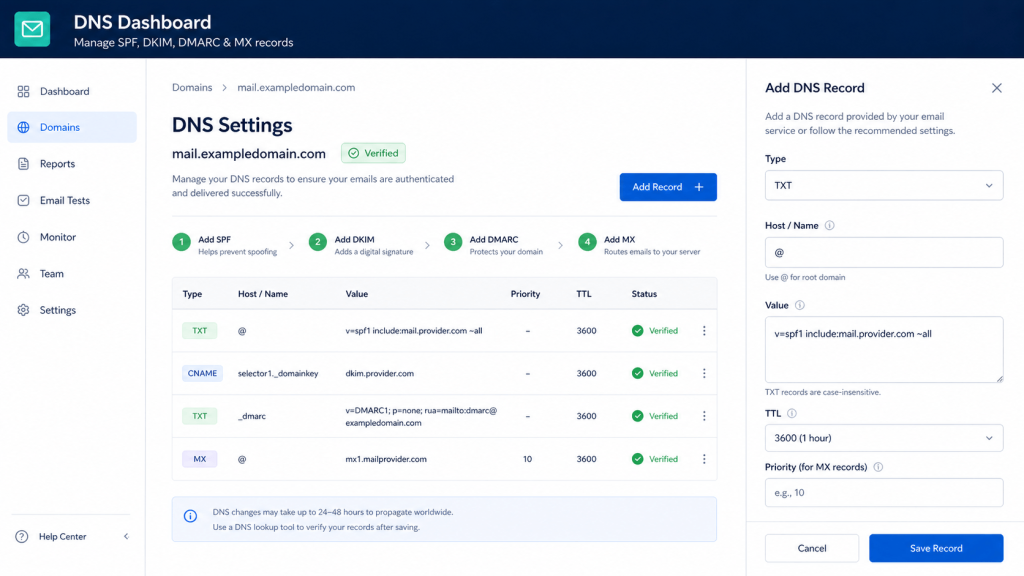
Show:
- DNS records
- Authentication status
- Verified domain
Authentication is the technical foundation of email deliverability.DNS settings showing SPF, DKIM, and DMARC configuration.
3: Inbox Placement Test
- Inbox vs spam results
- Gmail and Outlook split
- Seed-test result summary
Inbox placement testing helps measure deliverability across mailbox providers.
Email deliverability test results showing inbox and spam placement.
Frequently Asked Questions
What is email deliverability?
Email deliverability is the ability of a message to reach the inbox rather than spam or rejection.
Google recommends authentication with SPF, DKIM, and DMARC to improve delivery.
What is the difference between delivery and deliverability?
Delivery means the receiving server accepted the email. Deliverability means the email actually reached the inbox.
This distinction matters because a delivered email can still land in spam.
Why are my emails going to spam?
Common reasons include weak reputation, poor authentication, high complaint rates, weak list quality, and irrelevant content.
Microsoft and Google both note that reputation and authentication affect inbox placement.
How do I improve email deliverability fast?
Start by fixing SPF, DKIM, and DMARC, lowering spam complaints, cleaning the list, and checking Google Postmaster Tools.
Twilio SendGrid and Validity both emphasize these as core deliverability practices.
What is a good spam complaint rate?
Google recommends keeping the rate reported in Postmaster Tools below 0.3%. Lower is better.
Does sender reputation really matter?
Yes. Microsoft says low IP spam reputation can prevent successful delivery to Outlook.com users, and Google includes domain reputation in Postmaster Tools.
What tools help with deliverability?
Google Postmaster Tools, mailbox reputation dashboards, email verification tools, and domain-authentication tools are all useful.
Google and Twilio both provide official guidance and infrastructure support for this process.
Is email warm-up enough?
No. Warm-up can help sending behaviour, but authentication, list quality, complaint rates, and reputation still matter.
Validity and Google both frame deliverability as a multi-factor system.
Conclusion
An effective Email Deliverability Guide should not focus on one trick.
It should explain the full system: authentication, sender reputation, spam complaints, list quality, and message relevance.
Google, Microsoft, Twilio SendGrid, and Validity all point to the same practical reality: deliverability is built on trust, technical setup, and consistent sending behavior.
For LeadCanal, that means deliverability is not just a support topic. It is a business growth topic.
Strong inbox placement creates the conditions for more replies, more meetings, and better outbound results.
Call to Action
If your emails are landing in spam, getting rejected, or showing weak results, LeadCanal can help you audit the problem and improve your deliverability process.
Contact LeadCanal to review your domain authentication, sender reputation, and inbox placement strategy.