Skip to content

Why Are My Klaviyo Emails Going to Spam?
Direct Answer
Your Klaviyo emails are most likely going to spam because of poor sender reputation, missing email authentication (SPF, DKIM, or DMARC)
low-quality email lists, high spam complaint rates, low engagement, or sending practices that mailbox providers consider risky.
Even if your email design is perfect, Gmail, Outlook, Yahoo,
and Apple Mail evaluate dozens of technical and behavioural signals before deciding whether an email belongs in the inbox or the spam folder.
At LeadCanal, we’ve helped businesses improve Klaviyo deliverability by configuring proper domain authentication, cleaning email lists, warming up new domains,
and following deliverability best practices. In many cases, these improvements significantly increased inbox placement and campaign performance.
Table of Contents
- Why Are Klaviyo Emails Going to Spam?
- How Spam Filters Work
- Top Reasons Klaviyo Emails Go to Spam
- How to Fix Klaviyo Deliverability Issues
- SPF vs DKIM vs DMARC Comparison
- Best Practices
- Pros & Cons
- Real Business Example
- Frequently Asked Questions
- Conclusion
Why Email Deliverability Matters
Email marketing success depends on one thing your emails reaching the inbox.
If your emails consistently land in spam folders, subscribers won’t open them, click your links, or make purchases.
This reduces campaign performance, lowers revenue, and damages your sender reputation over time.
A healthy deliverability strategy ensures that marketing emails, abandoned cart reminders,
welcome sequences, and promotional campaigns reach the people who subscribed to receive them.
How Spam Filters Decide Where Emails Go
Modern mailbox providers use advanced algorithms to analyse every incoming email.
They evaluate factors such as:
- Sender reputation
- Domain reputation
- Email authentication
- Recipient engagement
- Spam complaints
- Bounce rate
- Sending history
- Content quality
- Sending volume
- Link reputation
Rather than relying on a single factor, providers combine these signals to determine whether an email should be delivered to the inbox, promotions tab, or spam folder.
12 Reasons Your Klaviyo Emails Are Going to Spam
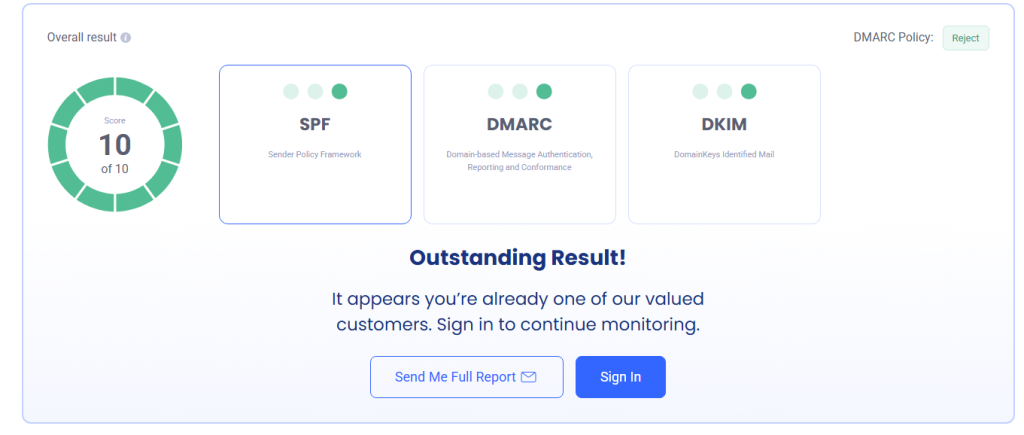
1. Missing SPF, DKIM, or DMARC Records
Authentication is one of the biggest factors affecting inbox placement.
If your sending domain isn’t properly authenticated, mailbox providers cannot verify that your emails are legitimate.
Always configure:
These DNS records help establish trust and protect your domain from spoofing.
2. Poor Sender Reputation
Every sending domain develops a reputation based on its email history.
High bounce rates, spam complaints, low engagement, and inconsistent sending can reduce your reputation.
A poor reputation makes future emails more likely to land in spam.
3. Sending to Old or Unverified Email Lists
One of the most common deliverability problems is sending emails to outdated subscribers.
Over time, email addresses become inactive or invalid.
Sending to these contacts increases:
- Hard bounces
- Spam complaints
- Negative engagement
Regular list cleaning is essential for maintaining a healthy sender reputation.
4. High Spam Complaint Rate
When recipients click the “Report Spam” button, mailbox providers treat it as a strong negative signal.
Common reasons include:
- Sending too frequently
- Irrelevant content
- No clear unsubscribe option
- Unexpected promotional emails
Keeping spam complaints low is critical for long-term deliverability.
5. Low Subscriber Engagement
Mailbox providers monitor how subscribers interact with your emails.
Positive engagement includes:
- Opens
- Clicks
- Replies
- Saving emails
- Moving emails out of spam
Negative engagement includes:
- Ignoring emails
- Deleting without opening
- Reporting spam
Low engagement gradually reduces inbox placement.
6. Sending Too Many Emails Too Quickly
Sudden spikes in email volume often trigger spam filters.
If you’re using a new sending domain, avoid sending thousands of emails immediately.
Instead, increase sending volume gradually while monitoring performance.
7. Poor Email Content
Spam filters also evaluate message content.
Avoid:
- ALL CAPS subject lines
- Excessive punctuation
- Misleading promises
- Too many promotional words
- Large attachments
Write natural, valuable content that matches subscriber expectations.
8. Purchased Email Lists
Purchased email databases usually contain:
- Invalid addresses
- Spam traps
- Inactive users
- Unverified contacts
These lists almost always reduce deliverability and increase spam placement.
Growing your email list organically produces much better long-term results.
9. Missing Custom Tracking Domain
Using Klaviyo’s default tracking links instead of your branded tracking domain can reduce trust with some mailbox providers.
Configuring a branded tracking domain creates a more consistent sending identity and supports better deliverability.
10. Inactive Subscribers
Subscribers who haven’t opened or clicked an email in several months may hurt engagement metrics.
Regularly remove or re-engage inactive contacts to keep your list healthy.
11. Shared Domain Reputation
If multiple businesses share the same infrastructure, another sender’s poor practices may indirectly affect deliverability.
Maintaining your own authenticated sending domain helps minimise this risk.
12. Incorrect DNS Configuration
Even small DNS errors can affect inbox placement.
Common problems include:
- Duplicate SPF records
- Incorrect DKIM selectors
- Missing DMARC policy
- DNS propagation issues
Reviewing your DNS configuration regularly helps prevent technical deliverability problems.
How to Fix Klaviyo Emails Going to Spam
Step 1: Authenticate Your Domain
Configure SPF, DKIM, and DMARC correctly before sending campaigns.
Authentication builds trust with Gmail, Outlook, Yahoo, and Apple Mail.
Step 2: Verify Your Email List
Remove:
- Invalid addresses
- Disposable emails
- Spam traps
- Hard bounces
A verified list dramatically reduces bounce rates and improves inbox placement.
Step 3: Warm Up New Domains
Avoid sending large campaigns immediately.
Increase sending volume gradually over several weeks while monitoring engagement.
Step 4: Segment Your Audience
Send targeted campaigns based on:
- Purchase history
- Engagement
- Customer lifecycle
- Interests
Relevant emails generate higher engagement and better deliverability.
Step 5: Monitor Campaign Performance
Track:
- Open rate
- Click rate
- Bounce rate
- Spam complaints
- Unsubscribes
These metrics reveal potential deliverability problems before they become serious.
Step 6: Clean Your Email List Regularly
Even a high-quality email list becomes outdated over time. People change jobs, abandon email accounts, or stop engaging with marketing emails.
Maintaining a clean email list helps improve engagement while reducing bounce rates and spam complaints.
Remove contacts who:
- Have hard bounced
- Haven’t engaged in 90–180 days
- Marked your emails as spam
- Unsubscribed
- Use invalid or disposable email addresses
Cleaning your list every month keeps your sender reputation healthy.
Step 7: Use Double Opt-In
Double opt-in requires subscribers to confirm their email address before joining your mailing list.
Benefits include:
- Higher-quality subscribers
- Lower bounce rates
- Better engagement
- Fewer spam complaints
- Improved inbox placement
Although your list may grow more slowly, the quality of subscribers is significantly higher.
Step 8: Improve Your Email Content
Mailbox providers evaluate both technical signals and email quality.
Write emails that provide value instead of sounding overly promotional.
Best practices include:
- Write clear subject lines.
- Personalise your emails.
- Keep paragraphs short.
- Avoid excessive sales language.
- Use a balanced text-to-image ratio.
- Include one clear call to action.
- Always include an unsubscribe link.
Well-written emails naturally receive better engagement, which improves deliverability over time.
Step 9: Monitor Your Sending Reputation
Your sender reputation changes continuously based on how recipients interact with your emails.
Monitor:
- Bounce rate
- Spam complaint rate
- Open rate
- Click-through rate
- Unsubscribe rate
- Inbox placement
If any of these metrics begin to decline, investigate the cause before sending your next campaign.
Step 10: Test Before Every Campaign
Before sending to your full audience:
- Send test emails.
- Check inbox placement.
- Verify links.
- Test personalisation.
- Confirm SPF, DKIM, and DMARC authentication.
- Review email rendering on desktop and mobile devices.
Testing reduces the likelihood of unexpected deliverability issues.
SPF vs DKIM vs DMARC Comparison
| Feature | SPF | DKIM | DMARC |
|---|---|---|---|
| Verifies sending server | ✅ | ❌ | ✅ |
| Uses digital signature | ❌ | ✅ | ❌ |
| Prevents spoofing | ✅ | ✅ | ✅ |
| Uses DNS records | ✅ | ✅ | ✅ |
| Improves inbox placement | ✅ | ✅ | ✅ |
| Required for modern deliverability | Yes | Yes | Strongly Recommended |
Best Practices for Klaviyo Deliverability
To maximise inbox placement, follow these proven practices:
- Authenticate every sending domain.
- Verify your email list regularly.
- Remove inactive subscribers.
- Warm up new domains slowly.
- Segment your audience.
- Personalise every campaign.
- Send consistently rather than in large spikes.
- Monitor engagement metrics weekly.
- Avoid purchased email lists.
- Review DNS settings after every major change.
Businesses that consistently follow these practices typically achieve better inbox placement and stronger email performance.
Pros and Cons of Klaviyo
| Pros | Cons |
|---|---|
| Powerful email automation | Deliverability depends on setup |
| Excellent Shopify integration | Authentication requires DNS configuration |
| Advanced customer segmentation | Poor list quality can affect performance |
| Detailed reporting | New domains require warm-up |
| Strong personalization features | Requires ongoing list maintenance |
Real Business Example
An online Shopify store contacted LeadCanal after noticing that nearly half of its promotional emails were landing in Gmail’s spam folder.
Despite using Klaviyo’s automation features, the business experienced:
- Low open rates
- Poor click-through rates
- High bounce rates
- Declining revenue from email marketing
After performing a complete deliverability audit, LeadCanal identified several issues:
- Missing DMARC authentication
- An outdated subscriber list
- Multiple inactive contacts
- No email verification process
- Inconsistent sending schedule
Our team implemented a complete optimisation strategy by:
- Configuring SPF, DKIM, and DMARC correctly.
- Verifying and cleaning the subscriber database.
- Removing inactive contacts.
- Warming up the sending domain.
- Improving audience segmentation.
- Monitoring campaign performance after every send.
Within six weeks:
- Inbox placement improved significantly.
- Bounce rates decreased.
- Open rates increased.
- Spam complaints declined.
- Revenue generated from email campaigns improved substantially.
This example demonstrates that email deliverability is influenced by technical configuration, list quality, and consistent sending practices not just the email platform itself.
Frequently Asked Questions
Why do Klaviyo emails go to Gmail spam?
Common reasons include missing SPF, DKIM, or DMARC records, poor sender reputation, low subscriber engagement, and sending to outdated email lists.
Does Klaviyo guarantee inbox placement?
No. Klaviyo provides powerful email marketing tools, but inbox placement depends on your domain reputation, authentication, subscriber engagement, and email quality.
Does SPF improve Klaviyo deliverability?
Yes. SPF helps receiving mail servers verify that your domain authorises the sending server, improving trust and deliverability.
Is DKIM required for Klaviyo?
Yes. DKIM digitally signs your emails, helping mailbox providers verify that messages haven’t been altered during delivery.
Should I use DMARC?
Absolutely. DMARC builds on SPF and DKIM to protect your domain from spoofing while improving sender credibility.
How often should I clean my email list?
Most businesses should review and clean their subscriber lists every 30 to 90 days, depending on sending frequency.
Can buying email lists cause spam placement?
Yes. Purchased lists often contain invalid addresses, spam traps, and disengaged recipients, all of which can damage deliverability.
How can I improve my Klaviyo sender reputation?
Authenticate your domain, verify your email list, warm up new domains, send valuable content, maintain low bounce rates, and monitor engagement consistently.
Conclusion
If your Klaviyo emails are going to spam, the issue is rarely caused by Klaviyo itself.
More often, the root cause is poor sender reputation, missing email authentication, outdated subscriber lists, inconsistent sending habits, or low engagement.
Improving inbox placement requires a combination of technical configuration and good email marketing practices.
Authenticating your domain with SPF, DKIM, and DMARC, verifying your email lists, warming up new domains,
removing inactive subscribers, and consistently monitoring campaign performance will significantly improve your deliverability over time.
Businesses that prioritise email deliverability not only reach more inboxes but also generate higher open rates, stronger customer engagement, and better revenue from every campaign.
Call to Action
If your Klaviyo emails are landing in spam, LeadCanal can help. Our deliverability specialists provide comprehensive audits,
domain authentication (SPF, DKIM, and DMARC), email verification, list hygiene, domain warm-up, and ongoing deliverability optimisation.
Whether you’re running Shopify campaigns, automated flows, or promotional newsletters,
we’ll help you maximise inbox placement and improve the performance of every email you send.