
How to Reduce Email Bounce Rate
Direct Answer
The best way to reduce your email bounce rate is to verify your email list, remove invalid addresses, authenticate your sending domain with SPF, DKIM, and DMARC,
send emails only to permission-based contacts, maintain good list hygiene, and avoid sending from a new domain without proper warm-up.
A healthy email bounce rate is typically below 2%. If your bounce rate exceeds 5%, mailbox providers like Gmail and Outlook may begin to view your domain as a risky sender.
This can lead to lower inbox placement, higher spam rates, and a damaged sender reputation.
At LeadCanal, we’ve found that businesses can significantly reduce bounce rates by combining email verification,
domain authentication, gradual email warm-up, and ongoing list maintenance.
These practices not only improve deliverability but also increase reply rates and campaign performance.
Table of Contents
- What Is Email Bounce Rate?
- Why Email Bounce Rate Matters
- Types of Email Bounces
- Email Bounce Rate Benchmarks
- Hard Bounce vs. Soft Bounce Comparison
- Why Emails Bounce
- How to Reduce Email Bounce Rate (Step-by-Step)
- Best Practices
- Pros and Cons of Bounce Reduction Strategies
- Real Business Example
- Frequently Asked Questions
- Conclusion
What Is Email Bounce Rate?
Email bounce rate is the percentage of emails that fail to reach recipients after being sent.
When an email cannot be delivered, the receiving mail server returns it to the sender with a bounce notification.
This notification explains why the email was rejected or could not be delivered.
The bounce rate is calculated using the following formula:
Email Bounce Rate = (Bounced Emails ÷ Total Emails Sent) × 100
For example:
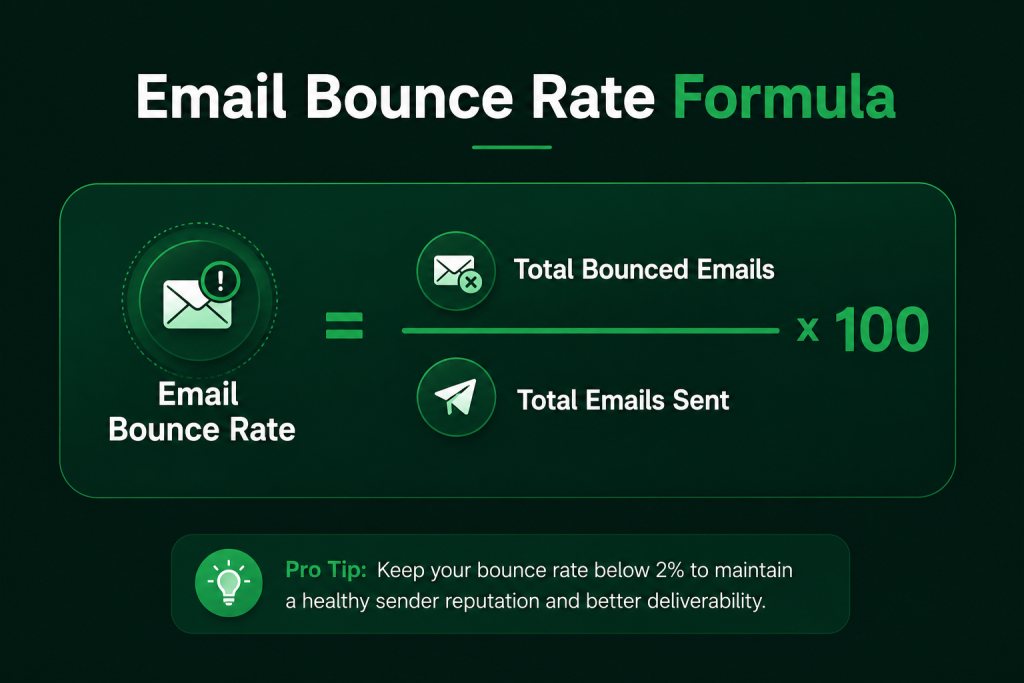
The lower your bounce rate, the healthier your email program is.
Why Email Bounce Rate Matters
Email bounce rate is one of the most important metrics used by email providers to evaluate sender quality.
High bounce rates signal poor list quality or technical problems, while low bounce rates indicate that your email program is well-managed.
A consistently low bounce rate helps you:
- Improve inbox placement.
- Protect your sender reputation.
- Increase email deliverability.
- Generate more replies.
- Improve campaign ROI.
- Build trust with mailbox providers.
- Reduce the risk of domain blacklisting.
For businesses that rely on cold email, newsletters, or transactional emails, maintaining a low bounce rate is essential for long-term success.
What Is a Good Email Bounce Rate?
Although benchmarks vary by industry, most email experts recommend the following guidelines.
| Bounce Rate | Performance |
|---|---|
| Below 2% | Excellent |
| 2%–5% | Acceptable |
| Above 5% | Needs Immediate Improvement |
| Above 10% | High Risk |
If your campaigns regularly exceed a 5% bounce rate, it’s important to identify the cause before continuing to send large volumes of email.
Types of Email Bounces
Understanding why emails bounce is the first step toward reducing your bounce rate.
There are two primary types of email bounces.
Hard Bounce
A hard bounce is a permanent delivery failure.
The email cannot be delivered because the address is invalid or no longer exists.
Common causes include:
- Invalid email addresses
- Misspelled domains
- Deleted mailboxes
- Non-existent recipients
- Fake email addresses
Hard bounces should be removed from your email list immediately.
Soft Bounce
A soft bounce is a temporary delivery problem.
Unlike a hard bounce, the email may be delivered successfully later.
Common reasons include:
- Recipient mailbox is full
- Temporary server outage
- Message size exceeds limits
- Temporary DNS issues
- Receiving server is unavailable
If a contact continues to soft bounce multiple times, it should be reviewed or removed from future campaigns.
Hard Bounce vs. Soft Bounce
| Feature | Hard Bounce | Soft Bounce |
|---|---|---|
| Permanent Failure | Yes | No |
| Temporary Issue | No | Yes |
| Should Remove Contact | Immediately | Only after repeated failures |
| Damages Sender Reputation | High | Moderate |
| Can Recover Automatically | No | Often Yes |
| Typical Cause | Invalid Email | Full Mailbox or Server Issue |
Why Emails Bounce
Email bounces usually occur because of one or more technical or list-quality issues.
The most common causes include:
1. Invalid Email Addresses
One of the biggest reasons for high bounce rates is sending to email addresses that no longer exist.
People change jobs, companies shut down, and domains expire. Over time, every email database becomes outdated.
2. Poor List Quality
Purchased, scraped, or outdated email lists often contain:
- Invalid addresses
- Spam traps
- Catch-all domains
- Disposable emails
These contacts increase bounce rates and damage your sender reputation.
3. Missing Email Authentication
Modern mailbox providers expect businesses to authenticate their domains.
Missing or incorrect:
can cause receiving servers to reject emails or reduce trust in your domain.
4. Sending From a New Domain
New domains have no sending history.
If you suddenly send thousands of emails without warming up the domain, mailbox providers may reject a portion of your messages.
Gradual warm-up helps establish a positive sender reputation.
5. Poor Sender Reputation
Mailbox providers evaluate every sender based on previous behaviour.
A poor reputation can result from:
- High bounce rates
- Spam complaints
- Low engagement
- Blacklisting
- Sending to invalid contacts
Improving sender reputation takes time but starts with maintaining a clean and verified email list.
How to Reduce Email Bounce Rate (Step-by-Step)
Reducing bounce rates requires a combination of technical setup, data quality, and consistent monitoring.
Follow these proven steps to improve email deliverability.
Step 1: Verify Every Email Address Before Sending
Email verification should be the first step before launching any campaign.
A verification service checks whether an email address:
- Exists
- Can receive emails
- Is a catch-all address
- Is disposable
- Is role-based (such as info@ or sales@)
- Is safe to send to
Removing invalid addresses before sending dramatically reduces hard bounces and protects your sender reputation.
For businesses running cold outreach or large-scale campaigns, verifying every list before sending should be a standard practice.
Step 2: Remove Hard Bounces Immediately
Never continue sending emails to addresses that have generated a hard bounce.
Doing so increases your bounce rate and signals poor list management to mailbox providers.
Create an automated process to suppress permanently bounced contacts after each campaign.
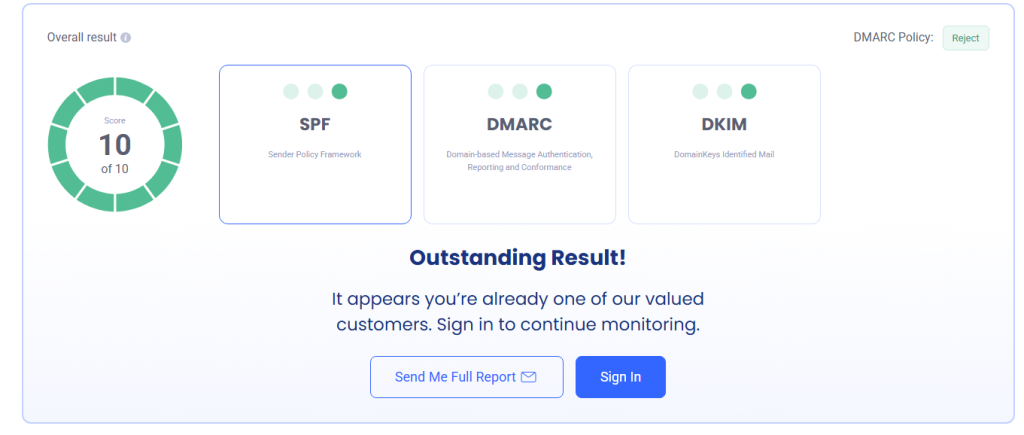
Step 3: Authenticate Your Email Domain
Proper email authentication builds trust with receiving mail servers and helps ensure that your messages are accepted.
Configure the following authentication protocols correctly:
- SPF (Sender Policy Framework)
- DKIM (DomainKeys Identified Mail)
- DMARC (Domain-based Message Authentication, Reporting, and Conformance)
Authentication not only improves deliverability but also protects your domain from spoofing and phishing attacks.
Continue in Part 2: Remaining strategies, best practices, common mistakes, pros & cons, and a real LeadCanal case study.
Step 4: Warm Up Your Email Domain
If you’re sending emails from a new domain or mailbox, avoid sending large volumes immediately.
New domains have little or no sender reputation, making them more likely to trigger spam filters.
A proper email warm-up gradually increases sending volume while generating positive engagement signals.
Best practices:
- Start with 20–30 emails per day.
- Increase volume gradually over several weeks.
- Maintain consistent sending patterns.
- Monitor inbox placement before scaling campaigns.
Step 5: Clean Your Email List Regularly
Email lists naturally become outdated over time as people change jobs, companies close, and email accounts are abandoned.
Maintaining good list hygiene helps keep bounce rates low.
Remove:
- Invalid addresses
- Duplicate contacts
- Unsubscribed users
- Inactive subscribers
- Hard-bounced emails
Cleaning your list every 30–90 days can significantly improve deliverability.
Step 6: Avoid Purchased Email Lists
Buying email lists may seem like a quick way to grow your audience, but it often leads to poor results.
Purchased lists frequently contain:
- Outdated contacts
- Spam traps
- Disposable emails
- Invalid addresses
These lists increase bounce rates and can permanently damage your sender reputation.
Instead, focus on building a high-quality, permission-based email list.
Step 7: Monitor Your Sender Reputation
Mailbox providers assign every domain a sender reputation based on email performance.
Factors that influence reputation include:
- Bounce rate
- Spam complaints
- Open rates
- Reply rates
- Domain authentication
- Sending consistency
Monitoring these metrics helps you identify issues before they impact deliverability.
Step 8: Segment Your Email List
Not every contact should receive the same email.
Segmenting your audience based on industry, engagement, or customer stage improves relevance and reduces the likelihood of bounces and spam complaints.
Common segments include:
- New leads
- Existing customers
- Inactive subscribers
- Industry-specific prospects
- Geographic regions
Step 9: Send Emails Consistently
Large spikes in email volume can appear suspicious to mailbox providers.
Maintain a consistent sending schedule instead of sending thousands of emails on one day and none the next.
Consistency builds trust with Gmail, Outlook, Yahoo, and other providers.
Step 10: Monitor Bounce Reports
Every email platform provides bounce reports that explain why messages failed.
Review these reports after every campaign to identify:
- Invalid addresses
- Authentication failures
- Blocked domains
- Full mailboxes
- Temporary server issues
Using this data helps improve future campaigns.
Step 11: Authenticate Every Sending Domain
Every domain used for email should have properly configured:
Authentication helps mailbox providers verify your identity and improves inbox placement.
Step 12: Avoid Spam Trigger Practices
Certain sending behaviours increase bounce rates and spam filtering.
Avoid:
- Excessive sending volume
- Misleading subject lines
- URL shorteners
- Too many attachments
- Spammy language
- Sending without permission
Step 13: Use a Reliable Email Service Provider
Choose an email platform with a strong sending infrastructure.
Reliable providers maintain healthy IP reputations and offer deliverability tools that help reduce bounce rates.
Step 14: Test Before Launching Large Campaigns
Always send test emails before launching a campaign.
Check:
- Inbox placement
- Authentication
- Links
- Personalization
- Spam score
Testing prevents costly mistakes.
Step 15: Continuously Monitor Deliverability
Email deliverability is not a one-time task.
Regularly review:
- Bounce rate
- Open rate
- Click rate
- Reply rate
- Spam complaints
- Sender reputation
Continuous monitoring ensures long-term email success.
Best Practices for Reducing Email Bounce Rate
Follow these proven best practices:
- Verify every email list before sending.
- Remove hard bounces immediately.
- Keep SPF, DKIM, and DMARC records updated.
- Warm up new domains gradually.
- Send emails only to permission-based contacts.
- Clean your database regularly.
- Personalize email campaigns.
- Monitor sender reputation monthly.
- Avoid purchasing email lists.
- Test every campaign before sending.
Common Mistakes to Avoid
Many businesses unknowingly increase their bounce rates by making avoidable mistakes.
These include:
- Buying email databases
- Ignoring hard bounces
- Sending from unauthenticated domains
- Skipping email verification
- Sending too many emails from a new domain
- Using outdated prospect lists
- Ignoring bounce reports
- Not warming up mailboxes
Correcting these issues can dramatically improve deliverability.
Pros and Cons of Bounce Reduction Strategies
| Pros | Cons |
|---|---|
| Higher inbox placement | Requires ongoing maintenance |
| Better sender reputation | Initial setup takes time |
| Improved campaign ROI | Verification tools may have a cost |
| Lower spam complaints | Regular list cleaning is necessary |
| Better customer engagement | Authentication requires DNS access |
| Increased email deliverability | Technical knowledge may be needed |
Real Business Example
A SaaS company approached LeadCanal after experiencing an email bounce rate of nearly 11%. Their cold outreach campaigns were generating very few replies, and many emails never reached the inbox.
After auditing their email infrastructure, our team identified several issues:
- An outdated prospect database with thousands of invalid contacts.
- Missing DMARC authentication.
- Poorly configured SPF records.
- A newly created sending domain that had not been warmed up.
- No regular list-cleaning process.
LeadCanal implemented a complete deliverability strategy that included:
- Verifying every email address before sending.
- Configuring SPF, DKIM, and DMARC correctly.
- Warming up the new sending domain gradually.
- Removing all invalid and hard-bounced contacts.
- Monitoring campaign performance after every send.
Within one month:
- Bounce rate dropped from 11% to below 2%.
- Inbox placement improved significantly.
- Reply rates increased.
- Sender reputation recovered.
- Overall campaign performance improved.
This example highlights how combining proper authentication, list hygiene, and consistent sending practices can dramatically improve email deliverability.

Expert Tips
If you want consistently low bounce rates:
- Verify every list before every campaign.
- Never send to purchased databases.
- Monitor your domain reputation regularly.
- Warm up every new mailbox.
- Remove inactive contacts periodically.
- Keep your authentication records updated.
- Track bounce trends over time instead of focusing on a single campaign.
Businesses that treat deliverability as an ongoing process consistently achieve better email marketing results.