How to Use Marketing Templates for Transactional Emails: A Practical 2026 Guide
On this page
- Quick Answer:
- Table of Contents
- What Is a Transactional Email?
- Marketing Emails vs Transactional Emails
- How to Use Marketing Templates for Transactional Emails
- Step 2: Move Critical Information to the Top
- Step 3: Replace Marketing CTAs With Functional CTAs
- Step 4: Add Dynamic Fields
- Step 5: Convert the Layout to Mobile-Friendly Single-Column Design
- Step 6: Create HTML and Plain-Text Versions
- Transactional Email Template Examples
- Can You Include Marketing Content in a Transactional Email?
- Should Transactional and Marketing Email Streams Be Separated?
- Email Authentication Matters for Transactional Emails
- Common Mistakes When Reusing Marketing Templates
- Practical Example: Converting a Marketing Template Into a Transactional Template
- How LeadCanal Can Support Email Infrastructure and Deliverability
- Frequently Asked Questions
Can You Use Marketing Email Templates for Transactional Emails?
Quick Answer:
Yes, you can reuse the visual structure of a marketing email template for transactional emails, but the message must be redesigned around the transaction or user action.
Keep the essential information such as an order confirmation, password-reset link, invoice, shipping update, or account alert at the top,
remove unnecessary promotional sections, use a clear single CTA, add dynamic customer data, and test the template across mobile and desktop email clients.
The distinction between design and purpose is important.
A branded marketing layout can often be adapted, but transactional emails should remain focused on operational information.
Pendo warns that transactional templates should be used for operational or required communications rather than promotional campaigns,
while Mailgun recommends keeping promotional material to a minimum.
If promotional material is added, compliance requirements can vary by jurisdiction and by the email’s primary purpose, so businesses should review applicable rules before sending mixed-purpose emails.
The FTC’s CAN-SPAM guidance specifically distinguishes transactional or relationship content from messages whose primary purpose is commercial.
Table of Contents
- What Is a Transactional Email?
- Marketing Emails vs Transactional Emails
- How to Adapt a Marketing Template
- Essential Design Rules
- Dynamic Content and Personalization
- Transactional Email Examples
- How Much Marketing Content Can You Include?
- Email Deliverability and Authentication
- Common Mistakes to Avoid
- Practical Example
- How LeadCanal Can Help
- Frequently Asked Questions
What Is a Transactional Email?
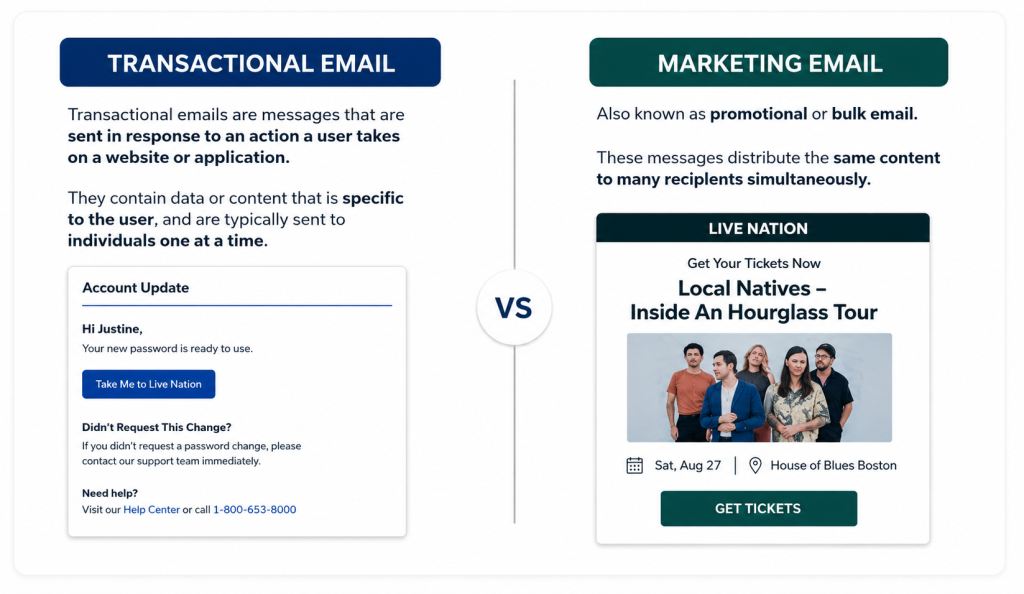
A transactional email is normally triggered by a user’s action, account event, purchase, or system activity and provides information needed to complete or understand that event.
Common transactional email examples include:
- Order confirmations
- Payment receipts
- Shipping notifications
- Password-reset emails
- Email verification messages
- Account alerts
- Billing notifications
- Appointment confirmations
- Two-factor authentication emails
- Subscription-status updates
Mailgun describes transactional emails as automated messages triggered by user actions such as purchases or password-reset requests.
The purpose is therefore different from a typical newsletter or sales campaign.
A customer who has just paid for an order usually wants to know:
Was my payment successful? What did I order? How much did I pay? What happens next?
Your template should answer those questions before introducing anything else.
Marketing Emails vs Transactional Emails
Although both can use professional HTML designs, their goals differ.
| Marketing Email | Transactional Email |
|---|---|
| Promotes a product or offer | Confirms or supports an action |
| Usually campaign-based | Usually event-triggered |
| Designed to encourage engagement | Designed to deliver essential information |
| May contain several content sections | Usually needs a clear information hierarchy |
| Often audience-segmented | Often personalized to one transaction |
| Promotional CTA | Functional CTA |
| Newsletter, launch, promotion | Receipt, password reset, shipping alert |
Pendo separates the two types according to purpose: marketing messages promote adoption or engagement,
while transactional messages provide operational information such as billing notices, receipts, account updates, and security alerts.
This means you can borrow a marketing template’s branding system, but you should not blindly reuse its marketing structure.
How to Use Marketing Templates for Transactional Emails
Step 1: Keep the Brand Framework
You can usually retain elements such as:
- Logo
- Brand colors
- Typography
- Header style
- Button styling
- Footer design
- Spacing system
- Brand voice
Consistent branding helps users immediately recognize who sent the email.
Mailgun recommends keeping transactional email templates consistent with the sender’s brand while still prioritizing clarity.
Example
A marketing newsletter might begin:
Summer Sale Save 25% Today
When converting the layout into an order-confirmation template, retain the logo and design style but replace the marketing hero with:
Order Confirmed
Order #LC-10482
Your operational message becomes the primary element.
Step 2: Move Critical Information to the Top
Do not make a customer scroll through:
- banners;
- testimonials;
- product promotions;
- social media sections; or
- blog recommendations
before reaching their receipt or security code.
For transactional emails, the most important information should appear immediately.
Order Confirmation Example
Order Confirmed
Hi Sarah,
Thanks for your order. We’ve received your payment successfully.
Order: #10482
Total: $129.00
Delivery: August 12–14
View Order
Everything after this information is secondary.
This content hierarchy also makes the message easier for AI assistants, inbox summaries, accessibility tools, and users scanning quickly to understand.
Step 3: Replace Marketing CTAs With Functional CTAs
Marketing templates often contain buttons like:
- Shop Now
- Buy Today
- Explore Products
- Get the Offer
Transactional emails normally require an action connected to the transaction.
Better examples include:
- Track Order
- View Receipt
- Reset Password
- Confirm Email
- Manage Booking
- Download Invoice
- Review Account
- Update Payment Method
Mailgun recommends focusing transactional templates around a single strong CTA rather than distracting recipients with multiple competing actions.
Step 4: Add Dynamic Fields
Transactional templates become much more useful when they automatically insert data related to each user or transaction.
Common dynamic fields include:
{{first_name}}
{{order_number}}
{{invoice_number}}
{{purchase_date}}
{{product_name}}
{{total_amount}}
{{tracking_number}}
{{reset_link}}
{{appointment_date}}
For example:
Hi {{first_name}}, your order {{order_number}} has shipped.
rather than:
Hello Customer, your order has shipped.
MailerSend allows templates to be created and reused using drag-and-drop, rich-text, or custom HTML editors, demonstrating how transactional templates can be standardized while the underlying content changes dynamically.
Step 5: Convert the Layout to Mobile-Friendly Single-Column Design
Marketing templates can contain complex grids, image galleries, or multi-column promotional blocks.
Transactional messages generally benefit from a simpler structure:
Logo
↓
Main transactional message
↓
Important details
↓
Primary CTA
↓
Support information
↓
Minimal footer
Mailgun recommends responsive transactional templates and a single-column layout with adequate spacing because email clients and device sizes render HTML differently.
You should test the final email in major environments such as Gmail and Outlook and on both desktop and mobile.
Step 6: Create HTML and Plain-Text Versions
Do not rely entirely on a visually rich HTML email.
A well-configured transactional message can include both:
HTML version:
Branded design, buttons, spacing, logo, and visual hierarchy.
Plain-text alternative:
The same essential information without HTML formatting.
Mailgun recommends providing both HTML and plain-text options for email because plain text provides a fallback while HTML enables richer formatting and responsive design.
Transactional Email Template Examples
1. Password Reset Email
Subject: Reset Your Password
Hi {{first_name}},
We received a request to reset the password for your account.
Reset Password
This link expires in {{expiration_time}}.
If you did not request a password reset, you can ignore this email or contact support.
Thanks,
{{brand_name}}
Why this works
The security action is immediately visible. There are no unnecessary sales sections competing with the password-reset link.
2. Order Confirmation Email
Subject: Your Order #{{order_number}} Is Confirmed
Hi {{first_name}},
Thanks for your order. Your payment has been received.
Order: {{order_number}}
Total: {{order_total}}
Delivery address: {{delivery_address}}
View Your Order
We’ll email you again when your order ships.
Need help? Contact {{support_email}}.
3. Invoice Email
Subject: Invoice {{invoice_number}}
Hi {{first_name}},
Your invoice for {{billing_period}} is ready.
Invoice: {{invoice_number}}
Amount: {{amount}}
Due date: {{due_date}}
View Invoice
If you have a billing question, reply to this message or contact our support team.
Can You Include Marketing Content in a Transactional Email?
This is where businesses need to be careful.
A transactional email can still look attractive and branded. However, turning half of an order-confirmation email into an advertisement can blur the purpose of the communication.
Mailgun specifically recommends keeping promotional material to a minimum in transactional templates.
Pendo takes an even more conservative operational approach and states that transactional templates should be used for required or operational communications rather than promotional purposes.
In the United States, the CAN-SPAM primary-purpose analysis can also matter when a message contains both transactional and commercial content.
Safer structure
Primary:
Your order has shipped.
Secondary:
Track your shipment.
Optional minor content:
Need help? Visit our support center.
Riskier structure
Primary banner:
50% OFF — BUY NOW!
Product carousel
Referral offer
Then:
Your order has shipped.
The second design allows the marketing content to compete with the actual reason for the message.
Should Transactional and Marketing Email Streams Be Separated?
Where the email platform and sending architecture allow it, separating message categories can make management easier.
Google’s current sender guidance recommends consistent From addresses for messages in the same category and gives separate examples for receipts, promotions, and account notifications. Google also notes that different IP addresses can be used for different message types when multiple sending IPs are required.
For example:
receipts@example.com
alerts@example.com
marketing@example.com
This provides clearer separation between operational and promotional traffic.
Email Authentication Matters for Transactional Emails
A perfectly designed template is useless if the message is rejected or sent to spam.
Configure:
Google requires SPF or DKIM for all senders to personal Gmail accounts and requires SPF, DKIM, and DMARC for bulk senders.
Google recommends configuring all three authentication methods more broadly to improve authentication and delivery reliability.
LeadCanal’s Email Deliverability Guide.
LeadCanal provides email infrastructure services that include domain configuration, SPF, DKIM, DMARC, sending-domain setup, and deliverability monitoring.
Common Mistakes When Reusing Marketing Templates
1. Keeping the Original Promotional Hero
The transaction should become the hero.
2. Using Too Many Buttons
Focus on the primary action.
3. Hiding Essential Details
Order numbers, security links, amounts, and dates should be easy to find.
4. Forgetting Mobile Users
Test responsive rendering.
5. Using Images for Critical Information
Important transactional information should remain understandable even if images fail to load.
6. Overloading the Email With Promotions
Keep the operational purpose clear.
7. Forgetting Personalization Fields
Use transaction-specific dynamic content.
8. Ignoring Authentication
SPF, DKIM, DMARC, and sending configuration affect whether messages can be authenticated and delivered reliably.
Practical Example: Converting a Marketing Template Into a Transactional Template
Imagine an ecommerce brand already has this marketing email:
Logo
Hero image
20% OFF
Shop Now
Three featured products
Customer reviews
Footer
Do not use that unchanged for an order confirmation.
Convert it to:
Logo
Order Confirmed
Customer Name
Order Number
Items Purchased
Payment Total
Delivery Information
View Order
Customer Support
Minimal Branded Footer
The visual identity remains consistent, but the information architecture changes completely.
That is the correct principle behind using marketing templates for transactional emails:
Reuse the branding system not necessarily the promotional structure.
How LeadCanal Can Support Email Infrastructure and Deliverability
LeadCanal provides B2B email and outreach services that include domain configuration, SPF, DKIM and DMARC setup, cold email infrastructure, deliverability monitoring, verified data, and campaign systems.
For businesses managing multiple email programs, strong infrastructure helps support:
- authenticated sending domains;
- better separation of email streams;
- DNS configuration;
- sender-reputation management;
- deliverability monitoring;
- email verification; and
- scalable business-email operations.
Build a Stronger Email Infrastructure With LeadCanal
Whether your business sends operational messages, customer communications, or outbound B2B campaigns, reliable email infrastructure is essential.
LeadCanal can help configure domains, authentication, sending systems, and deliverability processes designed to keep business email operations structured and scalable.
Internal anchor suggestion: email infrastructure and deliverability with LeadCanal

Frequently Asked Questions
Can I use a marketing email template for transactional emails?
Yes, you can reuse the branding and layout foundation, but the template should be redesigned so the transactional information and functional CTA are the primary focus.
What is the difference between marketing and transactional email templates?
Marketing templates are designed primarily to promote products, offers, or engagement.
Transactional templates deliver essential information triggered by an action or account event, such as an order, password reset, receipt, or notification.
Should transactional emails include promotional content?
Keep promotional content minimal and ensure it does not distract from the operational purpose.
Legal treatment can vary by jurisdiction and by the message’s primary purpose.
What are common transactional email examples?
Common examples include order confirmations, receipts, invoices, password resets, shipping updates, account notifications, security alerts, and email-verification messages.
Should transactional emails be mobile responsive?
Yes. Transactional templates should be tested across screen sizes and email clients so essential information and CTAs remain usable.
Should transactional emails include a plain-text version?
Providing both HTML and plain-text versions creates a useful fallback while allowing the HTML message to retain branding and responsive formatting.
Do transactional emails need SPF, DKIM and DMARC?
Google requires at least SPF or DKIM for senders to personal Gmail accounts and requires SPF, DKIM, and DMARC for bulk senders.
Google recommends broader use of authentication to reduce spoofing and delivery problems.
What should appear first in a transactional email?
The information that explains the transaction or required action should appear first for example, order status, confirmation details, security instructions, invoice amount, or reset action.