How Does Email Warmup Work? A Complete Guide for B2B Marketers
On this page
- Table of Contents
- What Is Email Warmup?
- How Does Email Warmup Work?
- Why Email Warmup Matters for B2B Outreach
- Email Warmup vs. Email Deliverability
- Step-by-Step Email Warmup Process
- Manual vs. Automated Email Warmup
- Pros and Cons of Email Warmup
- Common Email Warmup Mistakes
- Practical B2B Example: How LeadCanal Could Warm Up a New Mailbox
- Frequently Asked Questions
- Conclusion
- Build a Safer B2B Outreach System with LeadCanal
What Is Email Warmup and How Does It Improve Deliverability?
Quick Answer
Email warmup is the process of gradually increasing the number of emails sent from a new or inactive account to build a positive sender reputation with mailbox providers such as Gmail and Outlook.
It involves setting up SPF, DKIM, and DMARC authentication, maintaining consistent sending activity, generating genuine engagement through opens and replies, and increasing email volume gradually.
The goal is to improve deliverability and help legitimate cold emails reach the inbox instead of the spam folder.
However, email warmup is not a magic switch that guarantees inbox placement.
It works best when combined with correct email authentication, verified prospect data, relevant content, controlled sending volume, low complaint rates,
and continuous deliverability monitoring.
For B2B marketers, this process can create a safer foundation before launching a cold email campaign
Table of Contents
- What Is Email Warmup?
- How Does Email Warmup Work?
- Why Email Warmup Matters
- Email Warmup vs. Email Deliverability
- Step-by-Step Email Warmup Process
- Suggested Email Warmup Schedule
- Manual vs. Automated Email Warmup
- Pros and Cons
- Common Email Warmup Mistakes
- Practical B2B Example
- Frequently Asked Questions
- Conclusion
What Is Email Warmup?
Email warmup is the controlled process of establishing sending activity for a mailbox, domain, or dedicated IP address.
Instead of sending hundreds of prospecting emails immediately, the sender begins with a limited number and increases volume gradually.
The purpose is to establish a consistent sending history while monitoring bounces, complaints, authentication, and recipient engagement.
Inbox providers do not judge a sender through one simple “warmup score.” They can assess multiple signals, including:
- Domain and IP reputation
- SPF, DKIM, and DMARC authentication
- Sending volume and consistency
- Spam complaints
- Invalid-address and bounce rates
- Recipient engagement
- Message content
- Previous sending history
Domain reputation develops over time and cannot reliably be manufactured overnight.
Consistent infrastructure and responsible sending behaviour are therefore more important than simply exchanging automated warmup messages.
How Does Email Warmup Work?
Email warmup generally works through five connected stages.
1. The mailbox begins with limited sending activity
A new mailbox has little or no history. Sending a large cold campaign immediately can create an unnatural volume spike.
Warmup begins with a small, manageable number of messages. Volume is then increased only when delivery signals remain healthy.
2. Messages generate normal mailbox activity
During warmup, messages may be opened, read, replied to, or moved from spam when appropriate. This activity is intended to resemble ordinary correspondence.
Automated warmup platforms often coordinate these interactions through a network of participating inboxes. Manual warmup relies on genuine conversations with colleagues, customers, partners, or other known recipients.
Engagement can be useful, but marketers should not assume that artificial opens and replies can overcome poor targeting, invalid contacts, spam complaints, or badly configured authentication.
3. Inbox providers collect sending signals
Providers such as Gmail, Microsoft, and Yahoo use authentication and additional filtering signals to evaluate incoming mail.
Microsoft explains that its email systems use SPF, DKIM, DMARC, and other implicit authentication signals when assessing messages.
Over time, a predictable sending pattern gives receiving systems more information about the sender.
4. Sending volume rises gradually
If bounce rates, complaints, and delivery results remain stable, daily volume can be increased in controlled increments.
There is no universal warmup schedule that works for every business. The appropriate pace depends on factors such as:
- The mailbox’s history
- Domain age and reputation
- Email provider
- List quality
- Campaign type
- Intended sending volume
- Recipient engagement
- Number of mailboxes being used
Postmark recommends treating published warmup schedules as general guidance and adjusting the pace according to actual performance metrics.
5. Reputation is maintained after the warmup period
Warmup should not be viewed as permission to begin sending unlimited cold emails.
Once outreach starts, the sender must continue using verified contacts, relevant messages, stable volume, clear opt-out options, and proper list hygiene. A sudden jump from 30 daily emails to several hundred can undermine the gradual pattern established during warmup.
Why Email Warmup Matters for B2B Outreach
A B2B campaign can fail before prospects read its offer. Even excellent copy will not generate meetings when messages are rejected, filtered, or delivered to spam.
A controlled warmup process may help a marketing team:
- Introduce a new mailbox gradually
- Avoid sudden sending-volume spikes
- Detect authentication errors before a major campaign
- Establish baseline deliverability data
- Identify problems with contact lists
- Monitor inbox placement across providers
- Prepare sending infrastructure for consistent outreach
Warmup is particularly relevant when a business is:
- Starting outreach from a new domain
- Activating new employee mailboxes
- Returning to a mailbox after prolonged inactivity
- Moving to a new sending platform
- Introducing a dedicated sending IP
- Increasing legitimate campaign volume
Dedicated IP addresses normally require their own gradual warmup because the sender is building the reputation of that IP from the beginning.
Email Warmup vs. Email Deliverability
These terms are related but not interchangeable.
| Factor | Email Warmup | Email Deliverability |
|---|---|---|
| Primary purpose | Introduce sending activity gradually | Help legitimate messages reach intended inboxes |
| Typical duration | Initial ramp-up period plus maintenance | Continuous |
| Main focus | Volume, consistency and early reputation signals | Authentication, reputation, data quality, engagement and compliance |
| Suitable for | New, inactive or newly configured senders | Every email sender |
| Guarantees inbox placement? | No | No |
| Success measurement | Stable ramp-up and healthy early metrics | Delivery, bounce, complaint and inbox-placement trends |
Warmup is one component of deliverability. It cannot compensate for poor prospect data, deceptive messaging, excessive volume, missing authentication, or frequent spam complaints.
Step-by-Step Email Warmup Process
Step 1: Use a separate but recognizable sending domain
Protect your primary business domain from unnecessary outreach risk.
A company may use a related sending domain or subdomain that clearly represents the brand. It should not imitate another company, mislead recipients, or appear disposable.
For example, LeadCanal might operate carefully selected outreach infrastructure while keeping its primary customer and transactional communications separated.
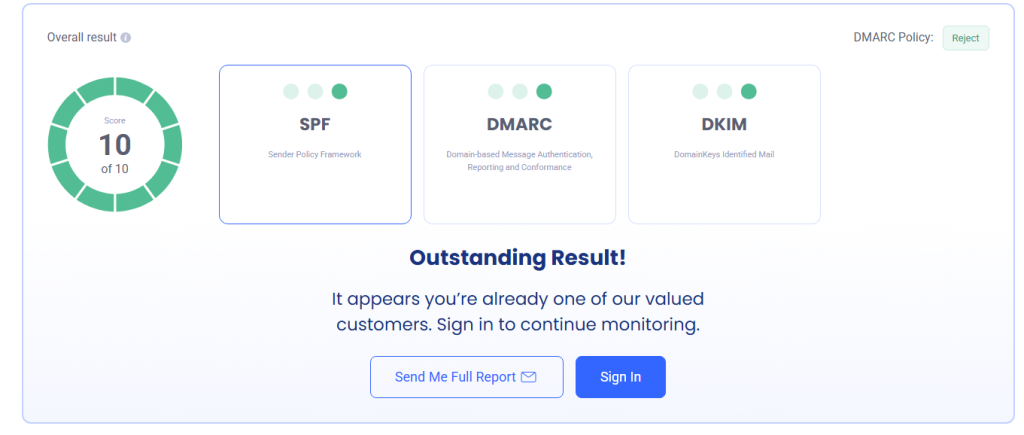
Step 2: Configure SPF, DKIM, and DMARC
Authentication should be completed before scaling email volume.
SPF identifies the servers permitted to send mail for a domain.
DKIM applies a cryptographic signature that allows receiving systems to verify the message and confirm that signed content was not altered unexpectedly.
DMARC builds on SPF and DKIM. It lets the domain owner define how receiving systems should handle authentication failures and provides reporting capabilities.
Microsoft notes that SPF by itself is not sufficient protection against domain spoofing, which is why SPF, DKIM, and DMARC should be configured together.
Yahoo requires authentication for senders and applies stronger SPF, DKIM, and DMARC requirements to bulk senders.
Step 3: Confirm mailbox readiness
Before activating warmup:
- Add an accurate sender name
- Use a professional signature
- Add a profile image when appropriate
- Confirm that the mailbox can send and receive
- Check forwarding and routing rules
- Confirm that replies are monitored
- Test authentication results
- Remove broken or unnecessary tracking
Insert a screenshot from the email provider showing that SPF, DKIM, and DMARC pass.
Blur domain identifiers, email addresses, DNS values, and other sensitive information before publishing.
Step 4: Begin with low-volume, relevant messages
Start with a conservative level based on the mailbox’s condition and intended campaign.
Send genuine, relevant messages wherever possible. Avoid sending repetitive templates to unverified contacts simply to create volume.
Step 5: Increase volume in controlled increments
A cautious illustrative schedule could look like this:
| Period | Illustrative daily volume | Primary objective |
|---|---|---|
| Days 1–3 | 5–10 | Confirm sending and authentication |
| Days 4–7 | 10–15 | Establish consistent activity |
| Week 2 | 15–25 | Monitor bounces and placement |
| Week 3 | 25–40 | Introduce limited outreach |
| Week 4 | 40–50 | Approach sustainable volume |
| Ongoing | Based on performance | Maintain stable, responsible sending |
This is not a universal formula. Pause increases when bounces, blocks, spam placement, or complaints rise.
Step 6: Introduce real outreach gradually
Do not switch from warmup-only messages to a large cold campaign in one day.
Blend a small number of relevant prospecting messages into the existing sending pattern.
Prioritize tightly matched prospects and personalized copy rather than maximizing volume.
Step 7: Monitor deliverability continuously
Track:
- Delivered messages
- Hard and soft bounces
- Spam complaints
- Reply rates
- Provider-specific failures
- Block messages
- Unsubscribes
- Inbox-placement tests
- SPF, DKIM, and DMARC results
Open rates are less reliable than they once were because privacy features and automated security scanners can record activity that does not represent a human reading the email.
Treat replies, positive responses, complaints, bounces, and booked meetings as stronger operational indicators.
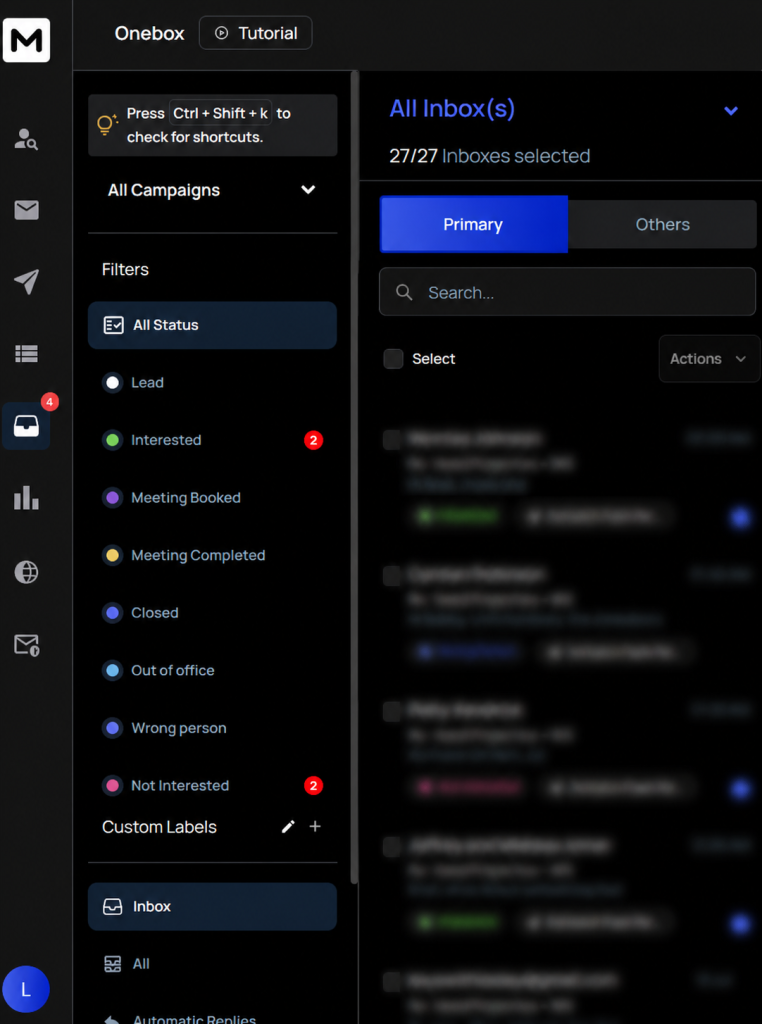
Add an anonymized campaign dashboard showing sent emails, bounces, replies, and provider-level inbox placement. Do not create a fake dashboard or label simulated results as real.
Manual vs. Automated Email Warmup
| Feature | Manual Warmup | Automated Warmup |
|---|---|---|
| Activity source | Genuine conversations | Software-managed inbox network |
| Time requirement | High | Lower |
| Control | High | Depends on provider |
| Scalability | Limited | More scalable |
| Authenticity | Usually stronger | Can appear manufactured |
| Main risk | Inconsistent execution | Overreliance on artificial engagement |
| Best suited for | Small teams and important mailboxes | Teams managing multiple mailboxes carefully |
Automated warmup can simplify scheduling and monitoring, but tool activity should not be mistaken for genuine market demand.
The strongest approach is usually a combination of correct technical setup, gradual sending, legitimate conversations, careful prospect selection, and close monitoring.
Pros and Cons of Email Warmup
Pros
- Creates a gradual sending pattern
- Provides time to identify technical problems
- Reduces the risk of an immediate volume spike
- Helps teams establish baseline metrics
- Encourages monitoring before scaling
- Can support the launch of new outreach infrastructure
Cons
- Does not guarantee inbox placement
- Cannot repair poor list quality
- Artificial engagement may provide misleading confidence
- Automated warmup networks carry third-party risk
- Excessive warmup activity can create unnecessary volume
- Results vary across domains and inbox providers
- A good warmup can still be damaged by aggressive outreach
Common Email Warmup Mistakes
Scaling too quickly
The most common mistake is increasing volume because the first few days appear successful. Deliverability problems may emerge only after providers receive enough data to identify a pattern.
Ignoring authentication
Warmup should not begin before SPF, DKIM, and DMARC are checked. Authentication is foundational, not optional.
Using unverified prospect lists
Sending to invalid or outdated addresses creates bounces and wastes campaign capacity.
Sending identical messages repeatedly
Repeated templates, identical links, and uniform timing can make a campaign appear automated and irrelevant.
Tracking vanity metrics only
A high open rate does not necessarily mean the campaign is healthy. Track replies, qualified responses, bounces, complaints, meetings, and revenue contribution.
Treating warmup as a permanent solution
Good deliverability requires ongoing control over targeting, data, content, infrastructure, and volume.
Practical B2B Example: How LeadCanal Could Warm Up a New Mailbox
Consider a fictional B2B company preparing a campaign for 300 qualified prospects.
During the first week, the company completes authentication and sends a limited number of genuine internal and partner messages.
It verifies that replies work and checks whether messages are being rejected.
In the second week, the team increases activity gradually and begins sending a small number of highly personalized emails to its best-matched prospects.
In the third week, it reviews:
- Hard bounces
- Spam complaints
- Positive and negative replies
- Provider-specific delivery failures
- Inbox-placement tests
- Meeting conversions
Suppose 20 prospect emails produce two bounces and no replies. Rather than doubling the volume,
the team pauses and investigates its contact verification, targeting, offer, and message relevance.
After correcting the list and refining the message, it resumes at a controlled level.
This example demonstrates an important principle: responsible warmup is performance-led, not calendar-led.
The team scales because the data supports scaling not because a generic schedule says that another week has passed.

Frequently Asked Questions
1. How does email warmup work?
Email warmup works by introducing sending activity gradually, generating legitimate interactions, monitoring delivery signals, and increasing volume only when performance remains healthy.
2. How long does email warmup take?
Many teams use a period of several weeks, but there is no fixed duration.
The correct timeline depends on domain history, list quality, intended volume, engagement, authentication, and inbox-provider responses.
3. Is email warmup necessary for every mailbox?
Not always. It is most relevant for new, inactive, newly configured, or rapidly scaling senders. Every sender, however, needs proper authentication and responsible sending practices.
4. Does email warmup guarantee inbox placement?
No. It may support a gradual introduction, but inbox placement is influenced by many signals beyond warmup.
5. Can I warm up an email manually?
Yes. Manual warmup can involve genuine, low-volume correspondence with known recipients while gradually increasing normal activity.
6. Are automated email warmup tools safe?
Safety depends on the provider, its access model, security controls, privacy practices, and the quality of its network.
Review permissions and data-handling policies before connecting a business mailbox.
7. Should I keep email warmup active after launching?
Some teams maintain limited background activity, but this should not replace genuine correspondence and responsible outreach.
Avoid creating unnecessary automated volume.
8. What happens when email volume increases too quickly?
A sudden increase may trigger filtering, temporary deferrals, blocks, spam placement, or closer scrutiny from receiving systems.
9. Can warmup fix a damaged domain reputation?
Warmup alone is unlikely to repair serious reputation problems. The root cause such as complaints, poor data,
compromised accounts, authentication failures, or aggressive sending must be identified and corrected first.
10. What is more important: warmup or list quality?
Both matter, but warmup cannot protect a campaign built on invalid or poorly targeted data. Accurate prospect data and relevant outreach are essential.
Conclusion
Email warmup works by gradually establishing a consistent sending pattern while allowing inbox providers to evaluate authentication, reputation, recipient responses, and sending behaviour.
For B2B marketers, the safest strategy is not simply to activate a warmup tool and wait. A successful process combines:
- Correct SPF, DKIM, and DMARC configuration
- Conservative volume increases
- Verified B2B contact data
- Relevant and personalized messages
- Genuine replies and conversations
- Low complaint and bounce rates
- Continuous deliverability monitoring
Warmup creates a foundation. The quality of your data, offer, messaging, and sending practices determines whether that foundation produces qualified conversations.
Build a Safer B2B Outreach System with LeadCanal
Your cold email results depend on more than sending volume. LeadCanal helps B2B teams build targeted prospecting systems focused on accurate lead data, relevant outreach, and measurable pipeline opportunities.
Ready to improve your B2B outreach process? Contact LeadCanal for a practical review of your lead generation and email campaign workflow.