AI Email Templates: 15 Ready-to-Use Examples and Prompts for Better Emails
On this page
- Quick Answer:
- Table of Contents
- What Are AI Email Templates?
- How Do AI Email Templates Work?
- What Makes a Good AI Email Prompt?
- 15 Ready-to-Use AI Email Templates
- 2. First Sales Follow-Up Email
- 3. LinkedIn-to-Email Follow-Up
- 4. Meeting Request Email
- 5. Referral Introduction Template
- 6. Lead Magnet Delivery Email
- 7. Welcome Email Template
- 8. Product Introduction Email
- 9. Re-Engagement Email
- 10. Proposal Follow-Up Email
- 11. Event Invitation Email
- 12. Case Study Email
- 13. Breakup Email Template
- 14. Customer Feedback Email
- 15. Partnership Outreach Email
- AI Email Templates for Cold Outreach: What Should Be Different?
- AI-Written Emails vs Traditional Templates
- Which Is Better?
- Pros and Cons of Using AI Email Templates
- Pros
- Cons
- How to Personalise AI Email Templates
- Step-by-Step Process for Creating Better AI Email Templates
- Common AI Email Writing Mistakes
- How LeadCanal Uses Email Templates for B2B Outreach
- Build Better Cold Email Campaigns With LeadCanal
- Frequently Asked Questions About AI Email Templates
What Are AI Email Templates and How Do You Use Them?
Quick Answer:
AI email templates are reusable email structures that can be created, personalised, or improved with artificial intelligence based on a goal, audience, tone, and context.
They can be used for cold outreach, sales follow-ups, welcome emails, meeting requests, newsletters, customer support, product announcements, and other business communications.
Instead of asking an AI tool to simply “write an email,” provide details such as who the recipient is, what you want them to do, why the message is relevant
the desired tone, and the call to action. The resulting draft should then be reviewed for accuracy, personalisation, brand voice, and clarity before sending.
Platforms such as Mailchimp already allow users to generate email copy and sections from prompts or source material, showing how generative AI is becoming integrated directly into email creation workflows.
For B2B outreach, LeadCanal combines targeted prospect research with personalised cold email templates, follow-up sequences, and deliverability-focused infrastructure rather than relying on generic mass-generated messages.
Table of Contents
- What Are AI Email Templates?
- How AI Email Templates Work
- What Makes a Good AI Email Prompt?
- 15 AI Email Templates and Examples
- AI Email Templates for Cold Outreach
- AI-Written vs Human-Written Emails
- How to Personalise AI Email Templates
- Common AI Email Writing Mistakes
- How LeadCanal Uses Email Templates for B2B Outreach
- Frequently Asked Questions
What Are AI Email Templates?
An AI email template is a reusable email framework created or adapted with an artificial intelligence writing tool.
Traditional templates normally contain fixed text with placeholders such as:
Hi [First Name],
AI-assisted templates can go further by adapting the message using information such as:
- recipient role;
- company;
- industry;
- pain point;
- campaign goal;
- previous conversation;
- product or service;
- desired tone;
- call to action; and
- available prospect context.
For example, instead of using one identical cold email for 500 companies, a sales team can keep the same basic structure while adapting the opening and value proposition to different industries.
That does not mean every AI-generated message is automatically good.
The value comes from combining:
Strong prompt + correct prospect data + human review + relevant offer.
How Do AI Email Templates Work?
Most AI email writing tools follow a simple process.
You provide context such as:
Write a short B2B cold email to an HR Director at a 200-person SaaS company. We provide recruitment software. Focus on reducing manual candidate screening. Keep it under 100 words and end with a low-pressure question.
The AI then creates:
- a subject line;
- opening;
- problem statement;
- value proposition;
- CTA; and sometimes
- alternative versions.
Some email platforms go beyond copy generation. Mailchimp, for example, can generate email sections from text or URLs and suggest layouts alongside generated content.
Saved templates can then be reused and adapted for future campaigns.
What Makes a Good AI Email Prompt?
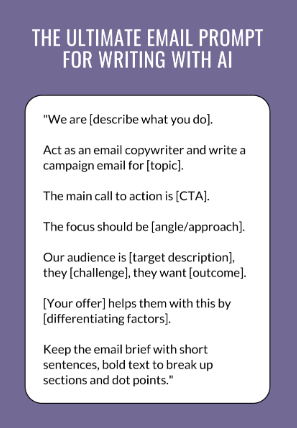
A weak prompt:
Write me a sales email.
A better prompt:
Write an 80-word cold email to Operations Directors at U.S. logistics companies with 100–500 employees. We provide warehouse automation consulting. Mention inefficient manual workflows as the problem. Use a professional conversational tone. Do not use hype. End by asking whether improving warehouse efficiency is a priority this quarter.
Use This AI Email Prompt Formula
Role + Audience + Context + Problem + Offer + Tone + Length + CTA
Example
Act as a B2B email copywriter. Write a cold email to facility managers at commercial office buildings. The company provides recurring commercial cleaning. Mention unreliable cleaning quality as a potential problem. Keep the email below 90 words, professional but conversational, and finish with a question about their next cleaning contract review.
This produces more useful output because the AI understands who, why, what, and how.
15 Ready-to-Use AI Email Templates
1. B2B Cold Email Template
Subject: Quick question about [Company]
Hi [First Name],
I noticed [relevant company detail].
We help [type of company] solve [specific problem] by [short explanation].
I thought this might be relevant because [personalised reason].
Would it make sense to explore whether this could help [Company]?
Best,
[Name]
AI Prompt
Personalise this template for a [job title] at a [industry] company using the company information below. Keep the final email below 90 words and avoid exaggerated claims.
2. First Sales Follow-Up Email
Subject: Re: [Original Subject]
Hi [First Name],
Just following up in case my previous message got buried.
We help [audience] with [specific outcome], particularly when [pain point].
Would this be relevant for your team right now?
Best,
[Name]
The purpose of a follow-up is not to repeat the entire original email.
Give the prospect another easy opportunity to respond.
3. LinkedIn-to-Email Follow-Up
Hi [First Name],
I came across your profile while researching [industry/company context].
I noticed you’re responsible for [relevant function] at [Company].
We work with similar teams on [specific problem].
If improving [outcome] is currently relevant, I’m happy to send over a short example of how we approach it.
Would that be useful?
4. Meeting Request Email
Subject: [Topic] at [Company]
Hi [First Name],
I’m reaching out because we help [company type] improve [specific business outcome].
Based on [relevant information], I thought the approach might be useful for [Company].
Would you be open to a brief conversation next week to see whether there’s a fit?
Best,
[Name]
5. Referral Introduction Template
Hi [Name],
[Mutual Contact] suggested I reach out.
We help [target market] solve [specific problem], and they thought the work might be relevant to what you’re doing at [Company].
Would you be open to a short conversation?
Best,
[Name]
6. Lead Magnet Delivery Email
Subject: Here’s the [guide/checklist]
Hi [First Name],
Thanks for requesting our [Resource Name].
You can access it here:
[Link]
It covers:
- [Benefit 1]
- [Benefit 2]
- [Benefit 3]
If you have questions while using it, feel free to reply directly.
Best,
[Name]
7. Welcome Email Template
Subject: Welcome to [Brand]
Hi [First Name],
Welcome to [Brand].
We’re glad you’re here.
You’ll receive practical information about [topics/outcome] designed to help you [specific benefit].
A good place to start is:
[Resource]
If there’s a particular topic you’d like us to cover, reply and let us know.
8. Product Introduction Email
Hi [First Name],
We recently launched [Product], built for [target user] who need to [problem/outcome].
It helps with:
- [Benefit]
- [Benefit]
- [Benefit]
You can see how it works here:
[Link]
Would you like me to send you a quick example relevant to your use case?
9. Re-Engagement Email
Subject: Still interested in [topic]?
Hi [First Name],
It’s been a while since we’ve heard from you.
If [problem/topic] is still relevant, we’ve recently published [resource/update] that may help.
You can find it here:
[Link]
If it’s no longer relevant, no problem.
Best,
[Name]
10. Proposal Follow-Up Email
Hi [First Name],
I wanted to check whether you’ve had a chance to review the proposal for [project/service].
I’m happy to clarify the scope, timeline, pricing, or implementation process if anything needs more detail.
Is there anything preventing you from moving to the next step?
Best,
[Name]
11. Event Invitation Email
Subject: Invitation: [Event Name]
Hi [First Name],
We’re hosting [Event Name] on [Date] for [audience].
We’ll cover:
- [Topic]
- [Topic]
- [Topic]
If you’re working on [relevant challenge], you may find the session useful.
Reserve your place here:
[Link]
12. Case Study Email
Hi [First Name],
I thought this example might be relevant to your team.
We recently helped a [client type] address [problem] using [solution].
The case study explains:
- the original challenge;
- what was changed; and
- the resulting outcome.
You can read it here:
[Link]
Would a similar approach be relevant at [Company]?
13. Breakup Email Template
Hi [First Name],
I haven’t heard back, so I’ll assume this isn’t a priority right now.
I’ll close the loop here rather than continue filling your inbox.
If [problem] becomes relevant later, feel free to reach out.
Best,
[Name]
A breakup email should be respectful. Artificial urgency or guilt usually makes a poor final impression.
14. Customer Feedback Email
Subject: Quick feedback?
Hi [First Name],
Thanks for using [Product/Service].
We’d love to know how your experience has been so far.
What’s one thing we’re doing well, and one thing we could improve?
Simply reply to this email we read every response.
Thanks,
[Name]
15. Partnership Outreach Email
Hi [First Name],
We both work with [shared audience], but provide complementary services.
You focus on [their service], while we help clients with [your service].
I wondered whether there might be an opportunity to refer suitable clients or collaborate on useful resources.
Would you be open to exploring that?
Best,
[Name]
AI Email Templates for Cold Outreach: What Should Be Different?
Cold emails require greater care because recipients have no established relationship with the sender.
For B2B outreach, your AI-generated email should usually answer four questions quickly:
- Why me?
- Why did you select this person?
- Why now?
- Is there a relevant trigger or reason?
- Why this solution?
- How does your offer connect with the prospect’s problem?
- What next?
What small action should the recipient take?
At LeadCanal, cold email campaigns are built around prospect research, targeted B2B lists, personalised templates, subject lines, follow-ups, and deliverability infrastructure rather than using the same message for an unrelated database.
AI-Written Emails vs Traditional Templates
| AI Email Templates | Traditional Email Templates |
|---|---|
| Can adapt to context | Mostly fixed copy |
| Faster first drafts | Requires manual writing |
| Can generate multiple variants | Variations created manually |
| Useful for personalisation | Often uses basic placeholders |
| Requires factual review | More predictable copy |
| Can sound generic if poorly prompted | Can become repetitive |
| Good for testing ideas | Good for approved brand messaging |
Which Is Better?
The best approach is often AI-assisted rather than AI-only.
Use AI to:
- brainstorm;
- shorten copy;
- create variants;
- adapt tone;
- personalise sections;
- generate subject-line ideas.
Then use human review to check:
- factual accuracy;
- relevance;
- tone;
- brand consistency;
- claims;
- CTA;
- personalisation.
Pros and Cons of Using AI Email Templates
Pros
- Faster drafting
- Easy template variations
- Useful subject-line brainstorming
- Faster personalisation
- Helps overcome writer’s block
- Can adapt copy by industry or persona
- Useful for testing different messages
Cons
- Can produce generic language
- Can invent unsupported facts
- May overuse sales clichés
- Personalisation can feel artificial
- Incorrect prompts produce weak emails
- Human review is still necessary
- Scaling poor copy simply creates more poor emails
AI should accelerate judgment not replace it.
How to Personalise AI Email Templates
Avoid telling AI only:
“Personalise this.”
Give it specific information.
Company Data
- industry;
- company size;
- location;
- product;
- growth;
- website context.
Contact Data
- name;
- role;
- department;
- responsibility.
Trigger Data
- hiring;
- funding;
- expansion;
- new product;
- job change;
- technology adoption;
- publicly identified business need.
LeadCanal’s B2B data approach includes fields such as company name, industry, location, job title, company size, website, LinkedIn information, and verified email status, which can provide useful context for targeted outreach.
Step-by-Step Process for Creating Better AI Email Templates
Step 1: Define One Goal
Examples:
- get a reply;
- schedule a call;
- download a guide;
- confirm a meeting;
- request feedback.
Do not give one email five competing CTAs.
Step 2: Define Your Audience
Specify exactly who will receive it.
Step 3: Give AI Real Context
Provide relevant company and recipient details.
Step 4: Specify Tone
For example:
Professional, concise, conversational, no exaggerated claims.
Step 5: Add Constraints
Tell the AI:
Under 90 words. No emojis. No clichés. One question at the end.
Step 6: Generate 3–5 Variations
Compare hooks, value propositions, and CTAs.
Step 7: Human-Edit the Winner
Remove anything that sounds robotic.
Step 8: Verify Every Claim
Do not allow AI-generated personalisation to invent facts about the recipient.
Step 9: Test
Compare versions based on meaningful metrics such as:
- positive replies;
- qualified conversations;
- booked meetings;
- conversions.
Step 10: Save Winning Templates
Build a library around:
- persona;
- industry;
- offer;
- campaign;
- funnel stage.
Common AI Email Writing Mistakes
Using the Same Prompt for Everyone
Different audiences require different context.
Letting AI Invent Personalisation
Never send:
“Congratulations on your recent Series B…”
unless that event is verified.
Writing Long Emails
AI often adds unnecessary explanation unless given a length limit.
Using Generic Openers
Avoid:
“I hope this email finds you well.”
when a more relevant opening is available.
Overusing Buzzwords
Words such as “revolutionary,” “game-changing,” and “cutting-edge” rarely make a weak offer stronger.
Ignoring Deliverability
Great copy cannot generate responses if your email does not reach the inbox.
LeadCanal deliverability guidance covers authentication, reputation, list quality, and responsible sending practices, including SPF, DKIM, and DMARC configuration.
How LeadCanal Uses Email Templates for B2B Outreach
AI-generated copy becomes much more useful when it is combined with the right prospecting system.
LeadCanal supports B2B businesses with:
- prospect research;
- targeted email-list building;
- verified business contacts;
- cold email infrastructure;
- personalised templates;
- subject lines;
- follow-up sequences
- SPF, DKIM, and DMARC configuration;
- deliverability monitoring; and
- campaign optimisation.
LeadCanal also documents its own use of ReachInbox for managing sending accounts, warm-up, campaign sequences, follow-ups, and outreach workflows.
The key principle is simple:
AI should help create a better message for the right person not make it easier to send irrelevant messages to more people.
Build Better Cold Email Campaigns With LeadCanal
If your business wants to combine AI-assisted email copy with verified B2B prospect data, personalised outreach, and deliverability-focused infrastructure, LeadCanal can help build a more structured cold email system.

Frequently Asked Questions About AI Email Templates
What are AI email templates?
AI email templates are reusable email structures generated or adapted with artificial intelligence using information such as the audience, campaign goal, tone, product, context, and desired call to action.
Can AI write professional emails?
Yes. Current platforms such as Mailchimp offer generative AI functionality for creating subject lines, email copy, and email sections from prompts or source material. Generated content should still be reviewed before sending.
How do I create an AI email template?
Define the recipient, purpose, context, tone, length, offer, and CTA. Give those details to the AI tool, generate several variants, verify the content, edit the strongest version, and save it as a reusable template.
What is the best prompt for AI email writing?
A strong prompt specifies the recipient, business context, problem, offer, tone, length, and CTA instead of simply asking the AI to “write an email.”
Can I use AI email templates for cold email?
Yes. AI can help draft and adapt cold emails, but prospect selection, factual personalisation, list quality, infrastructure, deliverability, compliance, and human review remain important.
Are AI email templates free?
Some AI writing and email platforms offer free tools or limited free usage, while others restrict AI functionality to particular paid plans. For example, Mailchimp states that some of its AI writing functionality is available on specified paid tiers.
Can AI personalise emails automatically?
AI can adapt copy using supplied information such as a recipient’s role, company, industry, or verified business context. However, the underlying information should be accurate and personalisation should be reviewed before sending.
Is AI email writing better than using traditional templates?
Neither is always better. AI is useful for drafting, variations, and contextual adaptation, while traditional templates provide predictable, approved messaging. Many teams can benefit from combining both.
What should I avoid in AI-generated emails?
Avoid invented facts, fake personalisation, exaggerated claims, unnecessary length, excessive jargon, generic introductions, and sending drafts without reviewing them.
How can LeadCanal help with AI-assisted cold email?
LeadCanal combines targeted prospect research, verified B2B contacts, personalised email templates, follow-up sequences, sending infrastructure, and deliverability optimisation for B2B cold outreach campaigns.