How to Get a Business Services Industry Email List That Converts
On this page
- Quick Answer
- Table of Contents
- What Is a Business Services Industry Email List?
- Who Actually Needs This Data?
- What’s Inside a Quality List
- Buy vs. Build: Comparing Your Options
- How to Evaluate a Provider
- Step-by-Step: Launching Your First Campaign
- Compliance: GDPR, CAN-SPAM, and CASL
- Common Mistakes That Kill Deliverability
- How LeadCanal Approaches This Differently
- FAQs
- Conclusion
Business Services Industry Email List: How to Build or Buy One That Actually Converts
Reaching decision-makers in accounting firms, law offices, consulting shops, IT providers, and marketing agencies starts with one thing: a clean, verified business services industry email list. Without it, even the best-written campaign lands in the wrong inbox or no inbox at all.
This guide breaks down what a business services email list actually is, how it’s built, what separates a compliant provider from a risky one, and how to use the data once you have it.
Whether you’re a B2B marketer, an SDR team lead, or a founder doing your own outbound, you’ll walk away knowing exactly how to evaluate and deploy this data without wasting budget or triggering spam complaints.
Quick Answer
A business services industry email list is a segmented database of verified contact and firmographic details for professionals working in sectors like accounting, legal, consulting, IT services, HR, and marketing. It typically includes:
- Full name, verified email address, and direct phone number
- Job title, department, and seniority level
- Company name, size, revenue range, and location
- SIC/NAICS industry classification codes
Sales and marketing teams use these lists to run targeted outbound campaigns, cold email sequences, and account-based marketing (ABM) programs aimed at business-to-business decision-makers.
Table of Contents
- What Is a Business Services Industry Email List?
- Who Actually Needs This Data?
- What’s Inside a Quality List
- Buy vs. Build: Comparing Your Options
- How to Evaluate a Provider
- Step-by-Step: Launching Your First Campaign
- Compliance: GDPR, CAN-SPAM, and CASL
- Common Mistakes That Kill Deliverability
- How LeadCanal Approaches This Differently
- FAQs
- Conclusion
What Is a Business Services Industry Email List?
A business services industry email list is a filtered subset of a larger B2B database, narrowed down to companies and professionals operating within the “business services” sector a category that spans accounting, legal, consulting, staffing, IT support, marketing agencies, and administrative services.
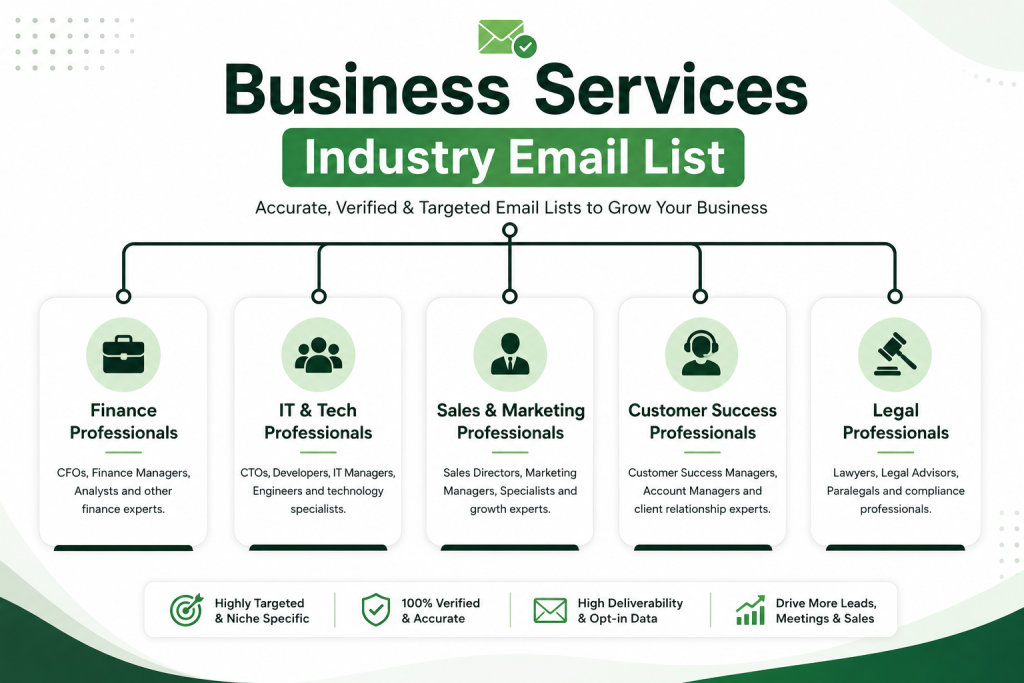
Unlike a generic contact scrape, a properly built list is segmented by firmographic data, meaning you can filter prospects by:
- Industry classification (SIC or NAICS code)
- Company size or employee headcount
- Annual revenue bracket
- Geographic region
- Job function or seniority (e.g., partner, director, VP)
This segmentation is what makes the list usable for targeted campaigns instead of a spray-and-pray blast.
Why Industry Segmentation Matters
Business services buyers behave differently than, say, retail or manufacturing buyers. A managing partner at a law firm responds to different messaging than an IT services director.
Segmenting your list by industry lets you tailor subject lines, pain points, and offers to match how each vertical actually makes buying decisions which is the entire point of B2B email marketing.
Who Actually Needs This Data?
Not every business needs an industry-specific list. It makes the most sense for:
- B2B SaaS companies selling tools to accounting, legal, or consulting firms
- Agencies pitching services like SEO, web design, or recruitment to business services firms
- Recruiters and staffing companies sourcing candidates or clients within the sector
- Financial and insurance providers targeting firm partners and finance leads
- Sales teams running account-based marketing (ABM) against a defined target account list
If your ideal customer profile (ICP) includes professional services firms, this data type is worth building into your pipeline.
What’s Inside a Quality List
Here’s a breakdown of the core data fields you should expect from any reputable provider:
| Data Category | Fields Typically Included |
|---|---|
| Contact Information | Full name, verified email, direct dial phone number |
| Professional Details | Job title, department, seniority level, LinkedIn URL |
| Company Firmographics | Company name, website, HQ location, subsidiary info |
| Classification Data | SIC/NAICS codes, industry vertical, sub-sector |
| Financial Data | Annual revenue range, employee headcount |
| Technographic Data (add-on) | Software/tools the company currently uses |
The more complete these fields are, the easier it becomes to personalize outreach and qualify leads before your sales team ever picks up the phone.
Buy vs. Build: Comparing Your Options
Most teams choose between three paths: buying a pre-built list, using a self-serve database tool, or building a list manually through scraping and manual research. Here’s how they stack up.
| Approach | Speed | Data Accuracy | Cost | Best For |
|---|---|---|---|---|
| Pre-built purchased list | Fast (instant to 48 hrs) | Varies by vendor | Low to moderate | Quick campaign launches |
| Self-serve list-building platform | Moderate | High (real-time verified) | Moderate | Ongoing prospecting needs |
| Manual research/scraping | Slow | Inconsistent | Low direct cost, high time cost | Small, highly niche target lists |
| Custom-built by a data vendor | Moderate (days) | High | Higher | Enterprise ABM campaigns |
Expert insight: In our experience running outbound campaigns across professional services verticals, self-serve platforms with real-time email verification consistently outperform static purchased lists because static lists decay fast. Business contacts change jobs often, and a list that’s six months old can carry a 20–30% bounce rate.
How to Evaluate a Provider
Before you buy any business services email list, run it through this checklist:
1. Verification Method
Ask how recently emails were verified and what method was used (SMTP ping, catch-all detection, etc.). Lists “verified” a year ago are effectively unverified today.
2. Compliance Documentation
A trustworthy provider can explain how their data collection aligns with GDPR (for EU contacts) and CAN-SPAM (for US contacts). If they can’t answer this clearly, walk away.
3. Sample Data Access
Reputable vendors let you preview a sample before purchase. If a provider refuses any sample or transparency into data sourcing, treat that as a red flag.
4. Refresh Frequency
Ask how often the underlying database is refreshed. Monthly or real-time refresh cycles are far more reliable than annual updates.
5. Return/Replacement Policy
Good providers replace bounced or invalid contacts. This is a strong trust signal and protects your sender reputation.
Step-by-Step: Launching Your First Campaign
Once you have a verified business services industry email list, here’s how to put it to work.
Step 1: Segment Your List by Sub-Industry
Break the list into smaller groups legal, accounting, consulting, IT services so your messaging can speak directly to each buyer’s specific pain points.
Step 2: Warm Up Your Sending Domain
Never send cold outreach at volume from a brand-new domain. Warm it up over 2–3 weeks with gradually increasing send volume to protect deliverability.
Step 3: Personalize Beyond First Name
Reference the recipient’s job function, company size, or industry challenge. Generic “Hi {{FirstName}}” emails get ignored or reported as spam.
Step 4: Set Up a Multi-Touch Sequence
Plan 3–5 touchpoints across email and, where appropriate, LinkedIn spaced 2–4 days apart, rather than a single one-off blast.
Step 5: Monitor Deliverability Metrics Daily
Track bounce rate, spam complaints, and open rate in the first 48 hours. A bounce rate above 5% signals a data quality problem that needs fixing immediately.
Step 6: Suppress and Clean Continuously
Remove unsubscribes, bounces, and unengaged contacts every send cycle to protect your domain reputation long-term.
Compliance: GDPR, CAN-SPAM, and CASL
Data compliance isn’t optional it’s the difference between a sustainable outbound program and a legal liability.
- GDPR (EU/UK contacts): Requires a lawful basis for processing personal data, such as legitimate interest for B2B outreach, plus a clear opt-out mechanism in every email.
- CAN-SPAM (US contacts): Requires accurate sender information, a working unsubscribe link, and honouring opt-out requests within 10 business days.
- CASL (Canadian contacts): Generally requires express or implied consent before commercial email is sent.
Practical takeaway: Always include a physical mailing address and a one-click unsubscribe link in every campaign, regardless of which region you’re emailing into. This single habit prevents the majority of compliance complaints.
Common Mistakes That Kill Deliverability
- Buying a list once and using it for a year contact data decays roughly 2–3% per month.
- Skipping domain warm-up sending 5,000 cold emails from a fresh domain almost guarantees a spam-folder placement.
- Ignoring catch-all addresses these inflate list size but tank real engagement rates.
- No segmentation sending the same message to a law firm partner and an IT services director reduces relevance and response rates.
- Failing to track engagement without open/click/reply tracking, you can’t identify which contacts to prioritize or which to suppress.
How LeadCanal Approaches This Differently
At LeadCanal, list quality is treated as an ongoing process, not a one-time purchase. Instead of static exports that go stale within weeks, the focus is on real-time verified data, industry-specific segmentation, and compliance-first sourcing so campaigns built on this data start with a clean sender reputation instead of fighting to recover one.
If you’re building your outbound strategy around business services contacts, it’s worth pairing your list with:
- LeadCanal B2B Data Enrichment Tool to append missing firmographic and technographic fields
- LeadCanal Email Verification Service to catch invalid and catch-all addresses before you send
- LeadCanal Industry-Specific List Builder to self-serve segment by SIC/NAICS code and revenue range
- LeadCanal Cold Email Deliverability Guide for domain warm-up and inbox placement best practices
- LeadCanal ABM Campaign Playbook for structuring multi-touch sequences around this data

FAQs
What is a business services industry email list?
It’s a database of verified contact and firmographic information for professionals working at accounting, legal, consulting, IT, HR, and marketing firms, used for targeted B2B outreach.
How much does a business services email list cost?
Pricing varies widely by provider, list size, and data depth ranging from pay-per-contact self-serve platforms to custom quotes for enterprise-scale, highly segmented lists.
Is buying an email list legal?
Yes, in most jurisdictions, provided the sender complies with applicable laws like CAN-SPAM or GDPR, includes an unsubscribe option, and doesn’t misrepresent the sender’s identity.
How often should I refresh my email list?
Ideally every 3–6 months, since B2B contacts change roles frequently and unrefreshed lists degrade in deliverability over time.
What’s the difference between a verified and unverified list?
A verified list has had each email checked for deliverability (via SMTP validation or similar) close to the time of purchase, while an unverified list may include outdated or invalid addresses.
Can I use this data for LinkedIn outreach too?
Yes — many business services lists include LinkedIn profile URLs, making them useful for combined email and social selling sequences.
What industries fall under “business services”?
Typically accounting, legal, management consulting, IT services, staffing/HR, marketing and advertising agencies, and other professional/administrative service providers.
How do I avoid my emails landing in spam?
Warm up your sending domain gradually, personalize messaging, keep bounce rates low by verifying data first, and always include a working unsubscribe link.
Conclusion
A business services industry email list is only as valuable as its accuracy, segmentation, and compliance posture.
The providers that win long-term aren’t the ones with the biggest contact counts they’re the ones offering verified, regularly refreshed, properly classified data.