Skip to content
Cold email can still be one of the most effective ways to generate leads, book meetings, and grow a business. However, inbox providers have become much stricter over the past few years. Simply sending emails is no longer enough.
If your infrastructure is not configured correctly, your emails may:
- Go to spam
- Get blocked
- Land in promotions
- Fail authentication
- Damage your domain reputation
Modern cold email success depends heavily on email deliverability.
In this complete guide, you’ll learn:
- How cold email deliverability works
- How to set up proper email infrastructure
- SPF, DKIM, and DMARC configuration
- Domain warmup strategies
- Sending limits and reputation management
- Content optimization
- Monitoring and troubleshooting
You can also analyze your email authentication setup using the LeadCanal Domain Scanner, which checks:
- SPF
- DKIM
- DMARC
- Authentication health
You can also use:
to troubleshoot individual authentication records.
Introduction
Why Deliverability Matters

Cold email deliverability determines whether your emails reach:
- Inbox
- Promotions tab
- Spam folder
- Blocklists
Even the best outreach campaigns fail if emails never reach recipients.
Poor deliverability can lead to:
- Low open rates
- Reduced reply rates
- Damaged sender reputation
- Burned domains
Deliverability is now one of the most important parts of successful outbound marketing.
Domain Setup
Your domain setup is the foundation of cold email infrastructure.
Mailbox providers like Google Workspace and Microsoft 365 closely monitor:
- Domain reputation
- Authentication
- Sending behavior
Improper setup creates trust issues immediately.
Use Separate Sending Domains
Many businesses avoid sending cold emails from their primary business domain.
Instead, they use:
- Secondary domains
- Alternate domains
- Sending subdomains
Examples:
- companymail.co
- getcompany.com
- outreach.company.com
This helps protect the main business domain reputation.
Choose Clean Domains
When purchasing domains for cold email:
- Avoid previously abused domains
- Avoid spammy histories
- Avoid suspicious TLDs
A clean domain history improves trust with mailbox providers.
SPF, DKIM & DMARC Setup
Proper authentication is one of the most important deliverability factors.
Mailbox providers expect sending domains to authenticate emails correctly using:
- SPF
- DKIM
- DMARC
Without authentication:
- Emails are less trusted
- Spam placement increases
- DMARC failures occur
SPF Setup
SPF authorizes sending servers.
Example SPF record:
v=spf1 include:_spf.google.com ~allSPF helps mailbox providers verify:
- Which servers can send emails
- Whether the sender is authorized
DKIM Setup
DKIM adds digital signatures to emails.
This helps verify:
- Message integrity
- Sender authenticity
Proper DKIM setup improves:
- Inbox placement
- Domain trust
- Authentication reliability
DMARC Setup
DMARC ties SPF and DKIM together and defines how failed emails should be handled.
Example DMARC record:
v=DMARC1; p=none;DMARC helps:
- Prevent spoofing
- Improve trust
- Monitor authentication issues
You can verify your full setup using the LeadCanal Domain Scanner.
Inbox Warmup
New domains and inboxes should never start sending large email volumes immediately.
Mailbox providers become suspicious when:
- A new inbox suddenly sends hundreds of emails
- Sending patterns look automated
- Engagement is low
This is why warmup is critical.
Why Warmup Matters
Warmup helps build:
- Domain reputation
- Inbox trust
- Sending credibility
Proper warmup gradually introduces your domain to mailbox providers.
Recommended Warmup Strategy
A gradual sending increase works best.
Example:
- Day 1 → 5 emails
- Day 3 → 15 emails
- Week 2 → 40 emails
- Week 4 → 80+ emails
Consistency matters more than sudden volume increases.
Warmup Best Practices
During warmup:
- Focus on positive replies
- Avoid spam complaints
- Send personalized emails
- Maintain consistent schedules
Good engagement accelerates trust building.
Sending Limits
Cold email volume management is critical for long-term deliverability.
Sending too aggressively is one of the fastest ways to damage reputation.
Safe Sending Volume
Recommended limits depend on:
- Domain age
- Reputation
- Warmup status
- Engagement quality
Many cold email setups stay within:
- 20–50 emails daily per inbox initially
Higher volumes should only happen gradually.
Avoid Sending Spikes
Sudden traffic spikes trigger spam filters.
Mailbox providers prefer:
- Predictable sending patterns
- Gradual scaling
- Consistent behaviour
Large unpredictable increases often cause:
- Spam placement
- Temporary blocks
- Reputation decline
Email Content Optimization
Content quality directly impacts deliverability.
Spam filters analyze:
- Wording
- Structure
- Formatting
- Personalization
Even authenticated emails may go to spam if the content looks suspicious.
Avoid Spam Trigger Words
Overly promotional language increases filtering risks. overly promotional language can increase spam filtering risks. To check whether your email copy contains spam-triggering keywords,
you can use the LeadCanal Email Copy Checker before sending your campaign.
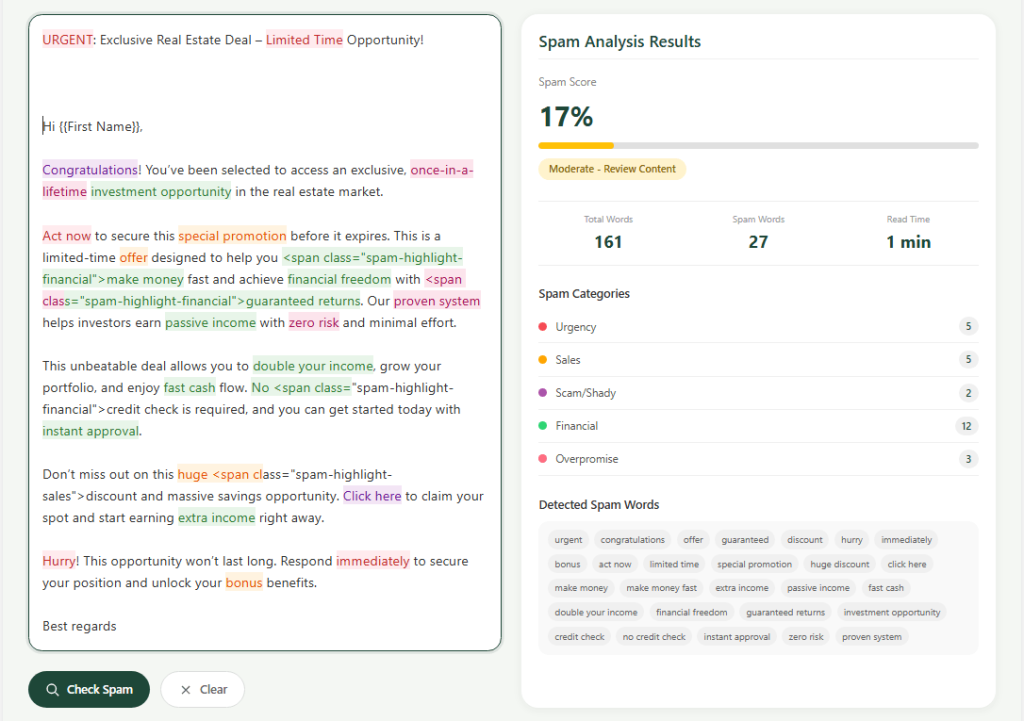
Examples include:
- “Guaranteed”
- “Make money fast”
- “Act now”
- “Risk free”
- “100% free”
Cold emails should sound:
- Natural
- Conversational
- Personalized
Keep Formatting Simple
Spam filters dislike:
- Excessive images
- Too many links
- Heavy HTML formatting
Simple plain-text emails often perform better.
Focus on Relevance
Better targeting improves:
- Open rates
- Replies
- Deliverability
Irrelevant outreach increases:
- Spam complaints
- Negative engagement
- Reputation damage
Technical Deliverability Factors
Several technical factors affect cold email performance beyond authentication.
Domain Age
Older domains usually have more trust.
Brand-new domains may face:
- Increased filtering
- Reputation challenges
- Lower inbox rates
This is why warmup matters so much.
Reverse DNS (PTR Records)
Reverse DNS helps verify mail server legitimacy.
Missing PTR records can:
- Trigger spam filters
- Reduce trust
This is especially important for custom SMTP infrastructure.
Blacklist Monitoring
If your domain or IP appears on blacklists:
- Deliverability suffers significantly
Blacklist issues often happen because of:
- Spam complaints
- Poor list quality
- Aggressive sending
Regular monitoring is important.
Monitoring Deliverability
Cold email deliverability requires continuous monitoring.
Mailbox providers constantly reevaluate sender reputation.
Open Rates
Low open rates may indicate:
- Spam placement
- Poor targeting
- Weak subject lines
Monitoring trends helps identify problems early.
Bounce Rates
High bounce rates hurt reputation.
Common causes include:
- Invalid emails
- Poor list hygiene
- Bad lead data
Always verify contact lists before sending.
Spam Complaints
Spam complaints are one of the most damaging signals.
Even small complaint rates can:
- Hurt reputation
- Reduce inbox placement
- Trigger provider restrictions
This is why targeting quality matters more than quantity.
Best Cold Email Tools
Cold email success depends heavily on proper infrastructure and authentication management.
Many businesses use platforms for:
- Email sequencing
- Warmup
- Tracking
- Automation
Regardless of the platform, authentication setup remains essential.
Authentication Testing Tools
You should regularly test:
- SPF
- DKIM
- DMARC
using:
This helps detect deliverability issues early.
Best Practices for Cold Email Deliverability
Long-term deliverability depends on consistency and infrastructure quality.
Personalize Emails Properly
Avoid generic mass outreach.
Good personalization improves:
- Engagement
- Replies
- Inbox placement
Use Multiple Inboxes
Instead of scaling one inbox aggressively:
- Distribute volume across multiple inboxes
This reduces risk concentration.
Maintain Positive Engagement
Mailbox providers monitor:
- Replies
- Opens
- Spam complaints
- Deletions
Positive engagement improves reputation over time.
Authenticate Every Sending Domain
Every domain should properly configure:
- SPF
- DKIM
- DMARC
You can verify authentication using the LeadCanal Domain Scanner.
FAQs
How Many Cold Emails Should I Send Daily?
This depends on:
- Domain reputation
- Warmup status
- Inbox age
Many businesses start with:
- 20–50 emails daily per inbox
then scale gradually.
Why Are My Cold Emails Going to Spam?
Common reasons include:
- Missing SPF/DKIM/DMARC
- Poor reputation
- Aggressive sending
- Low engagement
- Spammy content
Does Authentication Guarantee Inbox Placement?
No.
Authentication is essential, but deliverability also depends on:
- Reputation
- Engagement
- Sending behavior
- Content quality
Final Thoughts
Cold email deliverability has become increasingly technical and reputation-driven. Success now depends on proper authentication, warmup, sending behavior, and infrastructure management.
Businesses that ignore deliverability often experience:
- Spam folder placement
- Burned domains
- Poor reply rates
The strongest cold email systems focus on:
- Proper SPF, DKIM, and DMARC setup
- Consistent warmup
- Clean sending practices
- Positive engagement
You can analyze your full authentication setup using the LeadCanal Domain Scanner.
For deeper troubleshooting, use:
If your organization needs help with:
- Cold email infrastructure
- Deliverability optimization
- SPF/DKIM/DMARC setup
- Domain warmup
- Inbox placement improvement
you can contact LeadCanal for professional suppor