Why Are My Emails Going to Spam? 15 Common Reasons and Fixes
On this page
- Introduction
- SPF Problems
- DKIM Problems
- DMARC Problems
- Poor Domain Reputation
- What Hurts Domain Reputation?
- New Domains Need Warmup
- Sending Too Many Emails Too Fast
- Why Warmup Matters
- Bad Email Content
- Spam Trigger Words
- Too Many Links or Images
- Poor Personalization
- Low Engagement Rates
- Positive Engagement Signals
- Negative Engagement Signals
- Shared IP Problems
- Dedicated IP vs Shared IP
- Email Forwarding Issues
- Blacklisting Problems
- Common Causes of Blacklisting
- How to Fix Spam Issues
- Configure Authentication Properly
- Warm Up Domains Slowly
- Clean Your Email Lists
- Improve Email Content
- Monitor Deliverability
- Best Practices for Better Deliverability
- Use Separate Sending Domains
- Authenticate Every Sending Platform
- Maintain Consistent Sending Patterns
- FAQs
- Why Do Gmail Emails Go to Spam?
- How Long Does Deliverability Recovery Take?
- Can Good Authentication Guarantee Inboxing?
- Final Thoughts
One of the most frustrating problems businesses face is sending emails that never reach the inbox. Whether you are running cold email campaigns, marketing newsletters, SaaS notifications, or business communications,
poor email deliverability can destroy your results.
If your emails are going to spam folders instead of inboxes, there is usually a technical or reputation issue behind it.
Modern mailbox providers like Google Workspace, Microsoft 365, and Yahoo Mail use advanced filtering systems to decide whether emails should be trusted.
In this guide, you’ll learn:
- Why emails go to spam
- The most common deliverability mistakes
- How to improve inbox placement
- Technical fixes for authentication problems
- Best practices for cold email deliverability
You can also test your email authentication setup using the free tools from LeadCanal:
Introduction
Why Spam Placement Happens
Spam filters exist to protect users from:
- Phishing attacks
- Malware
- Fake emails
- Scams
- Unwanted promotions
Every email provider uses algorithms that evaluate:
- Sender reputation
- Email authentication
- Content quality
- Engagement rates
- Sending behaviour
If your emails trigger too many warning signals, they may be filtered into spam folders.
Spam placement is not caused by just one factor. It is usually a combination of:
- Technical setup issues
- Poor sending practices
- Weak domain reputation
Missing SPF, DKIM, or DMARC
One of the biggest reasons emails go to spam is missing authentication records.
Mailbox providers expect domains to properly authenticate emails using:
- SPF
- DKIM
- DMARC
Without these records:
- Your emails appear less trustworthy
- Spoofing risks increase
- Deliverability suffers
SPF Problems
SPF verifies which mail servers are authorized to send emails for your domain.
Common SPF issues include:
- Missing SPF records
- Multiple SPF records
- Too many DNS lookups
- Missing third-party providers
Example SPF record:
v=spf1 include:_spf.google.com ~allYou can validate SPF using the LeadCanal SPF Checker.
DKIM Problems
DKIM digitally signs your emails and verifies message integrity.
If DKIM fails:
- Mail providers may distrust your emails
- DMARC alignment may fail
- Spam placement becomes more likely
Common DKIM issues:
- Invalid signatures
- Missing selectors
- Incorrect DNS records
You can test DKIM using the LeadCanal DKIM Checker.
DMARC Problems
DMARC ties SPF and DKIM together and defines how failed emails should be handled.
Without DMARC:
- Your domain has weaker protection
- Spoofing risks increase
- Deliverability may decline
Basic DMARC example:
v=DMARC1; p=none;You can verify DMARC setup using the LeadCanal DMARC Checker.
Poor Domain Reputation
Mailbox providers assign reputation scores to domains and IP addresses.
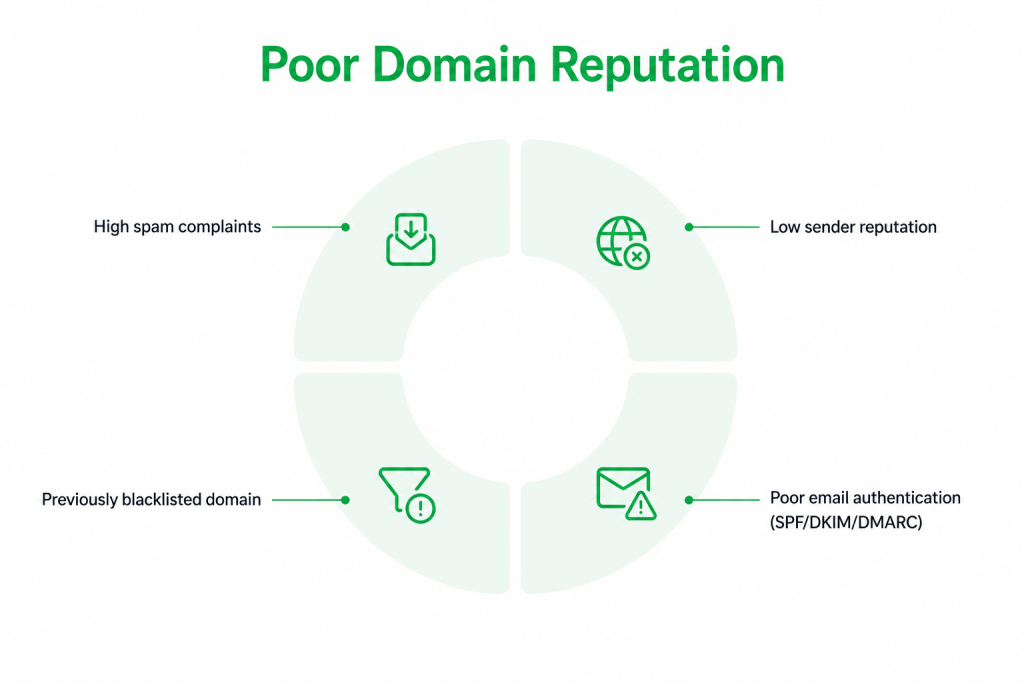
If your domain develops a poor reputation:
- Emails may go to spam
- Inbox placement drops
- Open rates decline
What Hurts Domain Reputation?
Several factors can damage sender reputation:
- High spam complaints
- Sending to invalid emails
- Low engagement
- Sudden sending spikes
- Blacklisting
- Spam trap hits
Your reputation acts like a trust score for email providers.
New Domains Need Warmup
Brand-new domains are often treated cautiously by mailbox providers.
If you suddenly send large email volumes from a new domain:
- Spam filters become suspicious
- Emails may be throttled or filtered
This is why proper domain warmup is important.
Sending Too Many Emails Too Fast
Large sending spikes are a major spam trigger.
Mailbox providers monitor:
- Daily sending volume
- Sending consistency
- Velocity changes
Sudden increases look suspicious.
Why Warmup Matters
Email warmup gradually builds sender trust.
A proper warmup process usually involves:
- Starting with low volume
- Increasing gradually
- Maintaining positive engagement
This helps mailbox providers recognize your domain as legitimate.
Warmup is especially important for:
- Cold email campaigns
- New domains
- New inboxes
Bad Email Content
Spam filters also analyze email content.
Even technically authenticated emails can go to spam if the content looks suspicious.
Spam Trigger Words
Overly promotional language can increase spam risk. You can verify leadcanal spam word checker
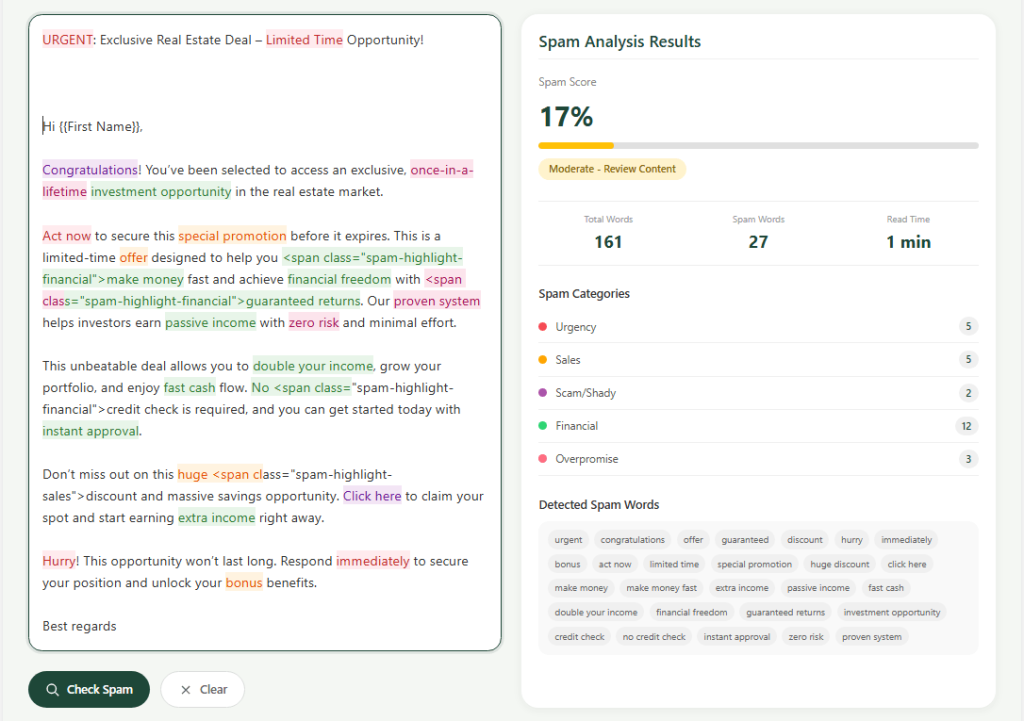
Examples include:
- “Make money fast”
- “Guaranteed income”
- “Act now”
- “Risk free”
- “100% free”
Using too many promotional phrases may trigger filtering systems.
Too Many Links or Images
Spam filters dislike emails with:
- Excessive links
- Large image-only emails
- Short low-quality content
Balanced formatting is important.
Good emails usually contain:
- Natural language
- Moderate link usage
- Clean formatting
Poor Personalization
Generic mass emails often perform poorly.
Low personalization can:
- Reduce engagement
- Increase spam complaints
- Hurt reputation
Better personalization improves:
- Open rates
- Replies
- Deliverability
Low Engagement Rates
Mailbox providers monitor how users interact with your emails.
If recipients:
- Ignore emails
- Delete without opening
- Mark as spam
your reputation declines.
Positive Engagement Signals
Good engagement improves inbox placement.
Positive signals include:
- Opens
- Replies
- Email saves
- Moving emails from spam to inbox
These behaviours help mailbox providers trust your domain more.
Negative Engagement Signals
Poor engagement sends warning signals.
Negative signals include:
- Spam complaints
- High unsubscribe rates
- Low open rates
- Immediate deletions
Cold email campaigns with poor targeting often struggle because of weak engagement.
Shared IP Problems
Some email providers use shared sending infrastructure.
This means multiple businesses may share the same sending IP.
If another sender abuses the IP:
- Your reputation may suffer too
This is common with:
- Cheap email platforms
- Shared SMTP providers
Dedicated IP vs Shared IP
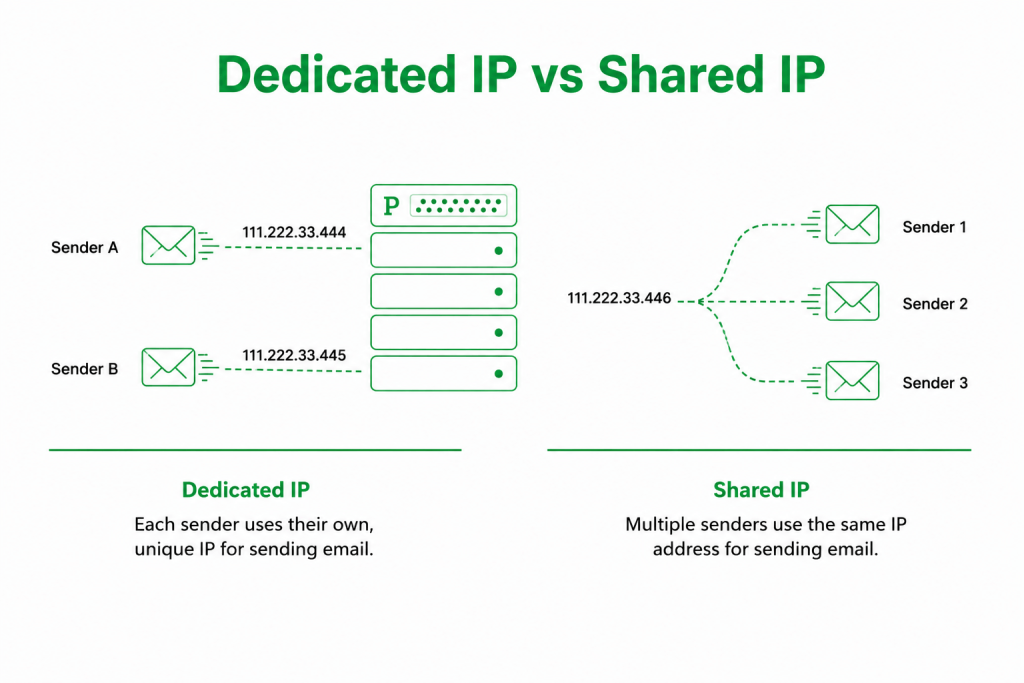
Dedicated IPs offer:
- More reputation control
- Better long-term stability
Shared IPs are:
- Easier for beginners
- More affordable
- Sometimes less predictable
High-volume senders often benefit from dedicated infrastructure.
Email Forwarding Issues
Forwarded emails can break SPF authentication.
This happens because:
- The forwarding server is not authorized in SPF
As a result:
- SPF may fail
- DMARC may fail
- Deliverability may suffer
DKIM helps reduce forwarding-related issues because signatures survive forwarding better than SPF.
Blacklisting Problems
If your domain or IP gets blacklisted:
- Emails may be rejected
- Spam placement increases dramatically
Blacklists track domains associated with:
- Spam
- Malware
- Abuse
- Poor practices
Common Causes of Blacklisting
Domains often get blacklisted because of:
- Sending to purchased lists
- High complaint rates
- Compromised accounts
- Malware infections
Regular monitoring is important.
How to Fix Spam Issues
Improving deliverability requires both technical fixes and better sending practices.
Configure Authentication Properly
Always configure:
- SPF
- DKIM
- DMARC
These records help mailbox providers trust your emails.
You can generate and verify records using:
Warm Up Domains Slowly
Avoid sending large volumes immediately.
Increase gradually:
- Day by day
- Week by week
Consistency is critical.
Clean Your Email Lists
Never send to:
- Invalid emails
- Old contacts
- Purchased lists
Poor-quality lists damage reputation quickly.
Improve Email Content
Focus on:
- Natural writing
- Personalization
- Relevance
- Clear value
Avoid overly promotional language.
Monitor Deliverability
Track:
- Open rates
- Bounce rates
- Spam complaints
- Inbox placement
Regular monitoring helps identify issues early.
Best Practices for Better Deliverability
Successful email deliverability requires ongoing maintenance.
Use Separate Sending Domains
Many businesses use separate domains or subdomains for:
- Cold email outreach
- Marketing campaigns
- Transactional emails
This protects primary business domains.
Authenticate Every Sending Platform
Always configure SPF and DKIM for:
- CRM systems
- Newsletter tools
- Cold email platforms
- SaaS applications
Missing authentication often causes failures.
Maintain Consistent Sending Patterns
Mailbox providers prefer:
- Stable sending behavior
- Predictable volume
- Consistent engagement
Avoid large unpredictable spikes.
FAQs
Why Do Gmail Emails Go to Spam?
Common reasons include:
- Missing SPF/DKIM/DMARC
- Poor sender reputation
- Spam complaints
- Weak content quality
- New domains without warmup
How Long Does Deliverability Recovery Take?
Recovery time varies.
Minor issues may improve within:
- Days
Severe reputation damage may require:
- Weeks or months
Consistency and proper setup are key.
Can Good Authentication Guarantee Inboxing?
No.
Authentication is essential, but deliverability also depends on:
- Reputation
- Engagement
- Content quality
- Sending behaviour
Final Thoughts
Email deliverability is no longer just about sending emails. Modern mailbox providers evaluate technical authentication, reputation, engagement, and sending quality together.
If your emails are going to spam, the problem is usually fixable with proper authentication and better sending practices.
Start by verifying:
- SPF
- DKIM
- DMARC
using the free tools from LeadCanal:
If your organization needs help with:
- Deliverability optimization
- Cold email infrastructure
- SPF/DKIM/DMARC setup
- Domain warmup
- Inbox placement improvement
you can contact LeadCanal for professional support.