Verified Email List of Software Companies for B2B Sales
On this page
- What Is an Email List of Software Companies?
- Who Can Use a Software Companies Email List?
- Which Software Company Decision-Makers Should You Target?
- What Information Should the Database Include?
- How LeadCanal Builds an Email List of Software Companies
- Tools Used to Research Software Companies
- How Much Does It Cost to Build the List?
- Why Choose LeadCanal?
- Request a Custom Email List of Software Companies
Selling products or services to software companies requires accurate targeting. Technology businesses regularly receive offers related to recruitment,
cloud infrastructure, software development, cybersecurity, marketing, finance, consulting, and business operations.
A generic spreadsheet containing unrelated company names is therefore unlikely to support an effective sales campaign.
A professionally researched email list of software companies helps your sales team identify suitable businesses, understand why each company matches your offer, and connect with the professionals responsible for making purchasing decisions.
LeadCanal builds customized software company databases based on location, software category, company size, business model,
funding stage, technology requirements, and target job titles. Instead of treating every technology company as the same,
the list-building process focuses on the characteristics that make an account relevant to a specific campaign.
This guide explains what a software companies email database should contain, how companies and decision-makers are researched, which tools can support the process,
what it may cost to build a list internally, and how the final data should be verified and organized.
What Is an Email List of Software Companies?
An email list of software companies is a structured B2B database containing information about businesses that develop, publish, license, sell, or support software products and services.
Depending on your campaign, the database may include:
- Software-as-a-Service companies
- Enterprise software vendors
- Artificial intelligence companies
- Cybersecurity businesses
- Financial technology companies
- Healthcare technology providers
- Human resources software platforms
- Marketing technology companies
- Customer relationship management providers
- Cloud infrastructure businesses
- Data and analytics platforms
- Developer-tool companies
- E-commerce technology providers
- Mobile application developers
- Gaming software studios
- Custom software development agencies
- IT consulting companies
A useful database should provide more than company names and generic inboxes.
It should connect qualified software businesses with relevant decision-makers and include enough information to support segmentation, qualification, and personalized outreach.
Who Can Use a Software Companies Email List?
A targeted software industry database can support many types of B2B companies.
Recruitment and Staffing Agencies
Technical recruiters can use the database to identify software companies hiring developers, product managers, designers, sales representatives, customer-success professionals, cybersecurity specialists, and senior executives.
Cloud and Infrastructure Providers
Cloud platforms, hosting providers, database vendors, API companies, monitoring platforms, and integration providers can target businesses that may require scalable technology infrastructure.
Cybersecurity Companies
Cybersecurity vendors can connect with software businesses that manage applications, customer information, cloud environments, payment systems, or other sensitive digital assets.
Marketing and Sales Agencies
SEO agencies, content marketing companies, appointment-setting providers, paid advertising specialists, and sales consultants can identify software firms that match their preferred size, market, and growth stage.
Software Development Companies
Development agencies, quality-assurance providers, user-experience teams, and engineering outsourcing businesses can target software companies that may need additional technical resources.
Professional Service Providers
Accountants, lawyers, insurance providers, financial consultants, investors, and merger-and-acquisition advisers can create lists around software category, location, funding stage, or company size.
Which Software Company Decision-Makers Should You Target?
The right contact depends on the product or service being promoted. A cybersecurity company and a recruitment agency should not target exactly the same professionals.
Relevant decision-makers may include:
- Founders and Co-Founders
- Chief Executive Officers
- Chief Technology Officers
- Chief Information Officers
- Chief Information Security Officers
- Vice Presidents of Engineering
- Engineering Directors
- Heads of Product
- Product Directors
- Chief Revenue Officers
- Vice Presidents of Sales
- Marketing Directors
- Growth Leaders
- Operations Directors
- Human Resources Directors
- Talent Acquisition Managers
- Procurement Leaders
- Finance Directors
Smaller software companies may have founders making decisions related to technology, recruitment, marketing, and external vendors.
Larger companies usually distribute these responsibilities across specialized departments.
LeadCanal can map target job titles according to your offer so the final list prioritizes contacts with a genuine connection to the purchasing decision.
What Information Should the Database Include?
A professional software companies contact database may include:
- Contact’s full name
- Current job title
- Department and seniority level
- Professional business email
- Company name and website
- Company LinkedIn page
- Contact’s LinkedIn profile
- Business phone number, when available
- Headquarters location
- Country, state, region, and city
- Employee-size range
- Software category
- Business model
- Target customer market
- Estimated revenue range, when reliable
- Funding stage, when available
- Technology or platform information
- Hiring or expansion signals
- Source URL
- Email verification status
- Verification date
- Research notes
Source links and verification dates improve transparency. They allow sales teams to review the information and refresh records when employees change positions.
How LeadCanal Builds an Email List of Software Companies
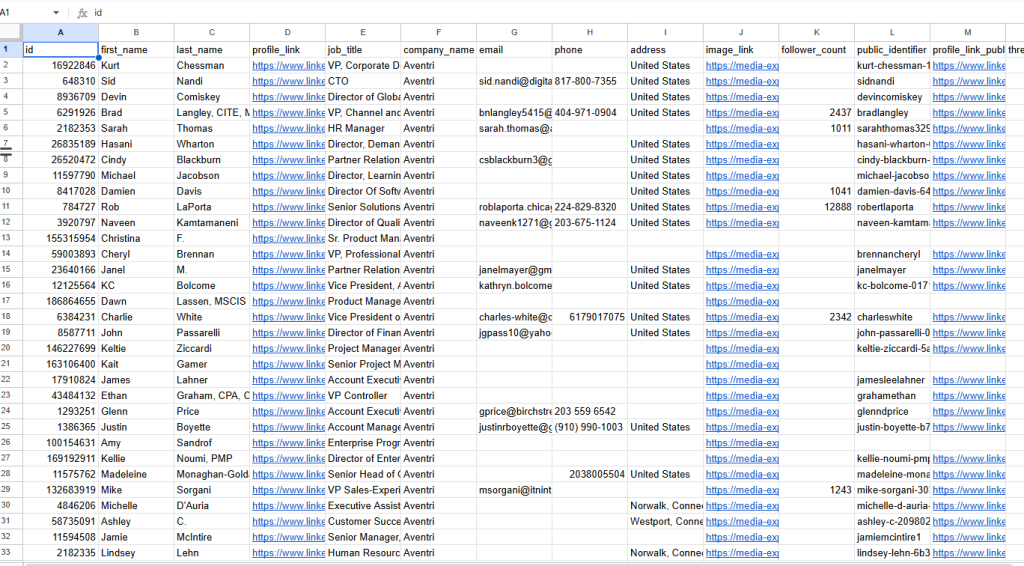
Here you can see the sample list. If you want to download these samples with dentists’ emails, please contact us or get a quote.
1. Define the Ideal Customer Profile
The process begins by defining the type of software company most likely to purchase or benefit from the client’s offer.
The ideal customer profile may include:
- Target country or region
- Required software category
- B2B or B2C business model
- Employee-size range
- Revenue or funding stage
- Target customer industry
- Required technologies
- Preferred decision-maker roles
- Growth or hiring signals
- Excluded company types
For example, a recruitment agency may target US SaaS companies with 20 to 200 employees that are actively hiring engineers.
A cybersecurity provider may focus on UK fintech companies. A development agency may want recently funded German software startups with small internal engineering teams.
Clear qualification criteria prevent the database from becoming a random collection of technology companies.
2. Discover Relevant Software Businesses
Potential companies can be identified through multiple business and technology sources, including:
- Official company websites
- Search engine results
- LinkedIn company pages
- Startup and funding databases
- Software review platforms
- Technology directories
- Application marketplaces
- Partner directories
- Industry associations
- Conference exhibitor lists
- Job boards
- Public company announcements
Research should use multiple semantic terms such as SaaS company, software publisher, cloud platform, application developer, cybersecurity vendor, fintech platform, enterprise software provider, and IT solutions company.
Companies frequently use different language to describe similar products. Using related search terms improves research coverage.
3. Classify Companies by Software Category
The term “software company” covers many different types of businesses. Categorizing each account makes the database more useful.
Possible categories include:
- Horizontal SaaS
- Vertical SaaS
- Artificial intelligence
- Cybersecurity
- Financial technology
- Healthcare technology
- Education technology
- Human resources technology
- Marketing technology
- Developer tools
- Data infrastructure
- E-commerce technology
- Enterprise software
- Custom software development
This classification allows sales teams to create messages that address the recipient’s actual market instead of sending a generic technology pitch.
4. Qualify Every Target Account
A company should not be included simply because its website contains the word “software.”
Each business should be reviewed to confirm that:
- The company is active
- Its website is functional
- It develops or provides relevant software
- It operates in the required location
- Its employee size matches the campaign
- Its business model fits the client’s offer
- It is not a duplicate or secondary office
- Relevant decision-makers can be identified
- The information comes from a traceable source
This stage removes inactive startups, individual freelancers, unrelated IT retailers, duplicate domains, and companies outside the target market.
5. Add Firmographic and Technographic Data
Firmographic information describes the company itself. It may include employee size, location, industry, revenue range, business model, and number of offices.
Technographic information identifies technologies associated with the business, such as cloud providers, analytics systems, content management platforms, payment technologies, customer-support tools, or marketing software.
These filters can be valuable when the client’s offer depends on a company using a particular technology.
For example, a migration service may target companies using a specific legacy platform. An integration provider may focus on businesses using compatible CRM or e-commerce systems.
Technology information should only be included when it comes from reliable and permitted sources.
6. Identify Growth and Buying Signals
Business signals can help sales teams prioritize companies that may be more likely to need a product or service.
Potential signals include:
- Recent funding
- Rapid employee growth
- Active recruitment
- New office locations
- Product launches
- Leadership appointments
- Entry into new markets
- Technology migrations
- New partnerships
- Merger or acquisition activity
A signal does not guarantee purchasing intent. However, it can provide useful context for account prioritization and outreach personalization.

7. Find Relevant Decision-Makers
After qualifying the company, researchers can identify appropriate professionals through:
- Leadership pages
- Team directories
- LinkedIn profiles
- Company press releases
- Conference speaker pages
- Company blogs
- Public business announcements
The selected roles should match the offer.
A developer-tool provider may target CTOs and engineering leaders. A recruitment agency may need talent acquisition managers and HR directors.
A marketing service may focus on growth, revenue, or marketing executives.
The objective is not to collect every senior employee. It is to find the professionals most likely to understand, influence, or approve the proposed solution.
8. Find and Verify Professional Emails
Professional email addresses may be found through official websites, transparent public business sources, domain patterns, email discovery platforms, and B2B data tools.
Verification may check:
- Email syntax
- Active company domain
- Mail exchange records
- Mailbox response
- Disposable email domains
- Generic role-based addresses
- Catch-all domain risk
- Duplicate email addresses
Email validation determines whether an address is structurally possible. Verification performs additional technical checks intended to determine whether the mailbox exists and can receive messages.
No responsible provider should promise permanent 100% deliverability. Employees change jobs, domains are updated, and mail servers can produce uncertain results.
A recent verification date and clearly defined status are more credible than an unsupported accuracy guarantee.
9. Clean and Segment the Database
Before delivery, the list should be reviewed for:
- Duplicate contacts
- Duplicate company domains
- Inconsistent company names
- Outdated job titles
- Invalid locations
- Unqualified businesses
- Missing source links
- Personal or generic email domains
- Incomplete records
The final database can be segmented by:
- Country or region
- Software category
- Company size
- Funding stage
- Job title
- Department
- Technology stack
- Growth signal
- Verification status
- Outreach priority
LeadCanal can prepare the data in CSV, Excel, Google Sheets, or another agreed CRM-compatible structure.
Tools Used to Research Software Companies
LinkedIn Sales Navigator
LinkedIn Sales Navigator supports company and professional research using filters such as location, industry, employee size, job title, seniority, and business function.
As of July 2026, LinkedIn lists the Sales Navigator Core plan from US$119.99 per month per license. Prices may vary by billing frequency, location, taxes, and future plan changes.
Hunter
Hunter can support domain searches, professional email discovery, enrichment, and bulk email verification.
Its current Starter plan is listed at US$49 with monthly billing or the equivalent of US$34 per month when billed annually.
Clay
Clay can combine multiple data sources, automate enrichment workflows, monitor business signals, and organize prospecting data.
Its Launch plan currently starts at approximately US$185 per month.
Spreadsheets and CRM Platforms
Google Sheets and Microsoft Excel can be used for data cleaning, formatting, filtering, standardization, and duplicate removal.
CRM platforms such as HubSpot or Salesforce may help manage contact ownership, campaign activity, follow-up status, and suppression records.
Tools can accelerate research, but they do not replace human judgment. Automated information may be incomplete, delayed, or incorrectly classified without manual review.
How Much Does It Cost to Build the List?
An illustrative research stack using:
- LinkedIn Sales Navigator Core: US$119.99 per month
- Hunter Starter with monthly billing: US$49 per month
- Clay Launch: from US$185 per month
would begin at approximately US$353.99 per month before taxes, additional data credits, CRM subscriptions, and labor costs.
The total internal cost may also include:
- Researcher or analyst time
- Manual account qualification
- Additional data credits
- Email verification
- Quality assurance
- CRM preparation
- Compliance review
- Database maintenance
- Replacement of outdated records
A cheap data export may become expensive when sales representatives spend hours removing irrelevant businesses.
Customized research may be more efficient when the targeting criteria are detailed.
Why Choose LeadCanal?
LeadCanal builds customized software company databases around the requirements of a specific campaign.
The service can include:
- Ideal customer profile development
- Software company discovery
- Software category classification
- Manual company qualification
- Firmographic enrichment
- Technology and growth filters
- Decision-maker research
- Professional email discovery
- Email verification
- Duplicate removal
- Source URL documentation
- CRM-ready formatting
Clients can request companies by country, software type, employee size, funding stage, business model, technology, or decision-maker role.
The objective is not simply to deliver the highest possible record count. It is to provide a structured and commercially relevant database that helps sales teams focus on suitable target accounts.
Request a Custom Email List of Software Companies
Successful B2B outreach begins with a clearly defined audience.
LeadCanal can prepare a customized email list of software companies based on your preferred country, software category, company size, funding stage, technology criteria, and target job titles.
Request a sample to review the data fields, source information, segmentation, and verification format before ordering the complete database.