Skip to content

Cold email doesn’t fail because of poor offers it fails because emails don’t reach inboxes. No matter how strong your copy or targeting is, if your emails land in spam, your campaigns won’t perform.
Tools like Instantly AI, ReachInbox AI, and Smartlead AI make it easy to scale outreach. But without the right setup, they can also damage your domain reputation. The key is using these tools with a deliverability-first approach.
Build the Right Foundation First
Before launching any campaign, your setup needs to be strong. Inbox placement starts with infrastructure, not sending.
Instead of relying on a single domain, use multiple domains and inboxes. This spreads risk and protects your main domain from damage. Your DNS setup should always include properly configured SPF, DKIM, and DMARC records.
A clean and structured setup ensures that email providers trust your sending behaviour from day one.
Set Up Your DNS Records Properly
Your DNS setup plays a major role in email deliverability. Before sending any cold email campaign, your domain should have the correct SPF, DKIM, DMARC, and MX records in place. These settings help email providers verify that your emails are coming from a trusted source.
In simple terms, SPF tells providers which servers are allowed to send emails from your domain. DKIM adds a secure signature that proves the message is real and has not been changed. DMARC works with SPF and DKIM and tells providers what to do if authentication fails. MX records manage where incoming emails are received.
If these records are missing or set up incorrectly, your emails may go to spam, get blocked, or damage your domain reputation. A strong DNS setup creates trust from the start and gives your campaigns a better chance of reaching the inbox.

Warm-Up Is Not Optional
Many campaigns fail because the warm-up is rushed or skipped. All three tools provide built-in warm-up features, and they should always be used.
Start slowly with low sending volume and gradually increase over time. Even after scaling, warm-up should continue in the background to maintain trust.
A well-warmed mailbox behaves like a real user, which significantly improves inbox placement.
Control Your Sending Volume
One of the most important factors is how many emails you send per inbox per day.
Safe limits matter. Sending too many emails too quickly signals spam behaviour. Instead, keep your sending volume consistent and controlled. You can calculate the safe sending limits using LeadCanal Cold Email Calculator.
Recommended approach:
- 30–50 emails per inbox per day
- Scale using more inboxes, not higher volume
- Maintain steady daily activity
This keeps your sending pattern natural and reduces risk.
Check Your Email Copy and Remove Spam Triggers
Check your email copy matters just as much as your technical setup. If your message sounds too promotional or contains too many spam-trigger words, it can reduce deliverability even if everything else is configured correctly.
Email providers look for patterns, and overly aggressive or unnatural copy can make your campaigns look risky.
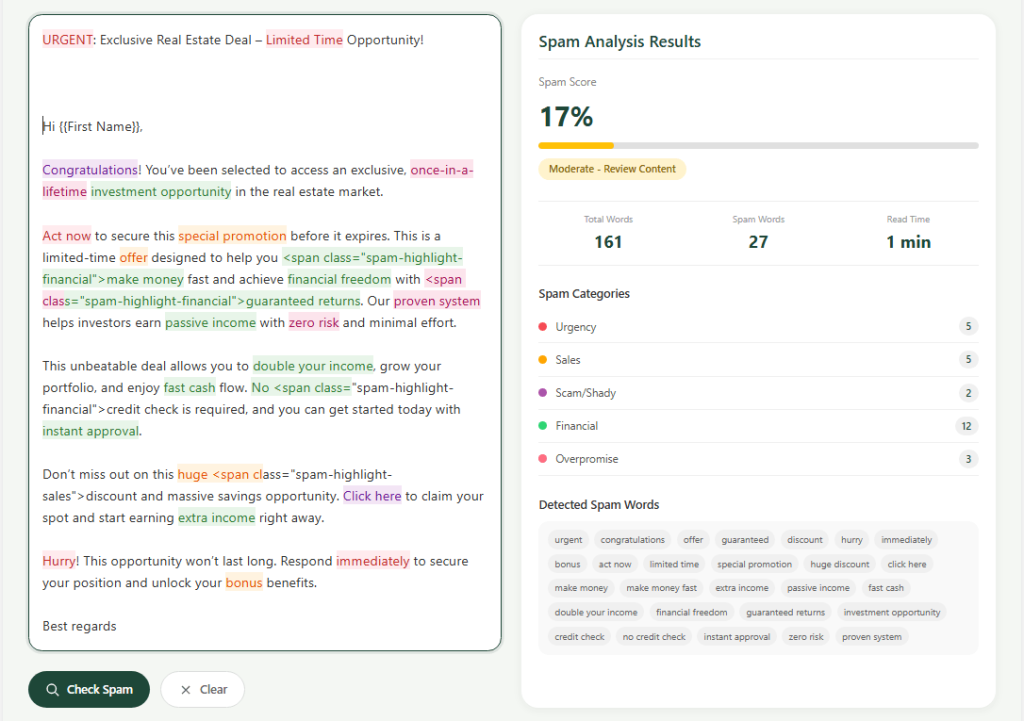
Keep your emails simple, direct, and human. Avoid too many links, too much formatting, and language that feels pushy or exaggerated.
Instead of trying to sound overly clever, focus on writing in a natural tone with one clear message and one simple call to action.
Clean copy improves readability, increases trust, and gives your emails a better chance of staying out of spam.
Keep Emails Simple and Human
Email providers can easily detect promotional patterns. Over-designed emails with links, images, and tracking pixels often get filtered.
Simple emails perform better. Write like a human, not a marketer.
Avoid unnecessary formatting. Plain text emails feel more personal and are less likely to trigger spam filters. Disabling open tracking can also improve deliverability since tracking pixels are commonly flagged.
Focus on Replies, Not Opens
Inbox placement improves when people engage with your emails. The most important signal is replies.
When your emails receive responses, it tells providers that your messages are wanted. This builds long-term trust.
Instead of optimizing for opens or clicks, focus on:
- Clear and simple messaging
- Personalized outreach
- Natural conversation tone
More replies directly improve inbox placement.
Verify Your Email List and Keep Bounce Rates Low
Email list quality has a direct impact on inbox placement. Even with the right tools and a strong setup, poor data can still hurt your campaigns. Sending emails to invalid or outdated addresses increases your bounce rate,
and high bounce rates are one of the clearest warning signs for email providers.
That is why list verification should always be part of the process. A verified list helps protect your domains and mailboxes by reducing unnecessary risk.
Low bounce rates show that your outreach is cleaner, safer, and more controlled.
When you combine good infrastructure with verified data, your email accounts stay healthier and your sending reputation remains stronger over time.
Use Smart Campaign Settings
Tools like ReachInbox offer advanced settings that can significantly impact deliverability if used correctly.
Features like stopping sequences when a lead replies help maintain natural communication. Provider matching ensures emails are sent between similar platforms (Gmail to Gmail, Outlook to Outlook), which increases trust.
Managing new leads and follow-ups properly also matters. Sending too many new emails too quickly can look unnatural. A balanced approach between new outreach and follow-ups works best.
Protect Your Domain Reputation
Your domain reputation is everything in cold email. Once damaged, it becomes difficult to recover.
Keep your bounce rate low by using verified data. High bounce rates are a major red flag and can lead to campaign pauses or domain issues.
Adding unsubscribe options and avoiding aggressive sending behaviour also helps maintain a clean reputation.
Data Quality Still Matters
Even with perfect infrastructure, poor data will hurt your campaigns.
Targeting the right audience improves engagement, and engagement improves deliverability. When your emails are relevant, people respond and that keeps your emails out of spam.
Focus on verified, segmented, and well-researched contact lists.
Monitor and Adjust
Cold email is not a one-time setup. It requires continuous monitoring and optimization.
Watch your campaign performance closely. Look at reply rates, bounce rates, and overall engagement. If something drops, adjust quickly.
Small improvements in sending behaviour or targeting can lead to big changes in inbox placement.
Monitor Spam Complaints
Tracking bounce rates is important, but it is not enough. You should also monitor spam complaints because when people click “Report spam,” mailbox providers may start treating your domain as risky.
According to Google’s sender guidelines, it is best to keep your spam rate below 0.10% and avoid ever reaching 0.30% or higher.
That is why every cold email campaign should focus on relevant messaging, a simple unsubscribe option, and avoiding aggressive follow-ups.
Avoid Sending the Same Message to Everyone
Conclusion
Maximizing inbox placement is about building a system, not just running campaigns. The tools you use are powerful, but they need the right structure behind them.
When you combine proper infrastructure, controlled sending, clean data, and smart campaign settings, cold email becomes a reliable and scalable channel.
Need Help Improving Your Deliverability?
If you want to build a system that actually works without risking your domains Lead Canal can help.
We set up a complete cold email infrastructure, optimize deliverability, and help you scale safely while reaching real inboxes.
Get in touch to build a deliverability-first outreach system.