DMARC Fail Explained: Causes, Fixes, and Troubleshooting Guide
On this page
- What Does DMARC Fail Mean?
- How DMARC Authentication Works
- SPF Alignment Failures
- Example of SPF Alignment Failure
- How to Fix SPF Alignment Issues
- DKIM Alignment Failures
- Example of DKIM Alignment Failure
- How to Fix DKIM Alignment Issues
- Common Causes of DMARC Failure
- Incorrect DNS Records
- Third-Party Sending Platforms
- Email Forwarding
- How to Read DMARC Reports
- Aggregate Reports (RUA)
- Forensic Reports (RUF)
- How to Fix DMARC Failures
- Step 1: Verify SPF
- Step 2 : Verify DKIM
- Step 3 : Verify DMARC
- Step 4 : Authenticate Every Sender
- DMARC Testing Tools
- Best Practices for Preventing DMARC Failures
- Final Thoughts
One of the most common email authentication problems businesses face is DMARC failure. If your emails are failing DMARC checks, mailbox providers may:
- Send your emails to spam
- Quarantine your messages
- Reject emails completely
DMARC failures can seriously impact:
- Email deliverability
- Cold email campaigns
- Marketing performance
- Brand reputation
The good news is that most DMARC issues are fixable once you understand what causes them.
In this guide, you’ll learn:
- What DMARC fail means
- Common DMARC failure causes
- SPF and DKIM alignment problems
- How to fix DMARC failures
- Best practices for monitoring and prevention
You can also quickly test your domain using the LeadCanal Domain Scanner, which checks:
- SPF
- DKIM
- DMARC
- Authentication health
For individual testing, you can also use:
What Does DMARC Fail Mean?
DMARC failure happens when an email does not properly pass SPF or DKIM authentication and alignment requirements.
DMARC is designed to help mailbox providers verify:
- The sender is legitimate
- The email was not spoofed
- The domain is authorized
If these checks fail, the receiving server follows the DMARC policy defined in your DNS record.
Depending on your DMARC policy:
- Emails may still be delivered
- Sent to spam
- Rejected completely
How DMARC Authentication Works
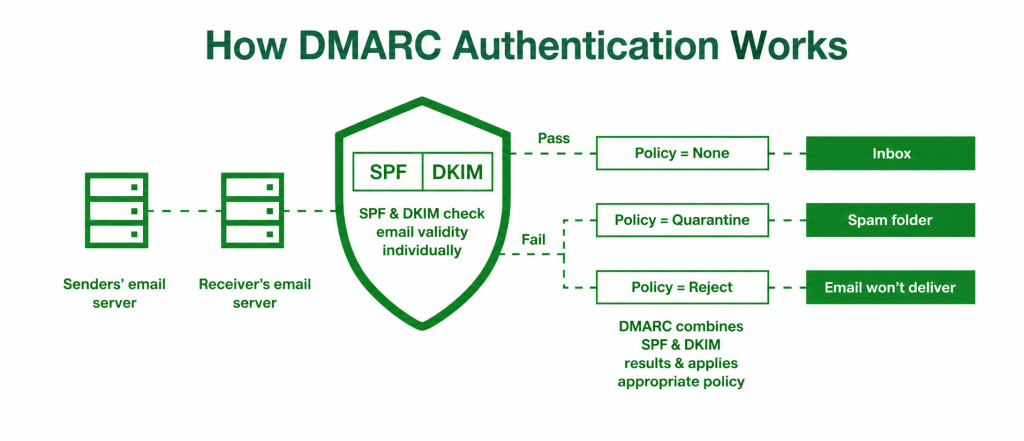
To understand DMARC failure, it’s important to understand how DMARC validates emails.
DMARC relies on two authentication methods:
- SPF
- DKIM
For DMARC to pass:
- SPF OR DKIM must pass authentication
- AND alignment must pass
This is where many businesses encounter problems.
SPF Alignment Failures
SPF alignment is one of the most common reasons for DMARC failure
SPF checks
- Whether the sending server is authorized
DMARC then checks:
- Whether the SPF-authenticated domain matches the visible “From” domain
If those domains do not align, DMARC may fail even if SPF technically passes
Example of SPF Alignment Failure
Visible sender:
support@example.comSPF Return-Path:
mailer.thirdparty.comIn this example:
- SPF may authenticate successfully
- But alignment fails because the domains differ
This often happens with:
- CRM systems
- Newsletter tools
- Marketing platforms
- Cold email software
How to Fix SPF Alignment Issues
To fix SPF alignment:
- Configure custom return-path domains
- Use branded tracking domains
- Authenticate third-party providers properly
Many providers like:
support domain alignment customization.
DKIM Alignment Failures
DKIM alignment problems are another major cause of DMARC failure
DKIM verifies
- The authenticity of the message signature
DMARC then checks:
- Whether the DKIM signing domain matches the visible sender domain
If the domains differ:
- DKIM alignment fails
- DMARC may fail
Example of DKIM Alignment Failure
Visible sender:
sales@example.comDKIM signing domain:
mail.vendor.comIn this case:
- DKIM authentication may pass
- But alignment fails because the domains are different
How to Fix DKIM Alignment Issues
Common fixes include:
- Enabling custom DKIM signing
- Using your own domain for signing
- Configuring domain authentication inside third-party platforms
Always ensure:
- The visible sender domain
- The DKIM signing domain
align properly.
Common Causes of DMARC Failure
DMARC failures usually happen because of configuration issues rather than server outages.
Missing SPF Records
If no SPF record exists:
- SPF authentication fails
- DMARC may fail
You can verify SPF using the LeadCanal SPF Checker
Missing DKIM Configuration
If DKIM is not enabled
- Message signatures are missing
- DKIM fails
This is very common with:
- New domains
- Third-party senders
- Misconfigured mail systems
Incorrect DNS Records
DNS mistakes often break authentication.
Common errors include:
- Wrong selectors
- Incorrect TXT formatting
- Missing semicolons
- Invalid tags
You can validate records using the LeadCanal Domain Scanner.
Third-Party Sending Platforms
Many businesses forget to authenticate:
- CRM systems
- Email marketing tools
- SaaS applications
- Cold email platforms
This causes:
- SPF failures
- DKIM failures
- Alignment issues
Every sending platform must be authenticated correctly.
Email Forwarding
Forwarding can break SPF authentication because:
- The forwarding server is not listed in SPF
This is why DKIM is extremely important since DKIM signatures often survive forwarding.
How to Read DMARC Reports
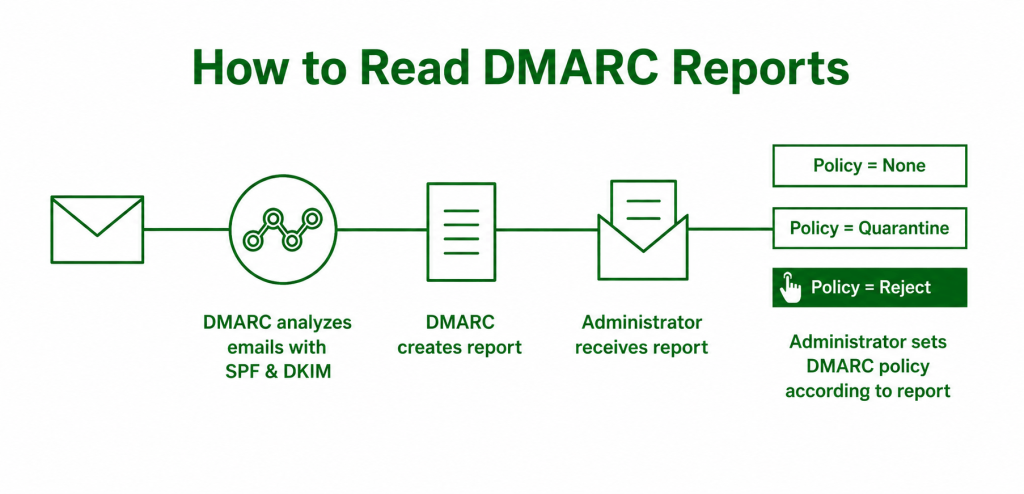
DMARC reports provide visibility into:
- Who is sending emails from your domain
- Authentication failures
- Alignment issues
- Suspicious activity
These reports are usually sent in XML format.
Aggregate Reports (RUA)
Aggregate reports summarize:
- SPF pass/fail rates
- DKIM pass/fail rates
- Sending IP addresses
- Authentication statistics
Example DMARC tag:
rua=mailto:dmarc@example.comThese reports help identify:
- Unauthorized senders
- Misconfigured services
- Deliverability problems
Forensic Reports (RUF)
Forensic reports provide:
- Detailed failure information
- Individual failed message samples
Example:
ruf=mailto:forensics@example.comNot all mailbox providers send forensic reports due to privacy policies.
How to Fix DMARC Failures
Fixing DMARC failures usually involves improving authentication and alignment.
Step 1: Verify SPF
Check:
- SPF syntax
- Authorized senders
- Lookup count
- Missing providers
Use:
Step 2 : Verify DKIM
Check:
- DKIM signatures
- DNS records
- Selectors
- Domain alignment
Use:
Step 3 : Verify DMARC
Check:
- Policy syntax
- Alignment configuration
- Reporting addresses
Use:
Or analyze everything together with the:
Step 4 : Authenticate Every Sender
Every platform sending emails for your domain must be authenticated.
This includes:
- Marketing tools
- CRM systems
- Helpdesk platforms
- Cold email software
- Transactional email providers
Many DMARC failures happen because businesses forget one provider.