DKIM Explained: How DKIM Protects Your Emails
On this page
Email authentication has become essential for businesses that rely on email communication. Whether you are sending cold emails, newsletters, SaaS notifications, or transactional messages,
mailbox providers now expect domains to be properly authenticated.
One of the most important authentication methods is DKIM.
DKIM helps receiving mail servers verify that your emails are legitimate and have not been altered during delivery. It improves email trust, protects your domain reputation, and plays a major role in modern email deliverability.
In this guide, you’ll learn:
- What DKIM is
- How DKIM works
- What DKIM selectors are
- How DKIM protects email integrity
- How to configure DKIM
- Common DKIM problems
- DKIM vs SPF differences
You can also verify your setup using the free tools from LeadCanal:
Introduction
Why Email Signatures Matter
Email spoofing and phishing attacks have become major threats for businesses worldwide. Attackers often impersonate trusted brands to trick users into:
- Sharing passwords
- Downloading malware
- Sending payments
- Revealing sensitive information
Without authentication, receiving mail servers cannot easily verify whether a message truly came from your domain.
DKIM helps solve this problem by digitally signing your emails.
This allows mailbox providers like Google Workspace, Microsoft 365, and Yahoo Mail to verify:
- The sender is legitimate
- The message was not modified
- The domain is trusted
This improves both email security and deliverability.
What is DKIM?
DKIM stands for DomainKeys Identified Mail. It is an email authentication protocol that uses cryptographic signatures to verify outbound messages.
Instead of simply checking which server sent the email, DKIM verifies the integrity of the message itself.
When DKIM is enabled:
- Outgoing emails are signed using a private key
- A public key is published in DNS
- Receiving servers validate the signature
If the signature matches correctly, the email passes DKIM authentication.
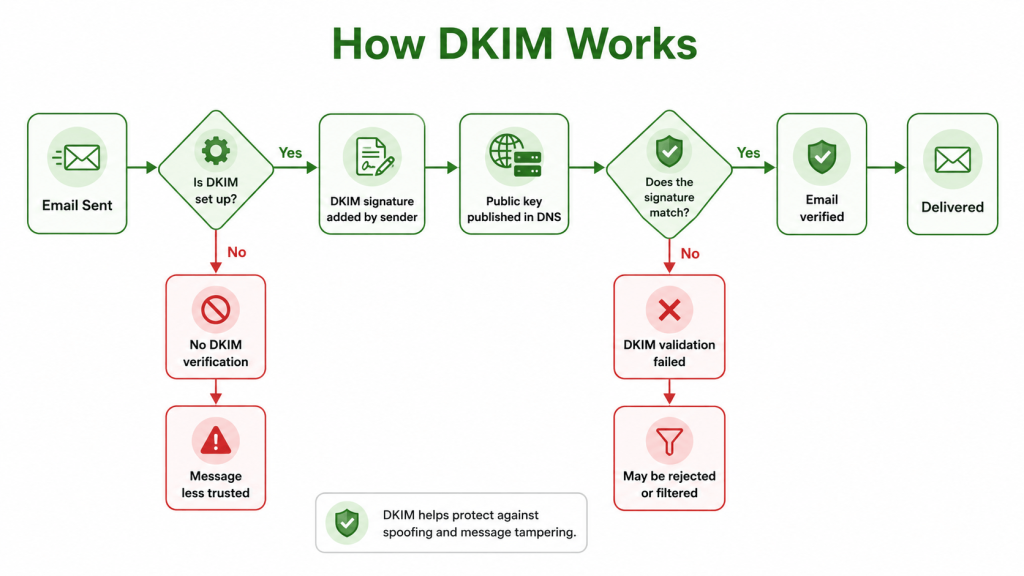
How DKIM Works
DKIM uses public-key cryptography to authenticate emails.
This process happens automatically in the background whenever emails are sent and received.
Step 1: Generate DKIM Keys
A DKIM setup starts with generating:
- A private key
- A public key
The private key stays securely on your mail server.
The public key is published in DNS.
Step 2: Sign Outbound Emails
When your server sends an email:
- It creates a digital signature
- The signature is added to the email header
The signature contains encrypted information based on:
- Message content
- Sender information
- DKIM configuration
Step 3: Receiving Server Verification
When the email reaches the recipient:
- The receiving server retrieves the public key from DNS
- It checks the signature
- It verifies the email integrity
If everything matches:
- DKIM passes
If the message was altered:
- DKIM fails
Digital Signatures Explained
A digital signature works similarly to a security seal.
If the message changes after signing:
- The signature becomes invalid
- Authentication fails
This helps prevent:
- Email tampering
- Content modification
- Message forgery
For example, if attackers intercept an email and modify:
- Links
- Attachments
- Content
the DKIM signature will no longer match.
This makes DKIM extremely valuable for protecting email integrity.
DKIM Selectors Explained
DKIM uses something called selectors to organize and identify keys.
A selector acts like a label that tells receiving servers which public key should be used for verification.
Why Selectors Exist
Selectors allow organizations to:
- Rotate keys safely
- Use multiple email systems
- Separate authentication configurations
For example:
- Marketing emails may use one selector
- Transactional emails may use another
This improves flexibility and security management.
Example DKIM Selector
Example hostname:
selector1._domainkey.example.comIn this example:
selector1is the selector_domainkeyidentifies DKIMexample.comis the domain
The receiving server uses this hostname to retrieve the public key.
DKIM DNS Record Example
DKIM records are published as TXT records in DNS.
Example DKIM record:
v=DKIM1; k=rsa; p=MIGfMA0GCSq...Each tag has a specific meaning.
v=DKIM1
Defines the DKIM version.
Example:
v=DKIM1
k=rsa
Defines the encryption algorithm.
Example
k=rsa
RSA is the most commonly used DKIM key type.
p=
Contains the public key itself.
Example:
p=MIGfMA0GCSq...This key is used by receiving servers to verify signatures.
You can create DKIM records using the LeadCanal DKIM Generator.
How DKIM Prevents Tampering
One of DKIM’s biggest advantages is message integrity protection.
Without DKIM:
- Emails can potentially be modified during transit
- Spoofed messages are harder to detect
With DKIM:
- Any message modification invalidates the signature
- Receiving servers can detect tampering immediately
This protects:
- Customers
- Employees
- Business communications
- Transactional emails
DKIM is especially important for:
- Financial institutions
- SaaS companies
- E-commerce brands
- Marketing campaigns
How to Set Up DKIM
Most modern email providers support DKIM configuration.
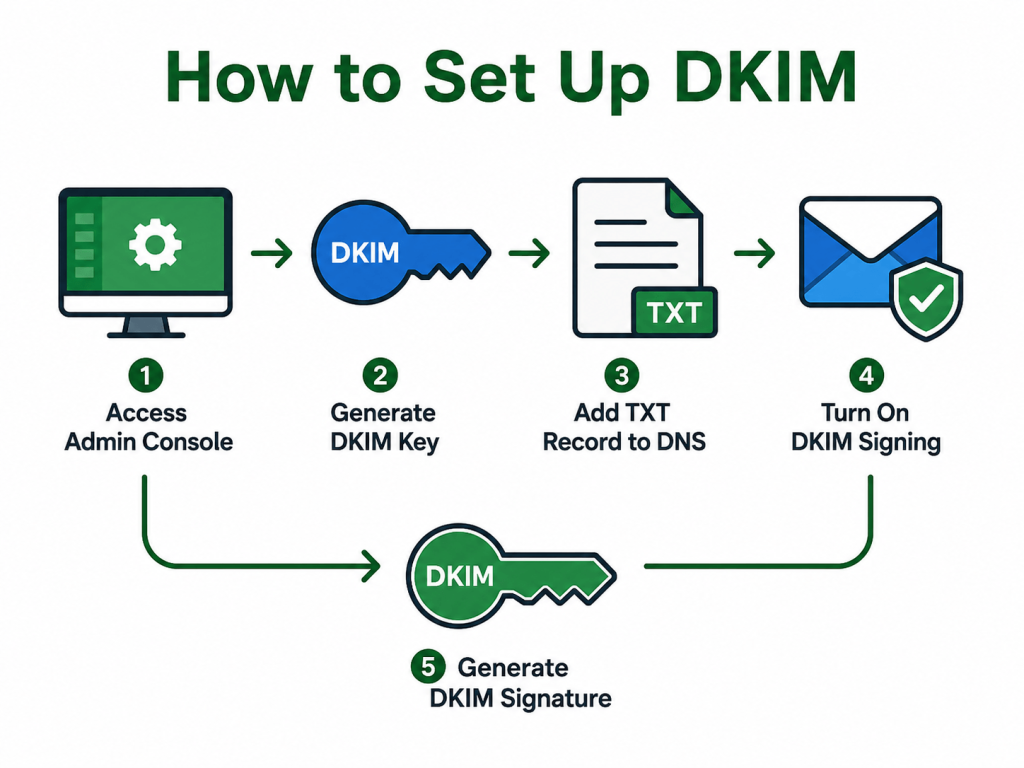
Step 1: Generate DKIM Keys
Many platforms automatically generate keys for you.
Providers that support DKIM include:
Step 2: Publish DNS Records
Add the DKIM TXT record to your DNS provider.
Popular DNS providers include:
Step 3: Enable DKIM Signing
Once DNS records are verified:
- Enable DKIM signing inside your email provider
All outbound emails will now be digitally signed automatically.
Step 4: Verify DKIM
After setup, always test your records.
Use the:
to verify:
- DNS visibility
- Signature validity
- Selector configuration
Common DKIM Problems
Incorrect DKIM configuration can cause authentication failures and deliverability issues.
Invalid Signature
This happens when:
- The public key does not match the private key
- Messages are modified during transit
- Signing is misconfigured
Invalid signatures may cause emails to:
- Land in spam
- Fail DMARC
- Be rejected
Missing Selector
If the selector is incorrect or missing:
- Receiving servers cannot find the public key
- DKIM authentication fails
Always verify selectors carefully.
DNS Propagation Delays
After adding DKIM records:
- DNS changes may take several hours to propagate
Testing too early may show temporary failures.
Third-Party Misconfiguration
Some third-party platforms may:
- Use incorrect signing domains
- Require custom DKIM setup
- Need domain authentication
This is common with:
- Marketing platforms
- CRM systems
- Cold email tools
DKIM vs SPF
DKIM and SPF are both email authentication protocols, but they work differently.
SPF Verifies Servers
SPF checks:
- Which mail servers are authorized to send emails
It focuses on:
- Sending IP addresses
- Mail server authorization
DKIM Verifies Message Integrity
DKIM checks:
- Whether the message was altered
- Whether the sender is authentic
It focuses on:
- Message signatures
- Email integrity
SPF Can Break During Forwarding
SPF often fails when emails are forwarded because:
- The forwarding server is not authorized
DKIM usually survives forwarding because:
- The original message signature remains intact
This is one reason why DKIM is extremely valuable.
Best Practices for DKIM
Proper DKIM configuration improves both security and deliverability.
Rotate Keys Regularly
Key rotation improves security by reducing long-term exposure risks.
Many organizations rotate:
- Every 6 months
- Every 12 months
Use Strong Key Lengths
Recommended:
- 2048-bit RSA keys
Longer keys provide stronger security.
Combine DKIM with SPF and DMARC
DKIM works best alongside:
- SPF
- DMARC
Together they create a complete email authentication framework.
You can verify all records using:
FAQs
Is DKIM Required for DMARC?
No, DMARC can technically work with SPF alone.
However, using DKIM is strongly recommended because:
- It improves deliverability
- It survives forwarding
- It adds message integrity protection
How Many DKIM Selectors Should I Use?
This depends on your infrastructure.
Many organizations use:
- One selector for simplicity
- Multiple selectors for different services
Larger businesses often separate:
- Marketing emails
- Transactional emails
- Corporate communications
Does DKIM Stop Phishing?
DKIM helps reduce spoofing and improves trust, but it does not completely stop phishing attacks.
For stronger protection, combine:
- DKIM
- SPF
- DMARC
- Multi-factor authentication
Final Thoughts
DKIM is a critical part of modern email authentication. It helps verify message integrity, improve deliverability, and protect your domain from spoofing and tampering.
For businesses sending important emails, DKIM is no longer optional.
You can generate and test DKIM records using the free tools from LeadCanal:
If your organization needs help with:
- DKIM setup
- DMARC implementation
- Cold email infrastructure
- Deliverability optimization
- Email authentication troubleshooting
you can contact LeadCanal for professional support.