What is DMARC? Complete Beginner Guide to Email Authentication
On this page
Email remains one of the most important communication channels for businesses. However, it is also one of the most abused by cybercriminals. Every day, attackers send fake emails pretending to be trusted companies, employees, banks, or vendors. This is known as email spoofing.
To fight this growing problem, modern email security relies on three major technologies:
- SPF
- DKIM
- DMARC
In this complete beginner guide, you’ll learn what DMARC is, how it works, why it matters, and how to set it up correctly for your business domain.
If you want to check your existing email authentication records, you can use the free tools available on LeadCanal including:
Introduction
Why Email Spoofing is Dangerous
Email spoofing happens when attackers forge the sender address to make emails appear as though they came from a legitimate business or person.
For example, an attacker may send emails pretending to be:
- Your company
- Your CEO
- Your support department
- Your billing team
The goal is usually to:
- Steal passwords
- Spread malware
- Commit payment fraud
- Trick customers
- Damage your brand reputation
Without proper email authentication, receiving mail servers cannot easily verify whether emails are truly coming from your domain.
Why Businesses Need DMARC
Modern email providers like Google Workspace, Microsoft 365, and Yahoo Mail increasingly require proper authentication to improve inbox security.
DMARC helps businesses:
- Prevent domain spoofing
- Protect customers
- Improve email deliverability
- Build trust with mailbox providers
- Reduce phishing attacks
- Monitor unauthorized senders
For businesses running cold email campaigns, newsletters, SaaS notifications, or transactional emails, DMARC has become essential.
What is DMARC?
Meaning of DMARC
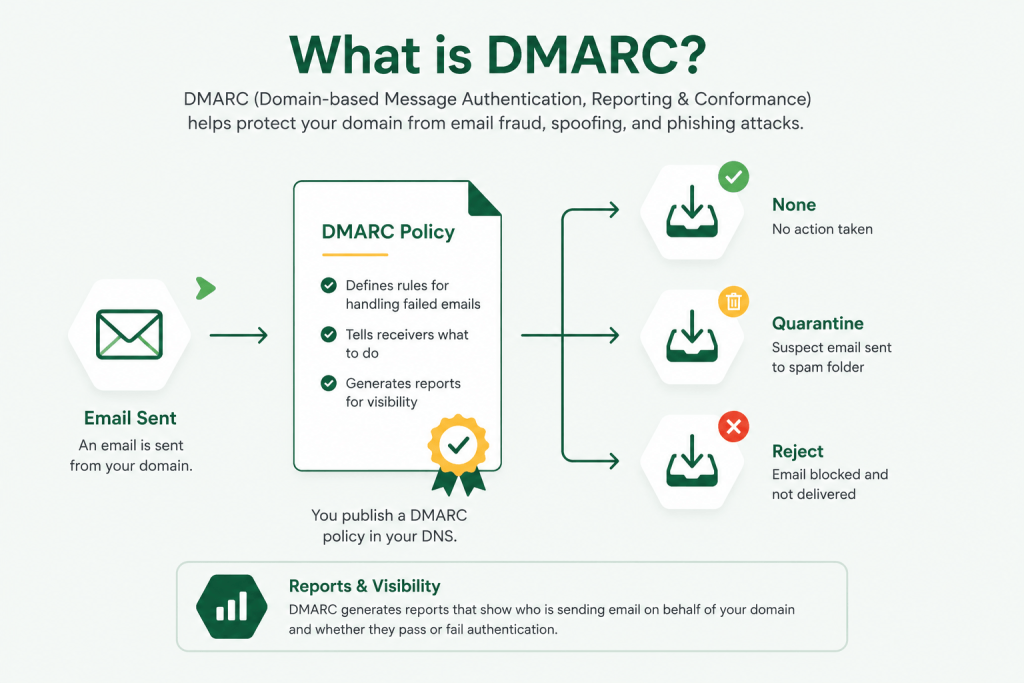
DMARC is an email authentication protocol that helps domain owners protect their domains from unauthorized use.
It allows domain owners to:
- Verify legitimate email senders
- Define how failed emails should be handled
- Receive reports about email activity
What DMARC Stands For
DMARC stands for:
Domain-based Message Authentication, Reporting & Conformance
It works together with:
- SPF (Sender Policy Framework)
- DKIM (DomainKeys Identified Mail)
How DMARC Works
DMARC itself does not authenticate emails directly. Instead, it relies on SPF and DKIM.
SPF Authentication
SPF verifies whether the server sending the email is authorized to send emails for your domain.
Example SPF record:
v=spf1 include:_spf.google.com ~allSPF checks:
- Sending IP address
- Authorized mail servers
- Mail From domain
You can analyze your SPF configuration using the LeadCanal SPF Checker
DKIM Authentication
DKIM adds a digital signature to outbound emails.
When an email arrives:
- The receiving server checks the signature
- Retrieves the public key from DNS
- Verifies message integrity
This ensures:
- The message was not altered
- The email came from an authorized source
You can verify DKIM records using the LeadCanal DKIM Checker.
Alignment Checks
DMARC also checks alignment.
This means:
- The visible “From” domain must align with SPF or DKIM domains.
Example:
Visible From Address:
support@example.comSPF Return-Path:
mailer.example.comIf domains match properly, alignment passes.
DMARC requires:
- SPF OR DKIM authentication
- AND alignment
Why DMARC is Important
Prevent Spoofing
DMARC prevents attackers from impersonating your domain.
Without DMARC:
- Anyone can fake your domain
- Customers may receive phishing emails
- Your brand trust can suffer
Protect Brand Reputation
Email providers track domain reputation.
If your domain is associated with:
- Spam
- Phishing
- Malware
Your legitimate emails may start landing in spam folders.
DMARC helps protect sender reputation.
Improve Email Deliverability
Mailbox providers trust authenticated domains more.
Proper SPF, DKIM, and DMARC setup can improve:
- Inbox placement
- Open rates
- Reply rates
- Customer trust
This is especially important for:
- SaaS companies
- Agencies
- Cold email marketers
- E-commerce businesses
DMARC Policies Explained
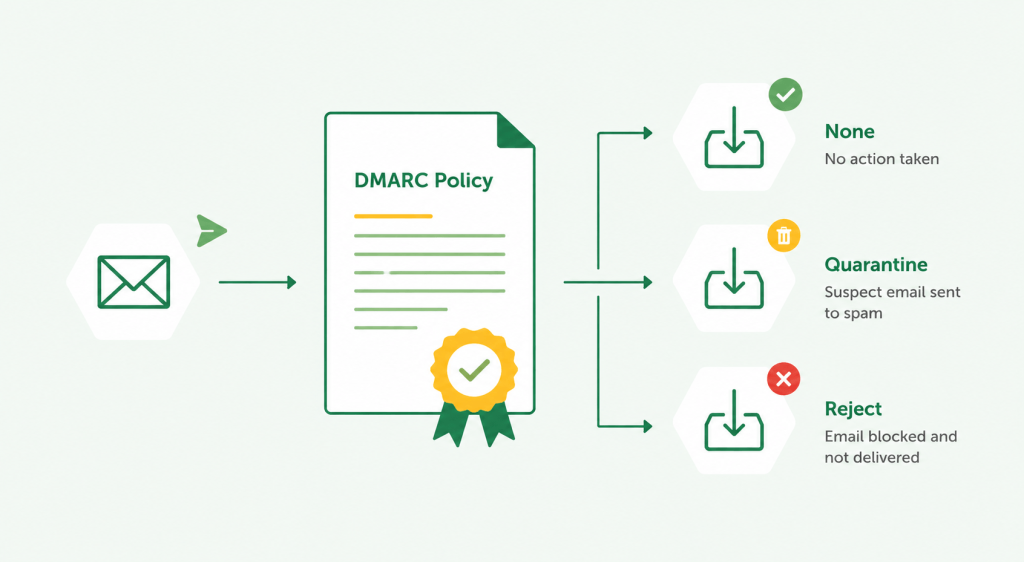
DMARC policies define how receiving servers should handle emails that fail authentication.
p=none
Example:
p=noneThis mode:
- Does not block emails
- Only monitors activity
- Sends reports
Best for:
- Initial setup
- Testing configurations
p=quarantine
Example:
p=quarantineThis tells mailbox providers to:
- Send failed emails to spam/junk folders
Useful when:
- Most systems are authenticated
- You want stronger protection
p=reject
Example:
p=rejectThis is the strongest policy.
Failed emails are:
- Completely rejected
- Never delivered
Best for:
- Fully configured environments
- Maximum protection
Example of a DMARC Record
Sample DNS TXT Record
v=DMARC1; p=none; rua=mailto:dmarc@example.com
Breakdown of Tags
| Tag | Meaning |
|---|---|
| v=DMARC1 | DMARC version |
| p=none | Policy action |
| rua= | Aggregate reporting address |
| ruf= | Forensic reporting address |
| pct= | Percentage of emails affected |
| sp= | Subdomain policy |
You can create records instantly with the LeadCanal DMARC Generator.
Common DMARC Errors
DMARC Fail
DMARC failures happen when:
- SPF fails
- DKIM fails
- Alignment fails
Common causes:
- Missing DNS records
- Third-party sender misconfiguration
- Incorrect domains
Alignment Issues
Alignment problems occur when:
- From domain differs from SPF domain
- DKIM signing domain does not match sender domain
These issues are very common with:
- Email marketing platforms
- CRM systems
- Forwarded emails
Missing SPF/DKIM
DMARC depends on SPF and DKIM.
Without them:
- DMARC cannot function properly
- Emails may fail authentication
- Deliverability may suffer
Use:
to diagnose issues.
How to Set Up DMARC
Create SPF
First, publish an SPF record in DNS.
Example:
v=spf1 include:_spf.google.com ~allGenerate SPF records using the LeadCanal SPF Generator.
Configure DKIM
Enable DKIM inside your email provider.
Examples:
Then publish DKIM public keys in DNS.
Publish DMARC
Create a TXT record:
Host:
_dmarcValue:
v=DMARC1; p=none; rua=mailto:dmarc@example.comAfter propagation:
- Monitor reports
- Identify failures
- Fix authentication issues
Best Practices
Start with p=none
Never begin with reject mode immediately.
Start with:
p=noneThis allows safe monitoring.
Monitor Reports
DMARC reports help identify:
- Unauthorized senders
- Failed authentication
- Third-party issues
Review reports regularly.
Move Gradually to Reject
Recommended migration path:
- p=none
- p=quarantine
- p=reject
This minimizes delivery disruptions.
FAQs
Is DMARC Free?
Yes.
DMARC itself is free to implement using DNS records.
Some monitoring/reporting platforms offer paid dashboards and analytics.
Does DMARC Stop Phishing?
DMARC significantly reduces phishing and spoofing attacks involving your domain.
However, it cannot stop:
- Lookalike domains
- Social engineering
- Compromised accounts
DMARC should be combined with:
- Multi-factor authentication
- Security awareness training
- Strong password policies
Do Small Businesses Need DMARC?
Absolutely.
Small businesses are common phishing targets because they often lack advanced security protections.
Even a basic DMARC setup can:
- Protect customers
- Improve trust
- Enhance email deliverability
Final Thoughts
DMARC has become a critical part of modern email security and deliverability. Combined with SPF and DKIM, it helps businesses authenticate email, prevent spoofing, and improve inbox placement.
Whether you run:
- Cold email campaigns
- SaaS notifications
- Marketing emails
- Business communications
Proper email authentication is no longer optional.
If you want to test or generate your email authentication records, use the free tools from LeadCanal:
If your organization needs help with:
- Email deliverability
- DMARC implementation
- Cold email infrastructure
- SPF/DKIM troubleshooting
- Inbox placement optimization
you can also contact LeadCanal for professional assistance