SPF Too Many DNS Lookups? Here’s How to Fix It
On this page
- What is SPF PermError?
- Why SPF Has a 10 Lookup Limit
- What Counts as a DNS Lookup?
- What Causes Too Many Lookups?
- Nested Include Statements
- Old or Unused Services
- How to Check SPF Lookups
- How to Reduce SPF Lookups
- Remove Unused Services
- Consolidate Email Providers
- Use Subdomains for Different Services
- Benefits of SPF Flattening
- Risks of SPF Flattening
- Example SPF Optimization
- Poor SPF Example
- Optimized SPF Example
- Common SPF Lookup Mistakes
- Multiple SPF Records
- Excessive Includes
- Keep SPF Records Simple
- Audit Providers Regularly
- Combine SPF with DKIM and DMARC
- FAQs
- Fake Domains and Lookalike Domains
- Financial Fraud
- Brand Reputation Damage
- How SPF Helps Prevent Spoofing
- Example SPF Record
- SPF Limitations
- How DKIM Works
- Why DKIM is Important
- How DMARC Stops Spoofing
- DMARC Policies
- Why DMARC is Effective
- Enable Multi-Factor Authentication (MFA)
- Monitor Domain Activity
- Use SPF, DKIM, and DMARC Together
- Final Thoughts
One of the most common SPF errors businesses encounter is the “Too Many DNS Lookups” issue. This problem often causes SPF validation failures, which can lead to:
- Emails landing in spam
- DMARC failures
- Authentication errors
- Reduced email deliverability
The issue usually appears as:
- SPF PermError
- SPF lookup limit exceeded
- Too many DNS lookups
This problem is especially common for businesses using multiple email services such as:
- Google Workspace
- Microsoft 365
- Mailchimp
- SendGrid
- CRM systems
- Cold email tools
In this guide, you’ll learn:
- What SPF lookup limits are
- Why SPF PermError happens
- How to reduce DNS lookups
- SPF flattening explained
- Best practices for SPF optimization
You can quickly test your SPF configuration using the LeadCanal Domain Scanner, which checks:
- SPF
- DKIM
- DMARC
- Authentication issues
You can also use:
for deeper SPF troubleshooting.
What is SPF PermError?
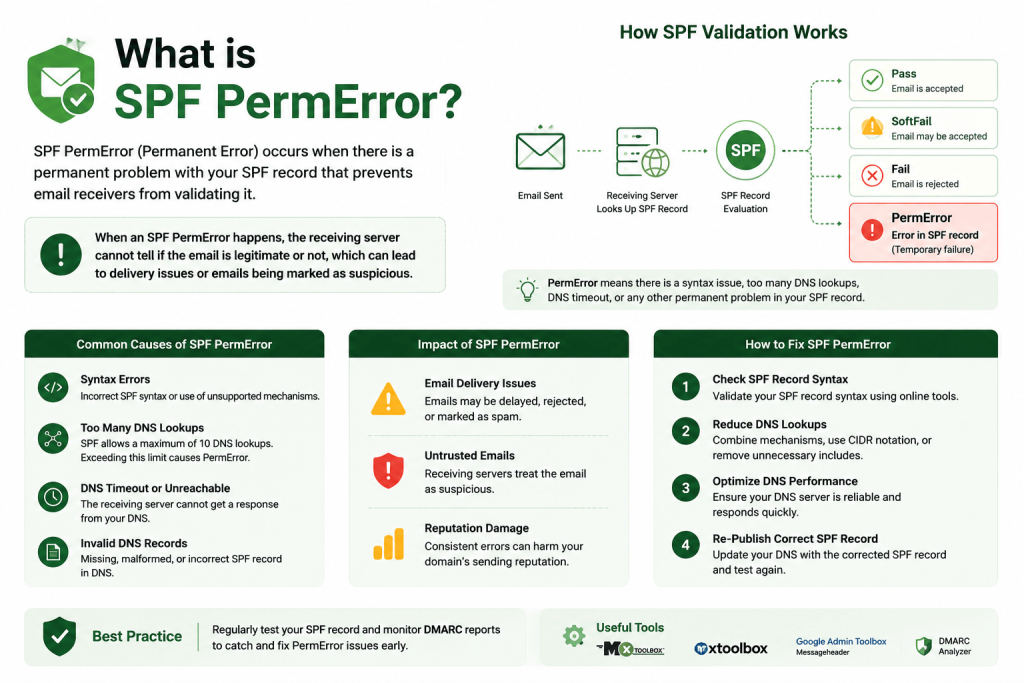
SPF PermError stands for Permanent Error. It occurs when a receiving mail server cannot properly process your SPF record.
One of the most common reasons is exceeding the SPF DNS lookup limit.
When this happens:
- SPF validation fails
- DMARC may fail
- Emails may go to spam
- Messages may be rejected
Mailbox providers treat SPF failures seriously because they affect sender trust and authentication.
Why SPF Has a 10 Lookup Limit
SPF records rely on DNS lookups to verify authorized mail servers.
However, to prevent excessive DNS queries and abuse, SPF standards limit domains to a maximum of 10 DNS lookups.
This rule is defined in SPF specifications and enforced by most major mailbox providers.
What Counts as a DNS Lookup?
Several SPF mechanisms generate lookups, including:
- include:
- a
- mx
- exists
- redirect
Each lookup consumes part of the 10-lookup limit.
Example:
v=spf1 include:_spf.google.com include:sendgrid.net ~allEach include statement may generate multiple additional lookups internally.
What Causes Too Many Lookups?
Most SPF lookup problems happen because businesses continue adding email providers over time without optimizing their SPF records.
Multiple Third-Party Providers
Modern businesses often use many email services simultaneously.
Examples include:
- Marketing platforms
- CRM systems
- Support tools
- Transactional email providers
- Cold email software
Every additional provider may increase lookup usage.
Nested Include Statements
Some SPF records contain nested includes.
For example:
include:service1.commay itself contain:
- multiple include statements
- redirects
- additional DNS queries
This quickly increases total lookups.
Old or Unused Services
Businesses often leave unused providers inside SPF records.
Over time, SPF records become bloated with:
- outdated platforms
- inactive marketing tools
- old mail systems
This unnecessarily consumes lookup limits.
How to Check SPF Lookups
Before fixing SPF issues, you should analyze your current SPF record.
A proper SPF analyzer helps identify:
- Lookup count
- Nested includes
- Invalid syntax
- Redundant entries
You can analyze your domain using:
These tools help identify whether your SPF record exceeds safe limits.
How to Reduce SPF Lookups
Reducing SPF lookups usually involves simplifying and optimizing your SPF record.
Remove Unused Services
The easiest fix is removing providers you no longer use.
Review:
- CRM systems
- Marketing tools
- Transactional email services
- Outreach platforms
If a platform no longer sends emails for your domain:
- Remove its include statement
This immediately reduces lookup usage.
Consolidate Email Providers
Many businesses use overlapping services unnecessarily.
Instead of using:
- Multiple SMTP providers
- Several outreach platforms
- Duplicate marketing tools
consider consolidating systems where possible.
Fewer providers usually mean:
- Simpler SPF records
- Better deliverability management
- Easier troubleshooting
Use Subdomains for Different Services
Large organizations often separate sending systems using subdomains.
Examples:
- marketing.example.com
- support.example.com
- outreach.example.com
Each subdomain can have its own SPF record.
This reduces pressure on the primary domain’s SPF lookup count.
SPF Flattening Explained
SPF flattening is one of the most common solutions for excessive lookups.
What is SPF Flattening?
SPF flattening replaces include statements with direct IP addresses.
Instead of:
include:_spf.google.comthe SPF record contains:
- Actual sending IP ranges
This reduces live DNS lookups.
Benefits of SPF Flattening
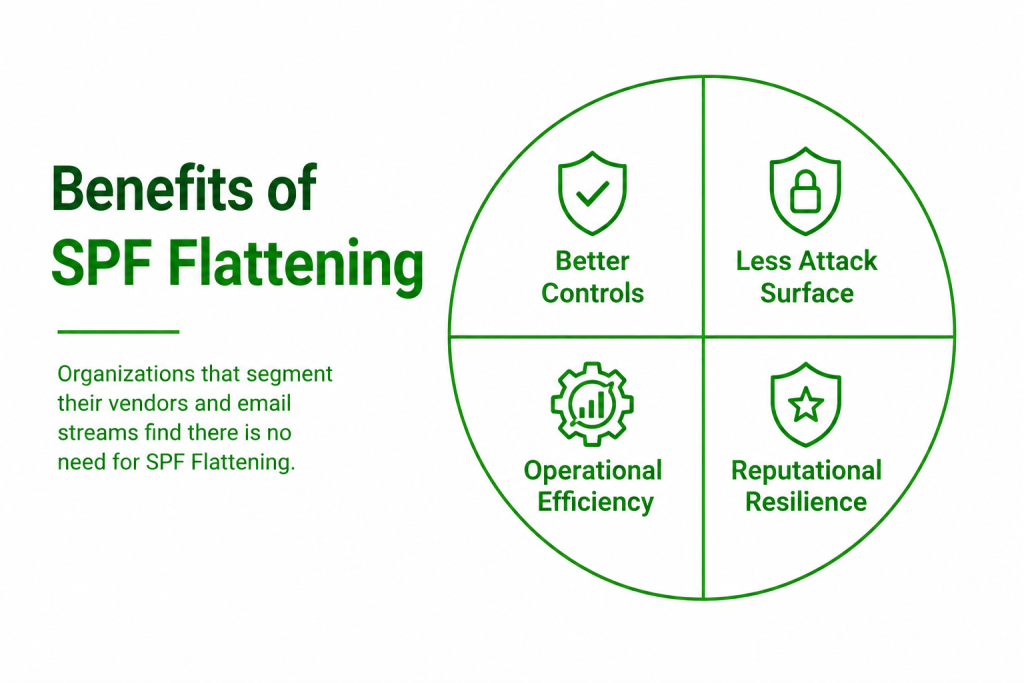
Flattening helps:
- Reduce lookup counts
- Prevent SPF PermError
- Improve DNS efficiency
This is especially useful for:
- Large organizations
- Complex email infrastructures
- High-volume senders
Risks of SPF Flattening
Flattening also has drawbacks.
Some providers change IP ranges regularly.
If your flattened SPF record becomes outdated:
- Legitimate emails may fail SPF
This means flattened records require ongoing maintenance.
Example SPF Optimization
Many SPF records become unnecessarily large over time.
Poor SPF Example
v=spf1 include:a.com include:b.com include:c.com include:d.com include:e.com ~allThis setup may exceed lookup limits depending on nested records.
Optimized SPF Example
v=spf1 include:_spf.google.com include:sendgrid.net ~allSimplifying providers reduces lookup risks significantly.
Common SPF Lookup Mistakes
Many SPF errors happen because of incorrect configuration practices.
Multiple SPF Records
A domain should only have one SPF record.
Incorrect setup:
v=spf1 include:_spf.google.com ~alland
v=spf1 include:sendgrid.net ~allThis cuses SPF failure.
Instead, combine everything into one SPF record.
Excessive Includes
Adding too many providers without monitoring lookup counts eventually causes problems.
Always review:
- Total lookups
- Nested includes
- Third-party dependencies
Best Practices for SPF Management
Proper SPF maintenance helps avoid long-term deliverability issues.
Keep SPF Records Simple
Avoid overly complex SPF structures.
Simpler records are:
- Easier to maintain
- Easier to troubleshoot
- Less likely to exceed limits
Audit Providers Regularly
Review sending services regularly and remove unused platforms.
This helps:
- Reduce complexity
- Improve security
- Maintain deliverability
Combine SPF with DKIM and DMARC
SPF alone is not enough for modern email authentication.
For stronger protection, combine SPF with:
- DKIM
- DMARC
You can verify all records using:
FAQs
What Happens After 10 SPF Lookups?
Once the SPF lookup limit is exceeded:
- SPF fails with PermError
- DMARC may fail
- Emails may go to spam or get rejected
Does Google Enforce SPF Lookup Limits?
Yes.
Major providers like:
enforce SPF lookup limits.
Is SPF Flattening Required?
Not always.
Smaller SPF records usually do not require flattening.
However, businesses with:
- Multiple providers
- Large infrastructures
- Complex authentication setups
may benefit from flattening.
What is Email Spoofing?
Email spoofing happens when attackers forge email headers to make messages appear as though they came from a trusted sender.
The attacker may impersonate:
- Your business domain
- Your CEO
- Your support department
- Vendors or suppliers
- Financial institutions
Spoofed emails are commonly used in:
- Phishing attacks
- Business Email Compromise (BEC)
- Invoice fraud
- Credential theft
Without proper email authentication, mailbox providers may struggle to verify whether emails are legitimate.
How Spoofing Works
Email was originally designed without strong authentication controls. Because of this, attackers can manipulate sender information relatively easily if protections are not in place.
From Address Manipulation
Attackers commonly spoof the visible “From” address.
For example:
billing@example.comEven if the attacker does not own the domain, they may still attempt to make the email appear legitimate.
To the recipient:
- The message may look authentic
- The sender appears trusted
- The email may create urgency or fear
This is why authentication protocols are so important.
Fake Domains and Lookalike Domains
Some attackers also register lookalike domains.
Examples:
- examp1e.com
- exarnple.com
- example-support.com
These domains are designed to confuse users visually.
Even with DMARC protection, businesses should monitor for lookalike domain abuse.
Financial Fraud
Business Email Compromise attacks often target:
- Finance teams
- Executives
- Vendors
Attackers may request:
- Wire transfers
- Invoice payments
- Gift card purchases
These scams cause billions of dollars in losses globally every year.
Brand Reputation Damage
If attackers spoof your domain:
- Customers may lose trust
- Your brand reputation may suffer
- Email providers may distrust your domain
This can also reduce email deliverability for legitimate messages.
How SPF Helps Prevent Spoofing
SPF (Sender Policy Framework) helps specify which servers are allowed to send emails on behalf of your domain.
When mailbox providers receive an email, they:
- Check the sending server
- Verify the SPF record
- Determine whether the sender is authorized
Example SPF Record
v=spf1 include:_spf.google.com ~allThis record authorizes:
- Google Workspace mail servers
to send emails for the domain.
SPF Limitations
SPF improves security, but it has limitations.
For example:
- SPF can break during forwarding
- Attackers may still spoof visible sender addresses
- SPF alone does not fully stop spoofing
This is why SPF should always be combined with DKIM and DMARC.
You can verify SPF records using the LeadCanal SPF Checker.
How DKIM Works
When an email is sent:
- The server signs the message using a private key
- A public key is published in DNS
- Receiving servers validate the signature
If the signature fails:
- The email may be treated as suspicious
Why DKIM is Important
DKIM helps:
- Protect message integrity
- Prevent tampering
- Improve email trust
Unlike SPF, DKIM signatures often survive forwarding, making DKIM especially valuable for reliable authentication.
You can test DKIM using the LeadCanal DKIM Checker.
How DMARC Stops Spoofing
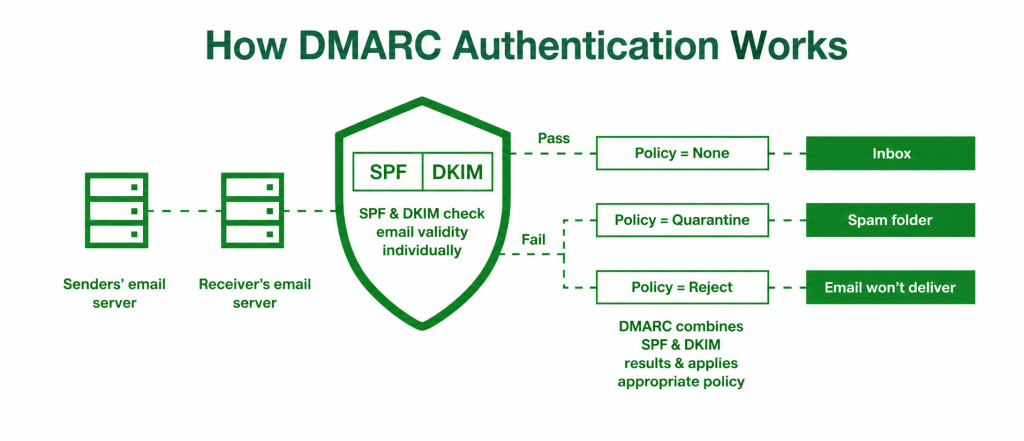
is the strongest layer of email authentication because it combines SPF and DKIM with policy enforcement.
DMARC tells mailbox providers:
- How to verify emails
- How to handle failures
- How to report suspicious activity
DMARC Policies
DMARC supports three policy levels.
p=none
p=noneUsed for monitoring only.
p=quarantine
p=quarantineSuspicious emails may be sent to spam folders.
p=reject
p=rejectFailed emails are rejected completely.
This provides the strongest protection against spoofing.
Why DMARC is Effective
DMARC helps:
- Block spoofed emails
- Protect brand identity
- Improve deliverability
- Monitor unauthorized senders
It also introduces alignment checks, which help prevent attackers from spoofing visible sender domains.
You can validate DMARC records using the LeadCanal DMARC Checker
Enable Multi-Factor Authentication (MFA)
MFA helps protect accounts even if passwords are stolen.
Common MFA methods include:
- Authenticator apps
- Security keys
- Biometrics
- SMS verification
Providers like:
strongly recommend MFA for business accounts
Monitor Domain Activity
Businesses should regularly monitor:
- DMARC reports
- Failed authentication attempts
- Suspicious sending activity
This helps detect spoofing attempts early.
How to Monitor Spoofing Attempts
DMARC reports provide visibility into who is sending emails using your domain.
These reports help identify:
- Unauthorized senders
- Failed authentication
- Spoofing attempts
Aggregate Reports
Aggregate reports summarize:
- SPF results
- DKIM results
- Sending IP addresses
- Authentication statistics
Example DMARC tag:
rua=mailto:dmarc@example.com
Use SPF, DKIM, and DMARC Together
No single technology completely prevents spoofing.
The strongest protection comes from combining:
- SPF
- DKIM
- DMARC
You can verify all records together using the LeadCanal Domain Scanner
Protect Non-Sending Domains
Defensive domains and parked domains should also have:
- SPF records
- DMARC reject policies
This prevents attackers from abusing unused domains.
Move Gradually to p=reject
The safest DMARC deployment path is:
- p=none
- p=quarantine
- p=reject
This minimizes the risk of accidentally blocking legitimate emails.
FAQs
Can Email Spoofing Be Completely Stopped?
No security solution is perfect, but proper SPF, DKIM, and DMARC configuration significantly reduces spoofing risks.
Combined with MFA and user training, businesses can greatly improve protection.
Does DMARC Protect Subdomains?
Yes.
DMARC supports subdomain policies using the:
sp=tag.
This allows businesses to define rules for subdomains separately.
Is SPF Alone Enough?
No.
SPF should always be combined with:
- DKIM
- DMARC
for stronger protection and better deliverability.
Final Thoughts
Email spoofing remains one of the biggest cybersecurity threats facing businesses today. Attackers constantly target trusted brands to steal information, commit fraud, and spread phishing attacks.
Proper email authentication is one of the best ways to protect your domain, your customers, and your reputation.
You can analyze your full authentication setup using the LeadCanal Domain Scanner.
For individual testing and troubleshooting, use:
If your organization needs help with:
- Email authentication
- DMARC implementation
- Domain protection
- Cold email infrastructure
- Deliverability optimization
you can contact LeadCanal for professional support.