SPF vs DKIM vs DMARC: What’s the Difference?
On this page
Email authentication has become one of the most important parts of modern email security. Whether you are sending cold emails, newsletters, transactional emails, or business communications, mailbox providers like Google Workspace,
Microsoft 365, and Yahoo Mail expect domains to be properly authenticated.
Three technologies form the foundation of email authentication:
- SPF
- DKIM
- DMARC
Many people get confused about the differences between them and wonder which one they actually need. The reality is that all three work together to improve email security and deliverability.
In this guide, we’ll explain SPF vs DKIM vs DMARC in simple terms, how each protocol works, and why businesses should implement all three.
You can also test your domain records using the free tools available on LeadCanal:
Introduction
Why Email Authentication Matters
Email was originally designed without strong security protections. Because of this, attackers can spoof domains, impersonate businesses, and send fraudulent emails pretending to come from trusted sources.
Without proper authentication:
- Your emails may land in spam
- Attackers can spoof your domain
- Your domain reputation may decline
- Customers may lose trust in your brand
This is where SPF, DKIM, and DMARC come in. These technologies help receiving mail servers verify that emails are truly coming from authorized senders.
Modern email authentication is now essential for:
- Cold email campaigns
- Marketing emails
- SaaS notifications
- E-commerce stores
- Corporate communications
What is SPF?
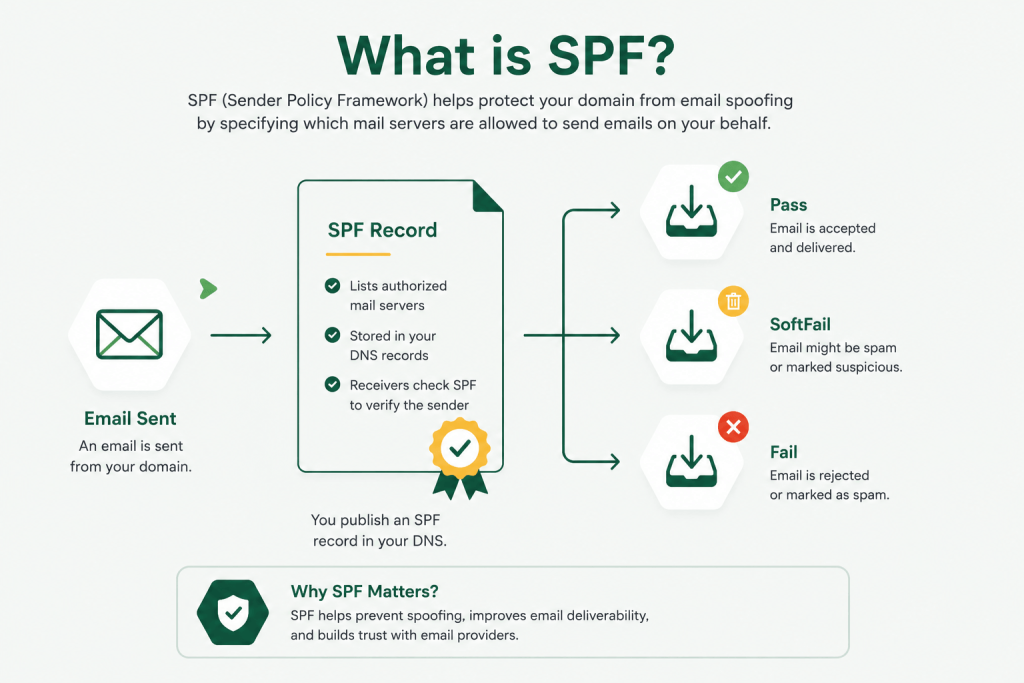
SPF stands for Sender Policy Framework. It is the first layer of email authentication and helps specify which mail servers are allowed to send emails on behalf of your domain.
How SPF Works
When an email is received, the receiving mail server checks:
- The sending server IP address
- The domain’s SPF record in DNS
- Whether the sending IP is authorized
If the IP address matches the authorized servers listed in the SPF record, SPF passes.
For example, if your business uses:
you need to include those services in your SPF record.
SPF DNS Records
SPF records are published as TXT records in your DNS settings.
Example SPF record:
v=spf1 include:_spf.google.com ~allHere’s what this means:
v=spf1→ SPF versioninclude:_spf.google.com→ Google servers are authorized~all→ Soft fail for unauthorized senders
SPF helps reduce spoofing, but it has limitations. One major issue is that SPF checks the server path not the actual visible sender identity users see in their inboxes.
You can validate SPF records using the LeadCanal SPF Checker.
What is DKIM?
DKIM stands for DomainKeys Identified Mail. Unlike SPF, DKIM focuses on verifying message integrity and authenticity using digital signatures.
Digital Signatures Explained
With DKIM enabled:
- Your mail server signs outgoing emails using a private key
- A public key is stored in DNS
- Receiving servers verify the signature
This confirms:
- The message was not modified
- The email came from an authorized sender
Even if attackers intercept the message during transit the signature will fail if any content is changed.
This makes DKIM extremely valuable for protecting email integrity
DKIM Selectors
DKIM uses something called selectors to manage keys.
A selector is simply a label that helps receiving servers find the correct public key in DNS.
Example DKIM DNS hostname:
selector1._domainkey.example.comBusinesses often use multiple selectors for:
- Key rotation
- Different email systems
- Security management
You can test DKIM records with the LeadCanal DKIM Checker.
What is DMARC?
DMARC stands for Domain-based Message Authentication, Reporting & Conformance.
DMARC builds on SPF and DKIM to create a full email authentication policy.
Combining SPF and DKIM
DMARC tells receiving servers:
- How to verify emails
- What to do if authentication fails
- Where to send reports
Unlike SPF or DKIM alone, DMARC introduces alignment checks.
This means:
- The visible “From” domain must match SPF or DKIM authenticated domains
DMARC policies allow businesses to:
- Monitor email authentication
- Quarantine suspicious emails
- Reject spoofed emails completely
Example DMARC record:
v=DMARC1; p=reject; rua=mailto:dmarc@example.comYou can generate records using the LeadCanal DMARC Generator.
SPF vs DKIM
SPF and DKIM both authenticate emails, but they do it differently.
Main Differences
SPF verifies:
- Which servers can send emails
DKIM verifies:
- Whether the email content was altered
- Whether the sender is authentic
SPF works at the server level, while DKIM works at the message level.
Another important difference is that SPF can break during forwarding, while DKIM usually survives forwarding because the message signature remains intact.
Strengths and Weaknesses
SPF Strengths
- Easy to configure
- Helps authorize mail servers
- Reduces spoofing
SPF Weaknesses
- Breaks with forwarding
- Limited to 10 DNS lookups
- Does not verify message integrity
DKIM Strengths
- Verifies message integrity
- Survives forwarding
- Improves sender trust
DKIM Weaknesses
- More complex setup
- Requires key management
- Some providers configure it incorrectly
SPF and DKIM complement each other rather than compete against each other.
Why DMARC Needs SPF and DKIM
DMARC cannot function properly without SPF or DKIM.
Authentication + Alignment
For DMARC to pass:
- SPF OR DKIM must authenticate successfully
- AND alignment must pass
This alignment check is what makes DMARC much stronger than SPF or DKIM alone.
Without alignment:
- Attackers could spoof visible sender addresses
- Emails may appear legitimate to users
DMARC closes this gap by enforcing domain consistency.
Real-World Example
Email Delivery Workflow
Let’s say a company sends emails using Google Workspace.
Here’s what happens:
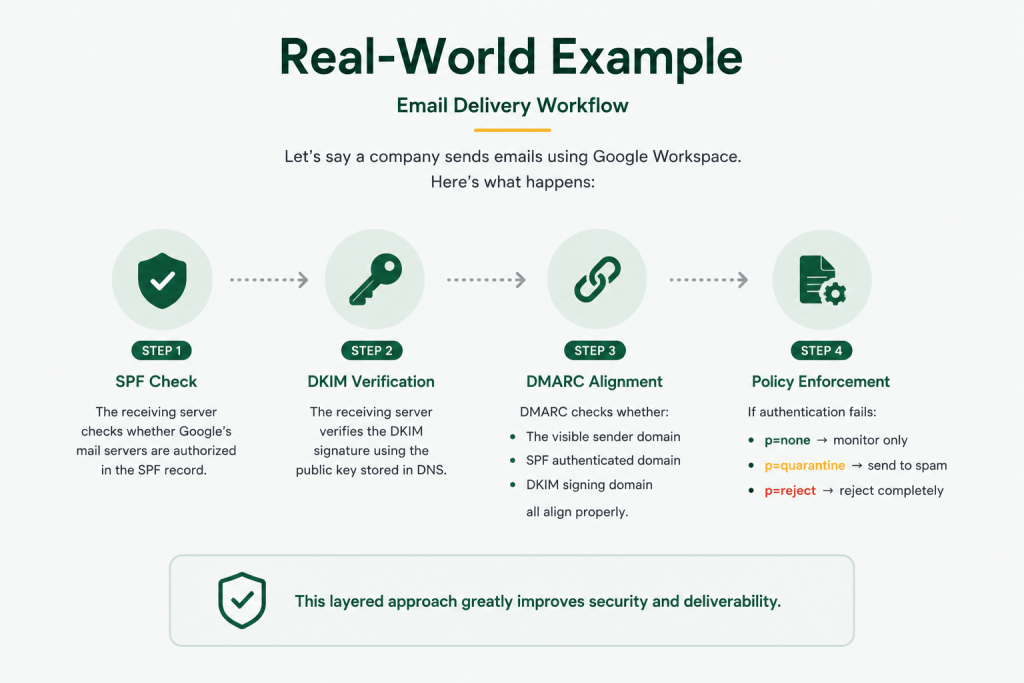
Step 1: SPF Check
The receiving server checks whether Google’s mail servers are authorized in the SPF record.
Step 2: DKIM Verification
The receiving server verifies the DKIM signature using the public key stored in DNS.
Step: 3 DMARC Alignment
DMARC checks whether:
- The visible sender domain
- SPF authenticated domain
- DKIM signing domain
all align properly.
Step: 4 Policy Enforcement
If authentication fails:
- p=none → monitor only
- p=quarantine → send to spam
- p=reject → reject completely
This layered approach greatly improves security and deliverability.
Which One Should You Use?
The simple answer is: all three.
Why All Three Are Necessary
Each protocol solves a different problem.
SPF Helps:
- Authorize mail servers
DKIM Helps:
- Protect message integrity
DMARC Helps:
- Enforce policies
- Prevent spoofing
- Monitor authentication
Using only SPF is no longer enough for modern email security.
Major mailbox providers increasingly expect:
- SPF
- DKIM
- DMARC
to all be configured properly.
This is especially important for:
- Cold email infrastructure
- Marketing campaigns
- SaaS platforms
- Business domains
Common Mistakes
Only Setting SPF
Many businesses configure SPF but ignore DKIM and DMARC.
This creates major security gaps because attackers can still spoof visible sender identities.
SPF alone does not fully protect your domain.
Ignoring Alignment
One of the most common DMARC issues is alignment failure.
This often happens when:
- Third-party senders use different domains
- Marketing tools are not configured properly
- DKIM domains don’t match visible sender domains
Always verify alignment when configuring:
- CRM platforms
- Newsletter systems
- Cold email tools
FAQs
Can DMARC Work Without DKIM?
Yes, DMARC can work with SPF alone if SPF passes authentication and alignment.
However, using both SPF and DKIM is strongly recommended because:
- DKIM survives forwarding
- It adds additional verification
- It improves deliverability
Which is Most Important?
DMARC is generally considered the most powerful because it ties SPF and DKIM together.
However:
- SPF is foundational
- DKIM adds integrity
- DMARC enforces policy
The best protection comes from implementing all three together.
Final Thoughts
SPF, DKIM, and DMARC are not competing technologies. They are complementary layers of email authentication that work together to secure your domain and improve deliverability.
If your business sends emails regularly, proper authentication is now essential for:
- Inbox placement
- Brand protection
- Phishing prevention
- Cold email success
You can test your current records using the free tools from LeadCanal:
For businesses that need help with:
- Email authentication
- Deliverability optimization
- Cold email setup
- DMARC implementation
- SPF and DKIM troubleshooting
you can contact LeadCanal for professional support.