 Skip to content

Spintax is one of the most useful text formatting methods for cold email, outreach, and content variation. It lets you write multiple versions of a word, phrase, sentence, subject line, or call-to-action inside one template. When the message is sent, one version is selected for each recipient.
For example, instead of sending the same greeting to every contact, you can write:
{Hi|Hello|Hey} {{first_name}}, One person may receive “Hi Sarah,” another may receive “Hello Sarah,” and another may receive “Hey Sarah.”
That is the basic idea behind spintax. But using it correctly requires more than adding random words inside brackets. You need to follow proper spintax text formatting rules so your emails stay readable, professional, and technically correct.
This guide explains how spintax works, how to format it, where to use it in cold emails, what mistakes to avoid, and how to check your copy before sending with LeadCanal.
What Is Spintax?
Spintax, also called spin syntax, is a formatting structure that creates multiple possible versions of the same text. Most email outreach tools use curly braces and pipe symbols to separate options.
The common format looks like this:
{Option 1|Option 2|Option 3} A simple greeting example:
{Hi|Hello|Hey} {{first_name}},explains that spintax formatting commonly uses curly braces{}and vertical bars|to represent alternative text options.
The goal is to create variety without changing the meaning of your message.
Why Spintax Matters for Cold Email
Cold email campaigns often fail when every message looks identical. If you send the same subject line, same opening line, same CTA, and same body copy to hundreds or thousands of people, your outreach may feel robotic.
Spintax helps you create small natural variations, such as different greetings, subject lines, value statements, and CTAs. This can make your campaigns feel less repetitive and help you test which wording performs better.
However, spintax is not a magic deliverability fix. Email providers also look at sender reputation, authentication, engagement, spam complaints, formatting, and recipient behaviour. Google’s email sender guidelines require authentication such as SPF or DKIM for all senders, and SPF, DKIM, and DMARC for bulk senders.
So, spintax should support a strong cold email strategy. It should not be used to hide bad targeting, spammy copy, misleading subject lines, or poor sending practices.
Basic Spintax Text Formatting Rules
The most important spintax text formatting rule is simple:
{versionone|version two| version three}Each option must be separated by the pipe symbol |.
Correct:
{Quickquestion| Small idea| Quick note}Incorrect:
{Quickquestion,Small idea, Quick note}Here are the core formatting rules:
- Use
{}to open and close the spintax block. - Use
|to separate each option. - Do not forget the closing brace.
- Make every option grammatically complete.
- Avoid empty options unless your email tool supports them.
- Preview multiple versions before sending.
- Do not spin words that change the meaning of the email.
A correct subject line example:
{Quick idea for{{company}}|Question about {{company}}|Idea for your sales team}A bad subject line example:
{Quick idea|Final warning |Your team is losing money}Step 1: Write the Email First
Before adding spintax, write one clean version of your email.
Example:
Subject: Quick idea for {{company}}
Hi {{first_name}},
I noticed {{company}} is growing its outbound team. LeadCanal helps sales teams find verified B2B leads and reduce manual prospecting time.
Would it make sense to compare notes next week?
Best,
{{sender_name}}
Do not start by spinning every sentence. First, make sure the core email is clear, relevant, and short.
Step 2: Choose Where to Add Spintax
You do not need spintax in every line. The best areas are:
- Subject line
- Greeting
- Opening sentence
- Value proposition
- CTA
- Sign-off
For example:
Subject: {Quick idea for {{company}}|Idea for your outbound team|Question about {{company}}}
Greeting:
{Hi|Hello|Hey} {{first_name}},
CTA:
{Would it make sense to compare notes next week?|Open to a quick conversation next week?|Worth a short chat next week?}
This gives variety without making the email messy.
Step 3: Use Section-Level Spintax
One of the biggest mistakes is spinning single words too much.
Bad example:
I {noticed |saw |found} your {company |team |business} is {growing |scaling| expanding}.
This can still work, but it often sounds robotic. A better approach is section-level spintax:
Step 4: Keep the Meaning Consistent
Every spintax option should say the same basic thing. Do not use spintax to test completely different promises in the same block.
Good:
{LeadCanal helps teams build verified lead lists faster.|LeadCanal helps outbound teams reduce manual prospect research.|LeadCanal helps sales teams find cleaner B2B contacts before outreach.}
Bad:
{LeadCanal helps teams build lead lists faster.|LeadCanal guarantees 10x revenue.|LeadCanal replaces your sales team.}
The bad version changes the claim. One version is practical, another is exaggerated, and another makes a much stronger promise. That can damage trust.
Step 5: Use Spintax in Subject Lines Carefully
Subject line spintax is useful, but every version must match the email body.
Good examples:
{Quick idea for {{company}}|Question about {{company}}|Idea for your outbound team}
{Quick note on lead sourcing|Question about prospecting|Idea for cleaner contact data}
Avoid misleading subject lines. The FTC’s CAN-SPAM guidance says commercial email subject lines should not be deceptive, and messages should include accurate information and a clear way to opt out when required.
Step 6: Use Spintax in CTAs
Your CTA is one of the best places to use spintax because small wording changes can affect replies.
Examples:
Keep the ask simple. Do not make every CTA sound like a hard sales push.
Full Cold Email Spintax Example
Subject: {Quick idea for {{company}}|Question about {{company}}’s outbound process|Idea for your sales team}
{Hi|Hello|Hey} {{first_name}},
{I noticed {{company}} is growing in {{industry}}.|I came across {{company}} while researching {{industry}} teams.|Saw your team is active in {{industry}} and wanted to reach out.}
{LeadCanal helps sales teams build targeted and verified lead lists faster.|LeadCanal helps outbound teams reduce manual prospect research.|LeadCanal helps teams find cleaner B2B contacts before launching campaigns.}
{Would it make sense to compare notes next week?|Open to a quick conversation next week?|Worth a short chat to see if this is relevant?}
{Best,|Regards,|Thanks,}
{{sender_name}}
This example works because every variation keeps the same tone and message.
Common Spintax Formatting Mistakes
Missing curly braces
Wrong:
Hi|Hello |Hey {{first_name}},
Correct:
Missing pipe symbols
Wrong:
Too many variations in one sentence
Wrong:
Tone mismatch
Wrong:
{Quick idea for your team|Small suggestion for your outbound process|Question about your current workflow}
Correct:
{Quick idea for your team|Small suggestion for your outbound process|Question about your current workflow}
Spintax vs A/B Testing
Spintax and A/B testing are not the same the spintax creates small wording variations inside one campaign. A/B testing compares two clear versions to see which performs better.
Use A/B testing for bigger questions like:
- Which subject line gets more opens?
- Which CTA gets more replies?
- Which offer gets more positive responses?
Use spintax for smaller variations like:
- Greeting changes
- CTA wording
- Opening sentence variation
- Sign-off differences
For best results, test one major variable at a time and use light spintax only where it does not change the message.
Check Spam Keywords Before Sending
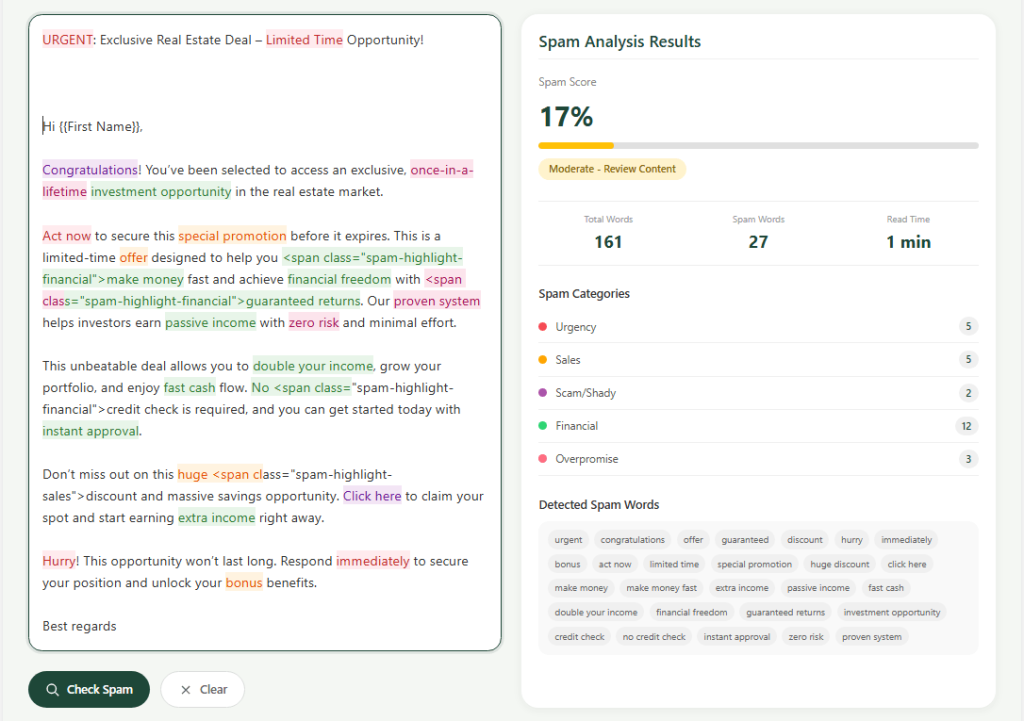
Before sending a spintax campaign, run your email through the LeadCanal Email Copy Spam Checker. This helps you catch spam-looking words, excessive punctuation, unnatural formatting, too many links, and subject lines that may look overly promotional.
Avoid suspicious-looking links, shortened URLs, unrelated links, all-caps phrases, and exaggerated claims. A clean, simple email is usually better than a message filled with buttons, images, tracking-heavy links, or aggressive sales language.
Spintax can make your copy more varied, but it cannot save an email that looks spammy.
Final Thoughts
Spintax text formatting rules are simple, but using spintax well takes strategy. The basic formula is easy:
{option one|option two|option three} The harder part is making sure every option sounds natural, keeps the same meaning, and supports a clear cold email message.
To compete with the current SERP, LeadCanal’s article should not be just another short help doc. It should be a complete guide that explains syntax, examples, mistakes, deliverability, A/B testing, and spam-checking.’
Google says helpful content should be created for people first, not only to manipulate rankings, so the strongest version of this article should answer the user’s full question better than the current tool-specific pages.


