Skip to content

Cold emails do not always fail because the offer is weak. Many campaigns fail before the prospect even sees the message. Your subject line may be strong, your targeting may be accurate,
and your CTA may be clear, but if the email lands in spam, none of that matters.
This is why email deliverability is one of the most important parts of cold outreach. Tools like Instantly.ai, ReachInbox.ai, Smartlead.ai, and other outreach platforms can help you scale campaigns,
but they cannot protect your results if your setup is weak. Inbox placement depends on your domain reputation, DNS records, sending behaviour, list quality, email copy, and recipient engagement.
Google now requires authentication for all senders, and bulk senders need SPF, DKIM, and DMARC. Google also recommends keeping spam rates below 0.10% and avoiding 0.30% or higher because high spam rates can increase spam filtering.
In this guide, you will learn why cold emails go to spam and how to fix each issue step by step.
1. Your DNS Records Are Missing or Incorrect
One of the biggest reasons cold emails go to spam is poor domain authentication. Before mailbox providers trust your emails, they need to confirm that you are allowed to send from your domain.
The three main records are SPF, DKIM, and DMARC.
SPF tells email providers which servers are allowed to send emails from your domain.
DKIM adds a digital signature to your emails. This proves the message has not been changed during delivery.
DMARC works with SPF and DKIM. It tells receiving mail servers what to do if an email fails authentication.
If these records are missing, broken, or not aligned, your emails look suspicious. Even a well-written email can land in spam if authentication fails.
Yahoo also requires bulk senders to authenticate mail with SPF and DKIM, publish a valid DMARC policy, and make sure the From domain aligns with SPF or DKIM for DMARC alignment
How to fix it:
Set up SPF, DKIM, and DMARC for every sending domain. After adding the records, verify them with a DNS checker before launching campaigns. Start DMARC with a monitoring policy such as p=none,
then move to stricter policies only after confirming your setup is stable.If you want to check whether your SPF record is correct, you can use the LeadCanal SPF Checker.
If you need help creating a DMARC record, use the LeadCanal DMARC Generator to build a clean policy before adding it to your DNS.
DKIM should also be added from your email provider or outreach platform, because it adds a digital signature to your emails and helps mailbox providers confirm that your messages are legitimate.
At LeadCanal, we recommend treating SPF, DKIM, and DMARC as the first step in cold email deliverability. If your DNS setup is weak or incorrect, scaling your campaign will only increase the risk of emails landing in spam.

2. You Are Sending From Your Main Business Domain
Many businesses send cold emails from their primary domain because it feels simple. But this is risky.
Your main domain is connected to your website, customer communication, internal email, invoices, support messages, and brand reputation. If your cold outreach damages that domain, your regular business emails may also be affected.
Cold email should usually be sent from dedicated sending domains or carefully managed subdomains. This helps separate outreach risk from your main business domain.
How to fix it:
Use dedicated sending domains that are close to your brand but not your main domain. For example, if your main domain is company.com, you may use a related outreach domain such as trycompany.com or companymail.com.
Each sending domain needs its own DNS setup, warm-up, inboxes, and monitoring. Do not buy a domain and immediately start sending at high volume. Give it time to build trust.
3. You Skipped Email Warm-Up
New domains and new inboxes do not have an established sending history. If you start sending hundreds of cold emails immediately, mailbox providers may treat your behaviour as unnatural.
Warm-up helps your inbox build a positive reputation slowly. It creates a sending pattern that looks normal instead of sudden and aggressive.
The mistake many teams make is treating warm-up as optional. It is not. If you are serious about inbox placement, warm-up should be part of your normal process.
How to fix it:
Start with a low volume and gradually increase over time. Keep warm-up running in the background even after campaigns begin. Avoid sudden jumps in volume.
A safe approach is to send fewer emails from each inbox and scale by adding more properly warmed inboxes instead of forcing one inbox to send too much.
For many cold email teams, a practical limit is around 30–50 cold emails per inbox per day. The exact number depends on domain age, reputation, engagement, and your audience,
but the principle is simple: scale with control, not speed.
4. Your Sending Volume Looks Unnatural
Mailbox providers pay attention to behaviour. If an inbox is quiet for weeks and then suddenly sends 300 emails in one day, that looks suspicious.
Cold email platforms make it easy to scale, but easy scaling can create deliverability problems if you do not control volume. Sending too much too fast is one of the fastest ways to damage sender reputation.
How to fix it:
Keep your daily sending volume steady. Avoid sudden spikes. Spread campaigns across multiple inboxes and domains. Send during normal business hours and avoid sending every message at the exact same minute.
Also, balance new emails and follow-ups. If you send too many new emails every day without managing replies, unsubscribes, and follow-ups properly, your campaign can start to look like bulk spam.
5. Your Email List Has Bad Data
Poor data can destroy even the best cold email setup. If your list contains invalid addresses, outdated contacts, spam traps, or role-based emails like info@ and support@, your bounce rate will increase.
High bounce rates tell mailbox providers that your list is not clean. This makes your domain look careless or risky.
A cold email campaign is only as strong as the data behind it. Sending to the wrong people also lowers replies, increases spam complaints, and wastes your sending capacity.
How to fix it:
Verify every email before sending. Remove invalid emails, risky catch-all addresses, and role-based contacts when possible. Keep your lists updated and segmented.
Do not rely on old purchased lists. B2B data changes constantly because people change jobs, companies update domains, and inboxes become inactive.
LeadCanal’s approach should be simple: build targeted lists, verify contacts, segment prospects, and only send emails to people who match your actual ICP.
6. People Are Marking Your Emails as Spam
Spam complaints are one of the strongest negative signals. When someone clicks “Report spam,” mailbox providers learn that your message was unwanted.
Google recommends keeping spam rates below 0.10% and avoiding 0.30% or higher. A high spam rate can lead to more of your future emails being filtered as spam.
This is why relevance matters. A cold email that is short, specific, and useful is less likely to get reported. A generic email sent to everyone is much more likely to create complaints.
How to fix it:
Make every email relevant to the right person. Segment your list by industry, role, company size, pain point, or location. Then write copy that fits that segment.
Also, make it easy for people to opt out. The FTC’s CAN-SPAM guide says commercial emails must give recipients a clear way to opt out of future emails, and opt-out requests must be honoured.
A simple line like “If this is not relevant, let me know and I will not follow up” can reduce spam complaints because it gives people an easy way to say no.
7. Your Email Copy Looks Too Promotional
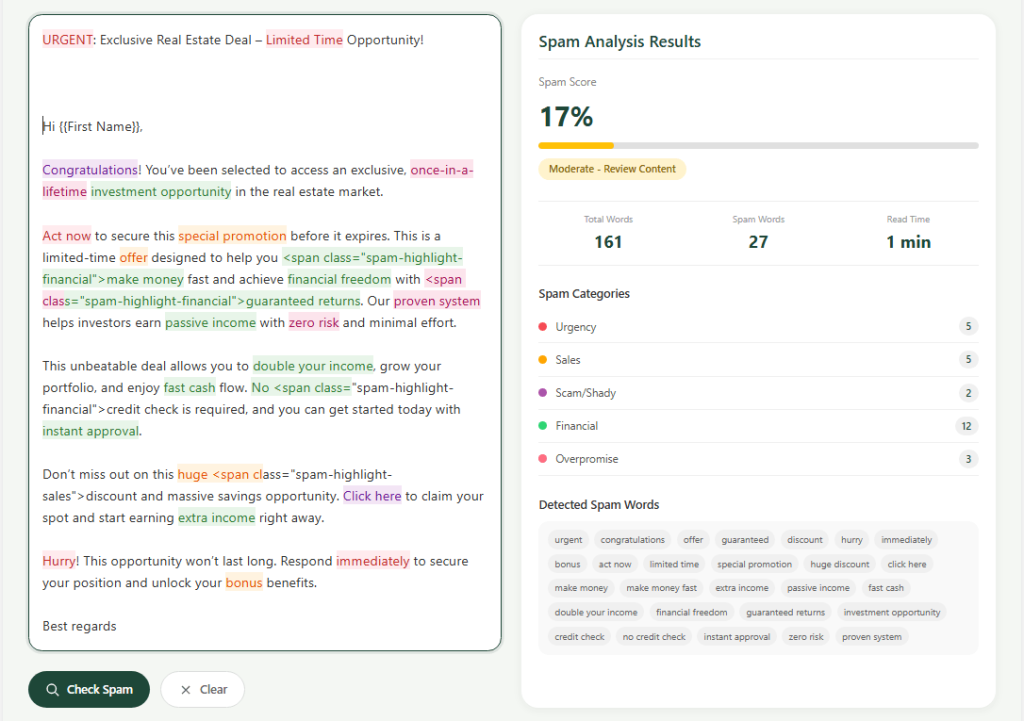
Cold email copy still matters. Spam filters do not only check technical setup. They also look at message patterns, links, formatting, and engagement.
Emails with too many links, images, buttons, attachments, tracking pixels, all-caps words, and exaggerated claims can look promotional or risky.
For example, phrases like “guaranteed results,” “limited time,” “act now,” “risk-free,” and “100% success” can make your email sound spammy, especially when combined with links and high-volume sending.
How to fix it:
Keep the first email simple. Use plain text. Write like a real person. Avoid over-formatting, unnecessary images, and multiple links.
- A strong cold email should usually have:
- A clear reason for reaching out
- One relevant observation
- One simple value point
- One easy CTA
Before sending, run your copy through the LeadCanal Email Copy Spam Checker. This helps you catch spammy phrases, excessive punctuation, too many links, and unnatural wording before your campaign goes live.
8. You Are Using Too Many Links and Tracking Tools
Links can hurt deliverability when used poorly. Shortened links, suspicious URLs, too many CTAs, and heavy tracking can make an email look less trustworthy.
Open tracking can also create issues because it uses invisible tracking pixels. Some mailbox providers and privacy tools treat tracking pixels carefully, and open data is not always reliable.
How to fix it:
Use one link at most in your first cold email. If possible, do not include any link in the first message. Instead, ask a simple question and try to start a conversation.
Avoid attachments in first-touch cold emails. If the prospect is interested, you can send a case study, deck, or link later.
Focus on replies, not opens. Replies are a stronger sign that your email is wanted.
9. Your Follow-Ups Are Too Aggressive
Follow-ups are important, but too many follow-ups can increase complaints. If your sequence feels pushy, prospects may ignore you, unsubscribe, or report the email as spam.
Cold email should feel like a conversation, not pressure.
How to fix it:
Use short follow-ups with a clear purpose. Do not repeat the same message again and again. Each follow-up should add context or make it easier for the person to respond.
For example:
“Should I send this to someone else on your team?”
This is better than:
“Just following up again. Please reply urgently.”
Also, stop sequences automatically when someone replies. This keeps your communication natural and avoids embarrassing mistakes.
10 You Are Not Monitoring Deliverability
Cold email is not a one-time setup. Deliverability changes over time. A domain that performs well this month can decline next month if bounce rates rise, spam complaints increase, or sending volume becomes too aggressive.
If you are not monitoring performance, you may only notice the problem after your campaigns stop producing replies.
How to fix it:
Track the right metrics every week:
- Inbox placement
- Bounce rate
- Spam complaints
- Reply rate
- Positive reply rate
- Unsubscribe rate
- Domain reputation
- Mailbox health
Microsoft also announced stricter requirements for domains sending more than 5,000 emails per day to Outlook consumer addresses, requiring SPF, DKIM, and DMARC compliance.
Non-compliant messages may be sent to junk or eventually rejected. This means deliverability monitoring is no longer optional for serious outreach teams.
LeadCanal Cold Email Spam Fix Checklist
Conclusion
Cold emails go to spam for many reasons, but most of them are fixable. The biggest problems are weak DNS setup, no warm-up, poor list quality, aggressive sending, spammy copy, too many links, and low engagement.
The solution is not to send more. The solution is to send smarter.
Build the right infrastructure first. Use clean data. Keep your copy simple. Warm up your inboxes. Control your sending volume. Monitor spam complaints. Focus on replies instead of vanity metrics.
At LeadCanal, the goal is to help businesses build a deliverability-first cold email system. When your DNS, data, copy, sending limits, and monitoring work together, your emails have a much better chance of reaching the inbox and turning into real conversations.