 Skip to content

Email is still one of the most important communication channels for businesses. Companies use it for sales outreach, customer support, newsletters, invoices, account notifications, and internal communication
But because email is so widely used, it is also one of the easiest channels for attackers to abuse. A spammer or fraudster can try to send fake emails that look like they came from your domain this is called email spoofing.
SPF record syntax allows a domain owner to tell receiving mail servers which IP addresses or mail services are allowed to send emails on behalf of that domain. When the syntax is correct,
mailbox providers can verify whether the sending server is trusted or not. When the syntax is wrong, even your real emails may fail authentication and land in spam.
For a business like LeadCanal, where email communication, outreach, and trust matter a lot, SPF is not just a technical setting. It directly affects deliverability, domain reputation,
and customer trust. A clean SPF record can help your emails reach the inbox, while a broken SPF record can silently damage your campaigns.
In this guide, you will learn what SPF record syntax means, how to read it, how to create it, what each part does, and how to fix common SPF errors.
What is an SPF Record?
SPF stands for Sender Policy Framework. It is an email authentication method that helps prevent unauthorized servers from sending emails using your domain name.
An SPF record is published in your domain’s DNS as a TXT record. It contains a list of approved sending sources. These sources can be your own mail server, your business email provider,
your CRM, your newsletter platform, your support desk, or any other tool that sends emails from your domain.
For example, a simple SPF record may look like this:
v=spf1 include:examplemail.com -allThis record tells receiving mail servers that examplemail.com is allowed to send email for your domain. The -all at the end tells the receiver that all other senders are not authorized.
SPF does not stop someone from writing your email address in the “From” field, but it helps the receiving server check whether the sending server is allowed to use your domain.
This is why SPF plays an important role in email authentication.
What Is SPF Record Syntax?
SPF record syntax is the proper structure used to write an SPF record. Just like a sentence needs correct grammar, an SPF record needs correct syntax. If the syntax is wrong,
the receiving server may not understand the record correctly.
A basic SPF record has three main parts:
v=spf1 mechanisms qualifier
Here is a practical example:
v=spf1 ip4:192.0.2.10 include:mailprovider.com -all
In this example,
v=spf1 defines the SPF version. The ip4 mechanism allows a specific IPv4 address. The include mechanism authorizes another mail provider.
The -all part tells the receiver to fail all senders that are not listed.
The syntax may look small, but every part has a specific meaning. If you miss one space, add the wrong symbol, include too many services, or create more than one SPF record,
your emails can face authentication problems.
Why SPF Record Syntax Matters for Email Deliverability
A correct SPF record helps mailbox providers trust your emails. When your email reaches Gmail, Outlook, Yahoo, or another mailbox provider,
the receiving server checks whether the sending IP is authorized in your SPF record. If it is authorized, SPF passes. If it is not authorized, SPF may fail.
This affects your email deliverability. If your SPF record is missing or incorrect, your emails may be accepted but placed in spam. In stricter cases,
they may be rejected completely. For businesses running outreach or email marketing campaigns, this can reduce replies, conversions, and trust.
A well-written SPF record also supports DMARC. DMARC uses SPF and DKIM to decide whether an email is legitimate. If SPF is broken, your DMARC results can also suffer.
That is why SPF should not be treated as a one-time DNS setting. It should be reviewed whenever your company adds or removes an email-sending tool.
How to Read an SPF Record
You can easily verify and monitor your SPF records using LeadCanal SPF Record Generator. Ensure your domain is secure and emails reach the inbox reliably.
Let’s break down this SPF record:
v=spf1 ip4:192.0.2.10 include:spf.mailprovider.com ~allThe first part, v=spf1, shows that this is an SPF version 1 record. Every SPF record must start with this value.
The second part, ip4:192.0.2.10, means this IPv4 address is allowed to send emails for the domain.
The third part, include:spf.mailprovider.com, means the domain is also allowing the sending sources listed in spf.mailprovider.com.
The last part, ~all, means all other senders should soft fail. A soft fail tells receiving servers that the sender is probably not authorized,
but the message does not always need to be rejected immediately.
This is the basic way to read SPF record syntax. You start from left to right and understand each mechanism in order.

Common SPF Mechanisms Explained
SPF mechanisms are the building blocks of SPF record syntax. They define which servers are allowed to send emails.
The ip4 mechanism is used to authorize an IPv4 address. For example:
v=spf1 ip4:192.0.2.10 -allThis means only the IP address 192.0.2.10 is allowed to send email for the domain.
The ip6 mechanism is used for IPv6 addresses:
v=spf1 ip6:2001:db8::/32 -allThis should be used only if your mail server sends emails through IPv6.
The include mechanism is one of the most common mechanisms. It allows your domain to trust another domain’s SPF record.
For example:
v=spf1 include:spf.mailprovider.com -allThis is useful when you send emails through a third-party service. Many companies use platforms for marketing, support, sales automation, billing, or transactional emails.
Each of those platforms may provide an SPF include value.
The a mechanism allows the IP address in your domain’s A record to send email:
v=spf1 a -allThis is useful only when your website server also sends email, but in many modern setups, website hosting and email sending are separate.
The mx mechanism allows your domain’s MX servers to send email:
v=spf1 mx -allThis can work for simple email setups, but it should not be used blindly. Your MX records are mainly for receiving email, not always for sending it.
The all mechanism is normally used at the end of the record. It catches every sender that did not match previous mechanisms. For example:
v=spf1 include:mailprovider.com -allHere, -all means every sender not listed before it should fail.
Good SPF Record Syntax Examples
A domain that does not send email can use:
v=spf1 -allThis is useful for parked domains or domains that are only used for websites.
A business that sends email through one provider can use:
v=spf1 include:spf.mailprovider.com -allA business that uses multiple tools may have:
v=spf1 include:spf.google.com include:spf.crmprovider.com include:spf.newslettertool.com -allHowever, this type of record should be checked carefully because too many includes can create DNS lookup problems.
A company using a custom mail server and a third-party service may use:
v=spf1 ip4:192.0.2.10 include:spf.mailprovider.com -allThis record allows one specific IP address and one external provider.
SPF DNS Lookup Limit
One of the most important SPF rules is the DNS lookup limit. SPF allows a maximum of 10 DNS lookups during evaluation.
You can easily verify and monitor your SPF records using LeadCanal SPF Checker. Ensure your domain is secure and emails reach the inbox reliably.
Some SPF mechanisms require DNS lookups. These include include, a, mx, ptr, exists, and redirect. If your SPF record goes over the 10 lookup limit, it can return a permanent error,
often called SPF Perm Error.
This usually happens when a company adds too many third-party tools into one SPF record. For example, if you use separate tools for cold outreach, newsletters, support tickets, CRM,
invoicing, and transactional emails, your SPF can become too large.
The best solution is not to keep adding includes forever. Instead, review your email tools and remove services you no longer use. You can also separate email streams by subdomain.
For example, marketing emails can be sent from news.yourdomain.com, transactional emails from mail.yourdomain.com, and support emails from support.yourdomain.com.
Each subdomain can have its own SPF record, which keeps your main domain cleaner. this is a stronger solution than simply trying to force everything into one SPF record.
Common SPF Record Syntax Mistakes
One of the most common mistakes is having multiple SPF records on the same domain. A domain should only have one SPF TXT record.
If you create two separate SPF records, receiving servers may return an error.
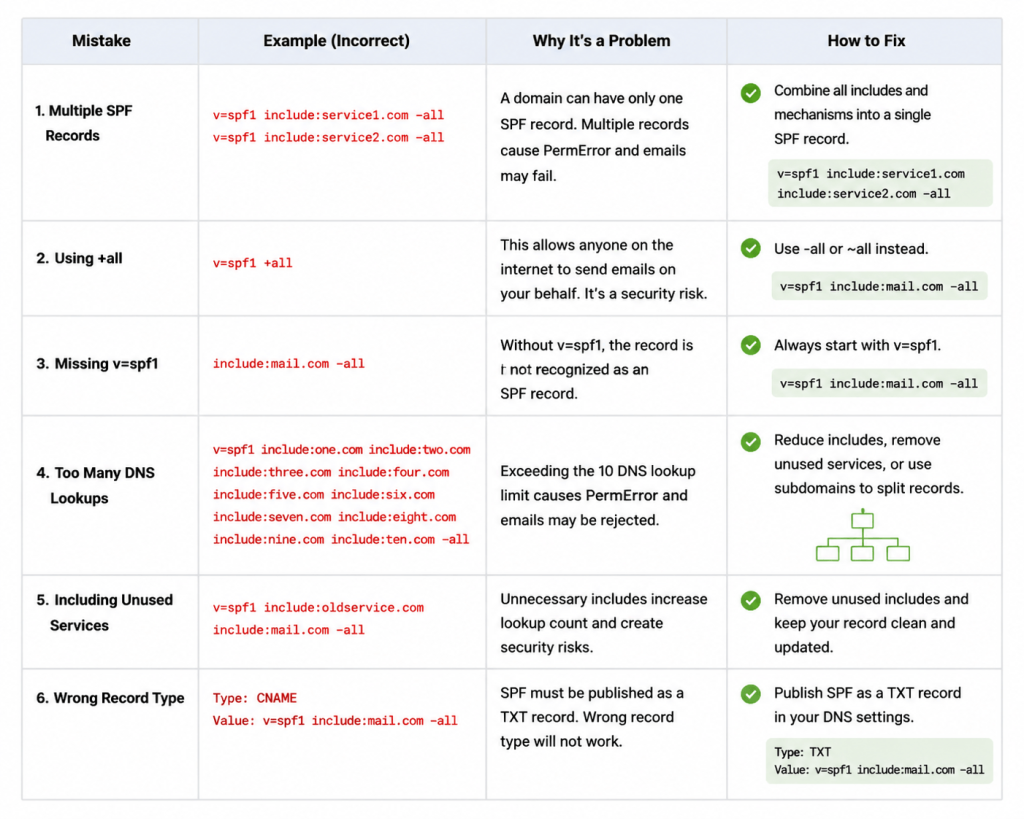
Wrong example:
v=spf1 include:service1.com -all
v=spf1 include:service2.com -all
Correct example:
v=spf1 include:service1.com include:service2.com -allAnother mistake is using +all. This is dangerous because it allows any server on the internet to send email for your domain.
Bad example:
v=spf1 +allA better record is:
v=spf1 include:yourmailprovider.com -allAnother common issue is forgetting to update SPF when you start using a new email tool. If your sales team starts sending from a new outreach platform but that platform is not included in SPF,
those emails may fail authentication.
Some businesses also keep old services in their SPF record even after they stop using them. This increases risk and can push the record closer to the 10 DNS lookup limit.
How to Fix SPF Record Syntax Problems
The first step is to identify every service that sends email from your domain. This may include your business email provider, CRM, marketing platform, lead generation tool, support system,
payment platform, and transactional email service.
Once you know your sending sources, check each provider’s SPF instructions. Some providers give you an include value, while others provide direct IP addresses.
Then combine everything into one SPF record.
A clean SPF record may look like this:
v=spf1 include:spf.mailprovider.com include:spf.crmtool.com ip4:192.0.2.10 -allAfter publishing the SPF record in DNS, test it with an SPF checker. The checker should confirm that only one SPF record exists, the syntax is valid, and the DNS lookup count is under the limit.
If you see a Perm Error, check for too many DNS lookups, invalid mechanisms, missing spaces, or duplicate SPF records. If you see SPF fail on legitimate emails,
it usually means one of your sending services is missing from the record.
SPF Record Syntax Best Practices
A strong SPF record should be clean, simple, and accurate. Do not add services unless they actually send email for your domain. Do not copy SPF records from other websites
because every domain has a different email setup.
Start with ~all if you are testing. Move to -all when you are confident that every legitimate sender is included. Avoid +all completely because it removes the protection SPF is supposed to provide.
Review your SPF record whenever your company changes email providers, adds a new sales tool, starts using a new CRM, or removes an old platform. SPF is not something you should set once and forget.
For better security, use SPF together with DKIM and DMARC. SPF checks the sending server, DKIM verifies that the message was not changed,
and DMARC tells receiving servers what to do if authentication fails. Together, they create a stronger email authentication setup.
Conclusion
Understanding SPF record syntax is essential for any business that sends email from its own domain. A correct SPF record helps receiving servers identify trusted senders,
improves email deliverability, and protects your domain from spoofing.
The most important thing is to keep your SPF record accurate. Add only the services that truly send email for your domain. Keep one SPF record, avoid +all, stay under the DNS lookup limit,
and test your record after every change.
For businesses like LeadCanal , email trust is directly connected to outreach performance and brand reputation. If your SPF syntax is correct, your emails have a better chance of reaching the inbox.
If it is broken, even your best campaigns can suffer.
A good SPF record is small, clear, and well-maintained. It may look like a simple DNS line, but it plays a big role in protecting your domain and improving email success.


