 Skip to content

Email Marketing Database: How to Build, Manage and Grow a High-Quality Email Database
Quick Answer: What Is an Email Marketing Database?
An email marketing database is an organized collection of contacts and related information used to run targeted email campaigns.
Depending on the business, a database may contain email addresses, names, job titles, company names, industries, locations, phone numbers, company sizes and other information that helps marketers identify and segment the right audience.
For B2B businesses, an email marketing database is more than a simple list of email addresses.
A strong B2B email database connects verified contact information with company and decision-maker data, allowing sales and marketing teams to create more relevant campaigns.
Businesses starting from scratch can use professional Email List Building Services to create targeted prospect databases based on criteria such as industry, job title, company size and location.
Table of Contents
- What Is an Email Marketing Database?
- What Information Does an Email Database Contain?
- Email Database vs Email List
- Why Email Database Quality Matters
- How to Build an Email Marketing Database
- How to Clean and Verify an Email Database
- Email Database Segmentation
- Pros and Cons
- Practical B2B Example
- How to Maintain Your Database
- FAQs
- Conclusion
What Information Does an Email Marketing Database Contain?
The exact fields depend on the purpose of your campaign.
A basic email contact database may contain only a name and email address. A detailed business email database, however, can contain several data points.
Common fields include:
- First and last name
- Business email address
- Company name
- Job title
- Phone number
- LinkedIn profile
- Company website
- Industry
- Location
- Company size
- Estimated revenue
- Decision-maker role
- Lead source
- Verification status
- Campaign status
Additional firmographic data makes it easier to identify who should receive each campaign.
For example, a software company targeting marketing agencies may want to reach only founders or marketing directors working at agencies with 10–100 employees.
That is far more useful than sending the same message to thousands of unrelated contacts.
Email Marketing Database vs Email List: What Is the Difference?
The terms email marketing database, email list and mailing list are often used interchangeably, but there can be an important difference.
| Feature | Basic Email List | Email Marketing Database |
|---|---|---|
| Email address | Yes | Yes |
| Name | Sometimes | Usually |
| Company information | Limited | Detailed |
| Job title | Sometimes | Often |
| Industry | Rarely | Yes |
| Location | Sometimes | Yes |
| Segmentation fields | Limited | Extensive |
| Verification status | Not always | Recommended |
| CRM integration | Basic | Strong |
| Personalization potential | Limited | High |
A simple email list tells you where to send a message.
A well-structured email marketing database helps you understand who the contact is, where they work, why they may be relevant and how they should be approached.
This additional context becomes especially valuable for B2B lead generation and cold email outreach.
Why Does Email Marketing Database Quality Matter?
More contacts do not automatically mean better marketing.
A database containing 100,000 irrelevant or outdated contacts can be less useful than a targeted list containing 5,000 prospects that closely match your ideal customer profile.
Database quality affects several areas.
1. Better Targeting
Detailed company and contact information allows marketers to target specific industries, locations, job roles and company sizes.
2. Better Personalization
Knowing a prospect’s company, job title and industry gives you more context for writing relevant outreach messages.
3. Lower Data Waste
Invalid addresses, duplicate contacts and outdated records consume time and campaign resources without adding value.
4. Better Database Organization
A structured marketing database makes filtering, CRM management and campaign reporting easier.
5. Stronger Email Deliverability
Sending repeatedly to invalid or poor-quality addresses can contribute to unnecessary bounces and other deliverability problems.
If database quality has deteriorated, LeadCanal’s B2B Data Cleansing Services can be used to clean, standardize, deduplicate and verify existing marketing data.
How to Build an Email Marketing Database Step by Step
Step 1: Define Your Ideal Customer Profile
Do not begin by collecting random email addresses.
First define the type of customer you want to reach.
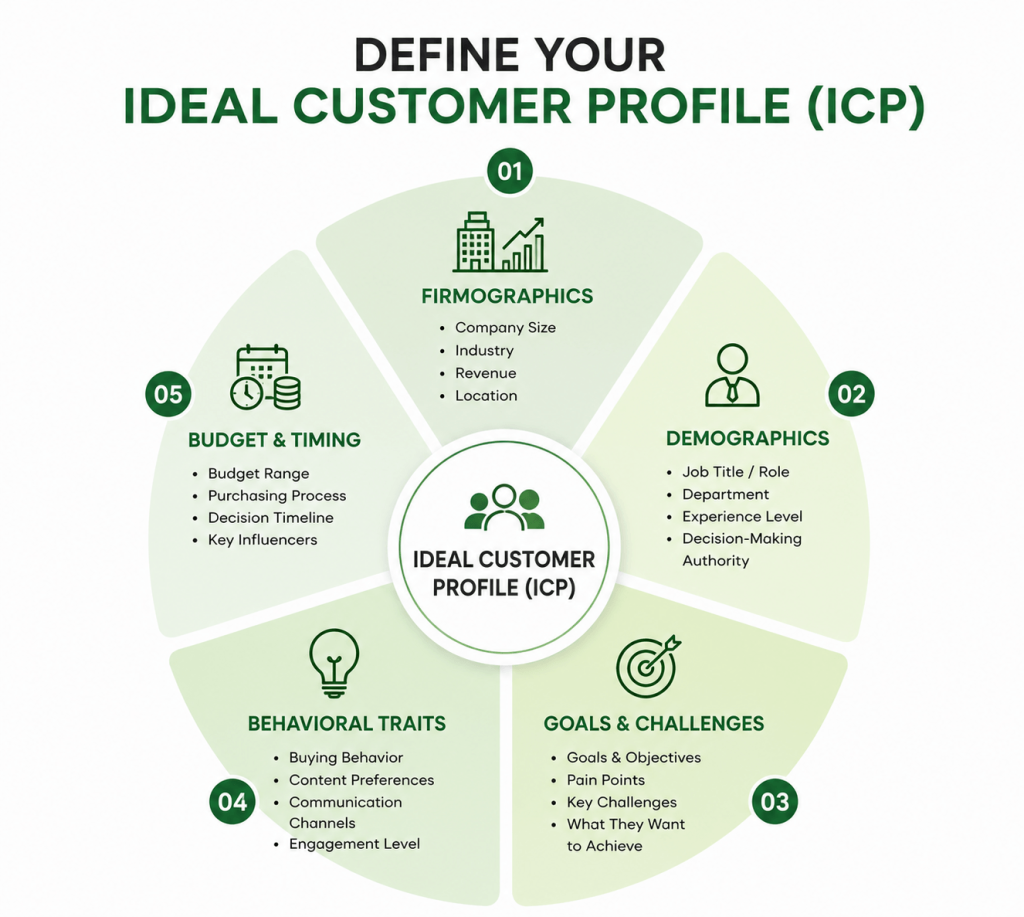
Consider:
- Industry
- Country or city
- Company size
- Annual revenue
- Job title
- Seniority
- Business type
- Technologies used
- Relevant buying signals
For example:
Target: US-based SaaS companies
Employees: 11–200
Contacts: Founder, CEO or Head of Sales
Goal: B2B sales outreach
This gives your database a clear purpose.
Step 2: Identify Relevant Companies
Once your ideal customer profile is defined, identify businesses that match it.
Research can involve professional prospecting platforms, business directories, company websites, LinkedIn and other appropriate business information sources.
The objective is not simply to collect as many companies as possible. It is to find organizations that closely match your campaign criteria.
Step 3: Find the Right Decision-Makers
Finding the company is only half the job.
A successful B2B email marketing database should also identify the appropriate person inside that company.
Depending on your offer, this may include:
- CEOs
- Founders
- Marketing Directors
- Sales Directors
- HR Managers
- Operations Managers
- CTOs
- Procurement Managers
- Business Owners
This is why targeted email list building is generally more valuable than collecting generic company inboxes.
LeadCanal’s Email List Building Services focus on building custom B2B lists around prospect criteria rather than relying only on generic bulk databases.
Step 4: Collect Relevant Contact Data
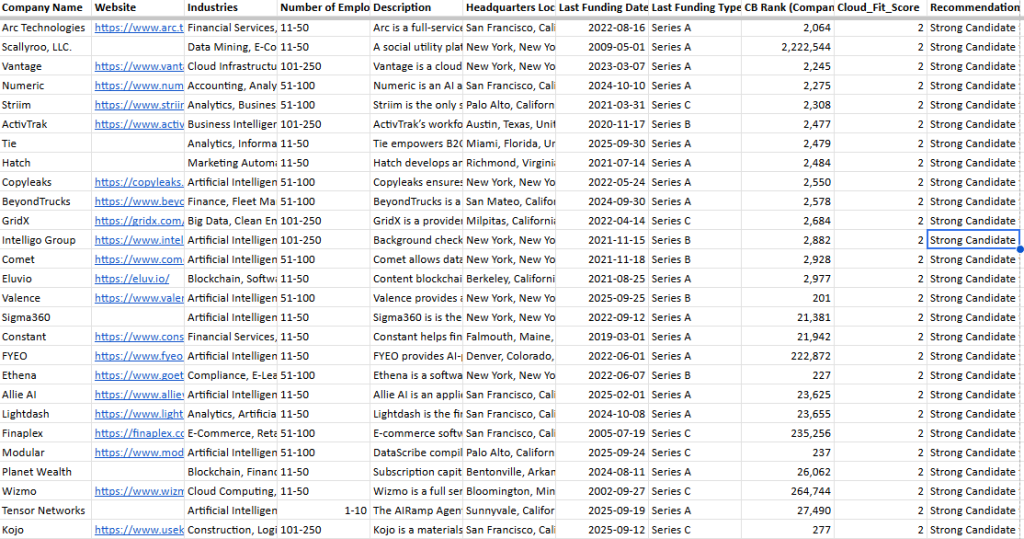
After identifying the right people, organize their information into structured columns.
A typical record may look like this:
| Field | Example |
|---|---|
| First Name | Michael |
| Last Name | Carter |
| Job Title | Sales Director |
| Company | ExampleTech |
| Industry | SaaS |
| Location | New York |
| michael@example.com | |
| Company Size | 51–200 |
| Profile URL | |
| Verification Status | Valid |
Keeping the same column structure throughout your file makes the database easier to filter, upload and maintain.
Step 5: Verify Email Addresses
Email verification should happen before a database is used for a major campaign.
Verification processes can help identify potentially invalid, malformed or risky addresses and separate them from cleaner records.
This creates a more campaign-ready verified email database.
LeadCanal also covers business email verification as part of its list-building and data-quality workflow.
Step 6: Remove Duplicate and Outdated Data
Duplicate records are common when data comes from several sources.
For example:
john@company.com
may appear once from LinkedIn research, again from an old CRM export and once more from another prospecting source.
Keeping all three records does not create three prospects.
It creates unnecessary duplication.
Use Data Cleansing Services to standardize records, identify duplicates and improve the quality of an existing marketing database.
Step 7: Append Missing Information
Some records may contain a company name and contact name but no usable email address.
Others may be missing job titles, phone numbers or important company information.
Instead of automatically deleting potentially valuable records, businesses can enrich them.
LeadCanal’s Email Appending Services can help fill missing email information in existing business datasets.

How to Segment an Email Marketing Database
Email list segmentation means dividing your database into smaller groups based on shared characteristics.
Instead of sending one generic message to everyone, you can build more focused campaigns.
Common segmentation options include:
Industry Segmentation
Create different groups for SaaS, healthcare, finance, real estate, ecommerce or other industries.
Job Title Segmentation
Separate CEOs, marketing directors, sales managers and other decision-makers.
Company Size Segmentation
A 10-person startup may have very different priorities from a company with 5,000 employees.
Geographic Segmentation
Campaigns can be organized by country, state, city or region.
Funnel Stage
Existing subscribers, new leads, engaged prospects and previous customers may need different messaging.
Good segmentation turns a large email marketing list into smaller, more relevant audiences.
Pros and Cons of an Email Marketing Database
| Pros | Cons |
|---|---|
| Makes audience targeting easier | Data becomes outdated over time |
| Supports personalized campaigns | Requires regular maintenance |
| Helps organize B2B prospects | Invalid emails can enter the database |
| Useful for CRM integration | Poor segmentation can reduce relevance |
| Supports scalable outreach | Large databases require stronger management |
| Provides richer customer context | Missing fields may require enrichment |
| Helps sales teams prioritize prospects | Quantity can become a distraction from quality |
The goal should therefore not be to build the largest email database possible.
The goal is to build the most relevant and usable database for your business.
Practical Example: Building a B2B Email Marketing Database
Imagine a digital marketing company wants to sell services to ecommerce businesses in the United States.
Instead of searching for a generic 10,000 email list free download, the company defines its ideal customer profile:
Industry: Ecommerce
Location: United States
Company Size: 10–100 employees
Decision-Makers: Founder, CEO, Head of Marketing
Technology: Shopify
Required Data: Name, title, company, email, website and LinkedIn
The research team identifies 3,000 matching companies.
After decision-maker research, 2,400 relevant contacts are found.
Email verification flags some records for review. Duplicate companies and contacts are removed, and missing fields are enriched where appropriate.
The final database might contain fewer records than the original research file—but every row now provides more useful information.
This is an important lesson:
A smaller, targeted email marketing database can be more useful than a huge generic mailing list.
The cleaned database can then be segmented into groups such as:
- Ecommerce founders
- Marketing directors
- Shopify companies with 10–50 employees
- Shopify companies with 51–100 employees
Each segment can receive messaging designed around its particular business context.
For companies that also need campaign execution, the cleaned database can feed into a structured Cold Email Outreach process.
How to Keep an Email Marketing Database Clean
Building the database is not the end of the process.
Contact information changes continuously.
Employees change jobs. Companies merge. Domains change. New decision-makers are hired. Old email addresses become unusable.
Database maintenance should therefore include:
- Remove duplicate records.
- Review invalid and bouncing emails.
- Update job titles.
- Update company information.
- Standardize field formatting.
- Verify old records before major campaigns.
- Append missing information where appropriate.
- Segment new contacts correctly.
- Record engagement and campaign status.
- Review your data before importing it into a new CRM.
Businesses experiencing email delivery problems should also examine infrastructure and sender reputation rather than assuming database quality is the only cause. LeadCanal provides separate Email Deliverability Services for this part of the email system.
Should You Buy an Email Marketing Database?
Searches such as buy email list by industry, B2B email database, email lists for marketing, free email lists for marketing and 10,000 email list free usually come from businesses looking for a faster way to start outreach.
However, database size and low price should not be the only considerations.
Before using any data source, evaluate:
- How recently was the data collected?
- Is the audience relevant?
- Are the emails verified?
- Are job titles current?
- Is company information included?
- Can the database be segmented?
- Does it match your ideal customer profile?
- Is your intended use appropriate under applicable privacy and marketing rules?
A custom-built database can often provide better targeting than a large generic file because the list is created around specific campaign criteria.
Frequently Asked Questions About Email Marketing Databases
1. What is an email marketing database?
An email marketing database is an organized collection of contact and related marketing information used to create, segment and manage email campaigns. It may include names, email addresses, companies, job titles, locations and behavioral or campaign information.
2. What is a B2B email database?
A B2B email database contains business contacts rather than general consumer contacts. It commonly includes company information and professional decision-makers such as founders, CEOs, directors and managers.
3. How do I build an email marketing database?
Start by defining your ideal customer, researching matching companies, identifying relevant decision-makers, collecting structured information, verifying email addresses, removing duplicates and organizing the final database into useful segments.
4. What is the difference between an email list and an email database?
An email list can simply contain email addresses, while an email marketing database generally includes additional contact, company, segmentation and campaign information.
5. How do I clean an email marketing database?
Remove duplicates, identify invalid addresses, standardize fields, update outdated contact information and enrich missing records. Professional data cleansing can help with larger B2B datasets.
6. What should a B2B email marketing database contain?
Useful fields can include the contact’s name, business email, company, job title, industry, location, company size, LinkedIn profile, phone number and verification status.
7. Why is email verification important?
Verification helps identify questionable or invalid email records before they are included in campaigns. This supports better database hygiene and reduces unnecessary sends to unusable addresses.
8. What is email database segmentation?
Email database segmentation divides contacts into groups according to criteria such as industry, job title, location, company size, interests or funnel stage so campaigns can be more relevant.
9. How often should an email database be cleaned?
There is no single schedule for every business. Databases should be reviewed regularly and especially before major campaigns, after combining multiple data sources, or when duplicate and invalid records start increasing.
10. Can LeadCanal build an email marketing database?
Businesses that need custom prospect research can use LeadCanal’s Email List Building Services to build targeted B2B lists around specific company and decision-maker criteria.
Conclusion
A successful email marketing database is not simply a large collection of email addresses.
It is a structured, targeted and maintained source of prospect or customer information that helps marketing and sales teams understand who they are contacting and why that person belongs in the campaign.
The strongest databases combine accurate business emails with company information, job titles, location, industry, segmentation data and verification status.
Whether you are building a new B2B email database, cleaning an old CRM, creating targeted email marketing lists or preparing a cold outreach campaign, prioritize relevance, accuracy and organization over raw list size.
Build a Better Email Marketing Database With LeadCanal
Need a targeted database built around your ideal customers?
LeadCanal can help with Email List Building, Data Cleansing, Email Appending and Cold Email Outreach to help turn prospect data into a structured outreach system.
Contact LeadCanal to discuss your target market and start building a cleaner, more relevant B2B email marketing database.


