 Skip to content

Email campaigns can only perform well when your message is clear, professional, and easy to read. But before you send any campaign, cold email, newsletter,
or sales follow-up, you need to test your email template carefully.
Many businesses write an email, add a few links, choose a subject line, and send it without checking how it will appear in the inbox this is a mistake.
An email template may look fine while you are editing it, but it can break inside Gmail, Outlook, Apple Mail, Yahoo Mail, or on mobile devices. Images may not load correctly,
buttons may not work, links may lead to the wrong page, and spammy words may reduce the quality of your campaign.
At Leadcanal, we understand that a strong email is not just about design. It is about clarity, trust, deliverability, and response. If your email template is not tested before sending,
you may lose leads before they even understand your offer.
This guide explains how to test email templates before sending, what to check, which mistakes to avoid, and how to improve your email performance.
What Does It Mean to Test an Email Template?
To test an email template means reviewing your email before it reaches real recipients. The purpose is to make sure your email looks good, reads well, works properly,
and gives the recipient a clear reason to take action.
A complete email template test includes checking the subject line, preview text, body copy, links, buttons, images, HTML formatting, mobile view, spam trigger words,
personalization fields, and call to action.
For businesses using email for outreach, lead generation, or sales communication, this step is very important. A broken or poorly written email can damage trust.
A clean and well-tested email can make your brand look more professional.
That is why Leadcanal recommends testing every email template before sending, especially if the email is part of a cold outreach or lead generation campaign.
Why You Should Test Email Templates Before Sending
Testing email templates helps you avoid small mistakes that can create big problems. Even one broken link or wrong personalization tag can reduce the quality of your campaign.
One reason to test your template is formatting. Different email platforms display emails in different ways. A design that looks perfect in one inbox may look messy in another.
Outlook, Gmail, and mobile apps can all handle spacing, fonts, images, and HTML differently.
Another reason is mobile readability. Many people check emails on their phones. If your email has long paragraphs, tiny fonts, wide images, or buttons that are hard to tap,
readers may leave without responding.
Testing also helps with deliverability. Certain words, too many links, heavy images, and poor formatting can make your email look less trustworthy.
While testing does not guarantee inbox placement, it helps you improve the quality of your message.
email testing is part of building better outreach. A good email should not only reach the inbox, it should also be simple, relevant, and easy to reply to.
Step 1: Check Your Subject Line
The subject line is the first thing your recipient sees. If it sounds spammy, unclear, or too promotional, your email may be ignored.
A good subject line should be short, specific, and relevant. It should tell the reader why the email matters without using fake urgency or exaggerated claims.
Avoid subject lines with all capital letters, too many exclamation marks, or aggressive sales words. Phrases like “limited time,” “guaranteed results,” and “urgent offer” can make your email look promotional.
For cold emails, simple subject lines often work better.
Weak example:
Amazing Offer You Cannot Miss!!!
Better example:
Quick idea for your outreach
The second subject line feels more natural and professional. It also matches the kind of clear communication that Leadcanal supports in email outreach.
Step 2: Review the Preview Text
Preview text appears beside or below the subject line in many inboxes. It gives the reader extra context before opening the email.
Many businesses forget to edit preview text. As a result, inboxes may show random text like “View this email in browser” or unnecessary image text.
Your preview text should support your subject line and encourage the reader to open the email.
Example:
Subject line:
Quick idea for your outreach
Preview text:
A short suggestion to help you reach more qualified prospects.
This combination is clear, simple, and relevant. It tells the reader what to expect without sounding pushy.
Step 3: Read the Email Body Like a Real Recipient
Before sending your email, read it from the recipient’s point of view. Ask yourself whether the message is clear within the first few seconds.
A strong email body should answer three basic questions:
- Who are you?
- Why are you contacting the reader?
- What should the reader do next?
Avoid long introductions. Your recipient does not need your full company history in the first email. Focus on the reader’s problem, interest, or possible benefit.
Keep paragraphs short. Two to three lines per paragraph are easier to read than large blocks of text.
For example, instead of writing a long paragraph about your services, you can write:
At Leadcanal, we help businesses improve outreach by focusing on cleaner targeting, better email quality, and more relevant communication.
This explains the value clearly without sounding too heavy.

Step 4: Test All Links and Buttons
Links and buttons are important because they guide the reader to the next step. Before sending your email, click every link yourself.
Check your website link, booking link, product link, landing page link, social media link, and unsubscribe link if required.
Make sure each link opens the correct page. Also check that the page loads properly on desktop and mobile.
Avoid adding too many links in one email. Too many links can distract the reader and may make your message look overly promotional. For cold emails, one clear call to action is usually enough.
Good CTA examples include:
- Would you be open to a quick call this week?
- Can I send over a few lead examples?
- Would it make sense to share more details?
These CTAs are simple and easy to answer.
Step 5: Check Mobile Readability
Mobile testing is one of the most important parts of email template testing. Many users read emails on their phones, so your template must be easy to scan.
Send a test email to yourself and open it on mobile. Check the font size, spacing, image width, button size, and paragraph length.
Your email should not require zooming. The text should be readable, and the CTA should be easy to tap.
If the email feels crowded, simplify it. Remove unnecessary images, reduce long paragraphs, and keep the message focused.
A clean mobile experience helps your email look more professional and improves the chance that people will continue reading.
Step 6: Check Images and File Size
Images can make an email look attractive, but they can also create problems. Large images may load slowly, and some email clients may block them by default.
Before sending, check whether your images load correctly. Make sure they fit on mobile screens and do not make the email too heavy.
You should also add alt text to images. Alt text helps users understand the image if it does not load.
For cold outreach, text-based emails often feel more personal. For newsletters or branded emails, images can be useful, but they should support the message instead of replacing it.
the focus should always be on clear communication first. Design should support the message, not hide it.
Step 7: Review HTML Email Formatting
If you are using an HTML email template, test the formatting carefully. HTML emails are not the same as normal website pages. Some email clients do not support advanced CSS,
scripts, or complex layouts.
Use simple structure, clean formatting, and email-friendly design. Avoid unnecessary animations, heavy code, and complicated sections.
If possible, use inline CSS for better compatibility. Also make sure the email still makes sense if images do not load.
A good HTML email should look professional, but it should also remain readable in a basic format.
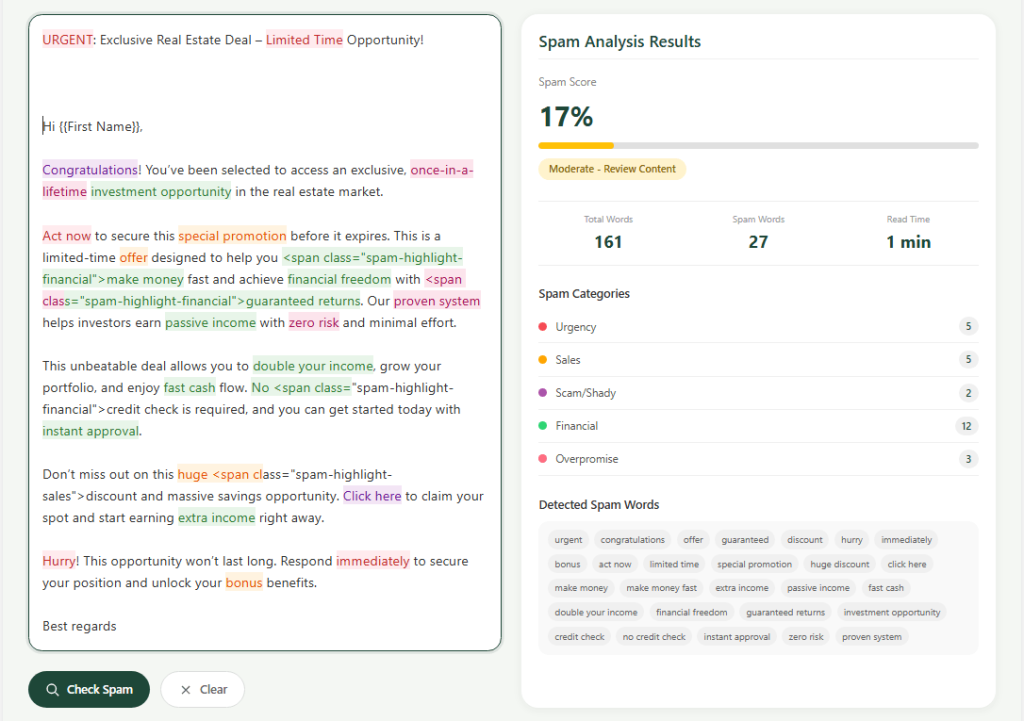
Step 8: Check for Spam Trigger Words
Spam filters look at many signals, and email content is one of them. Certain words and phrases can make your message look suspicious, especially when they are used too often.
Avoid aggressive sales language, unrealistic promises, and fake urgency. Words like “guaranteed,” “free money,” “winner,” “risk-free,” and “act now” can create problems if used carelessly.
Instead of writing:
We guarantee massive results instantly.
Write:
We help businesses improve outreach quality and connect with more relevant prospects.
The second version sounds more professional and realistic. This type of language is better for trust and brand reputation.
If you want to check your email for spammy keywords, you can use Leadcanal Spammy Keyword Checker before sending your campaign.
Step 9: Test Personalization Fields
Personalization can improve email quality, but only when it works correctly. Broken personalization makes your email look careless.
Before sending a campaign, check all merge tags. Make sure the first name, company name, industry, location, or custom fields appear correctly.
A mistake like this looks unprofessional:
Hi {{first_name}},
This tells the recipient that the email was automated and not checked.
Good personalization should feel natural. It should make the email more relevant, not forced.
Example:
I noticed your company works with SaaS brands, so I wanted to share a quick outreach idea that may be useful.
This sounds more thoughtful and specific.
Step 10: Review Your Call to Action
Every email should have one clear purpose. Before sending, decide what you want the reader to do next.
- Do you want them to reply?
- Book a call?
- Visit a page?
- Download a resource?
- Confirm interest?
Your CTA should be simple and easy. Do not ask for too much too soon.
For cold email campaigns, a soft CTA often works better than a hard sales pitch.
Example:
Would it be helpful if I shared a few lead examples?
This feels easier to answer than a pushy sales request.
Common Email Template Mistakes to Avoid
Many email campaigns fail because of simple mistakes. Before sending, check for these common issues:
- Long paragraphs
- Broken links
- Missing preview text
- Too many images
- No clear CTA
- Spammy subject lines
- Wrong personalization tags
- Poor mobile layout
- Overly promotional language
- Complicated HTML design
- No plain text version
- Unclear value proposition
Fixing these problems can make your email cleaner, more professional, and more effective.
Best Practices for Testing Email Templates
The best way to test an email template is to follow a simple process every time.
First, send a test email to yourself. Open it on desktop and mobile. Check the subject line, preview text, design, links, images, and CTA.
Second, read the email out loud. This helps you find awkward sentences and robotic language.
Third, review it from the reader’s point of view. Make sure the message is relevant and easy to understand.
Fourth, remove anything unnecessary. A shorter and clearer email often performs better than a long and complicated one.
Finally, check your email one last time before sending the campaign.
For businesses working on outreach and lead generation, Leadcanal recommends treating email testing as a required step, not an optional task.
Final Thoughts
Testing email templates before sending is one of the simplest ways to improve email quality. It helps you catch mistakes, improve readability, reduce spam risks, and create a better experience for your audience.
Whether you are sending cold emails, newsletters, sales follow-ups, or HTML campaigns, never send without reviewing your template first. Check your subject line, preview text, links, images, mobile layout, spam words, personalization, and call to action.
A well-tested email looks more professional, feels more trustworthy, and gives the reader a clear reason to respond.
At Leadcanal, better email communication starts with better preparation. When your email template is clear, tested, and focused on the recipient, your campaign has a stronger chance of performing well.
FAQs
What is email template testing?
Email template testing is the process of checking your email before sending it. It includes reviewing the subject line, preview text, content, links, images, mobile layout, HTML formatting, spam words, personalization, and call to action.
Why should I test email templates before sending?
You should test email templates to find mistakes before your audience sees them. Testing helps you avoid broken links, poor formatting, mobile issues, spammy words, and unclear messaging.
How do I test an HTML email template?
To test an HTML email template, send a test email to yourself, check how it looks in different inboxes, review the mobile layout, click all links, check images, and make sure the email is readable even if images do not load.
What should I check in a cold email template?
In a cold email template, check the subject line, personalization, message length, tone, CTA, links, spam words, and relevance. The email should be short, clear, and easy to reply to.
Can spam words affect email performance?
Yes, spammy or overly promotional words can make your email look less trustworthy. They may not be the only factor, but reducing aggressive language can improve overall email quality.
How does Leadcanal approach email quality?
Leadcanal focuses on clear, relevant, and professional email communication. Testing templates before sending helps improve outreach quality, avoid mistakes, and create a better experience for potential leads.


