Quick Answer
Cold email works best when it is built on a proper system. It is not just about writing one message and sending it to a big list.
A strong campaign needs clean setup, healthy inboxes, a targeted lead list, short email copy, and careful follow-up.
That is the approach we use at LeadCanal when we run outbound campaigns through Instantly.
The platform supports campaign creation, lead uploads, personalization, warmup, link insertion, and unsubscribe options, which makes it practical for a structured outbound workflow.
Instead of treating cold email like mass marketing, we treat it like a process.
We prepare the sending accounts first, warm them up, upload segmented leads, write a short sequence, add the right links, and only then start sending.
This method keeps the campaign more organized and helps protect deliverability from day one
Why We Use Instantly
At LeadCanal, we need a tool that supports both campaign management and deliverability. Instantly fits that need because it offers unlimited email accounts on its outreach plans,
unlimited warmup, lead imports, email sequence building, personalization variables, and built-in campaign controls.
LeadCanal own website also describes the company as providing cold email outreach, deliverability-related services, and lead generation support, so the fit is natural for our workflow.
We use it because it helps keep everything in one place. Instead of managing one tool for mailboxes, another for warmup, and another for campaign writing, we can handle most of the outbound workflow inside a single system. That makes setup cleaner and campaign execution easier.
Set Up the Sending Accounts
The first step is to prepare the email accounts properly. We do not launch campaigns from a fresh mailbox right away. We first connect the accounts, confirm the inboxes are working correctly, and make sure the sending setup is ready before anything goes live.
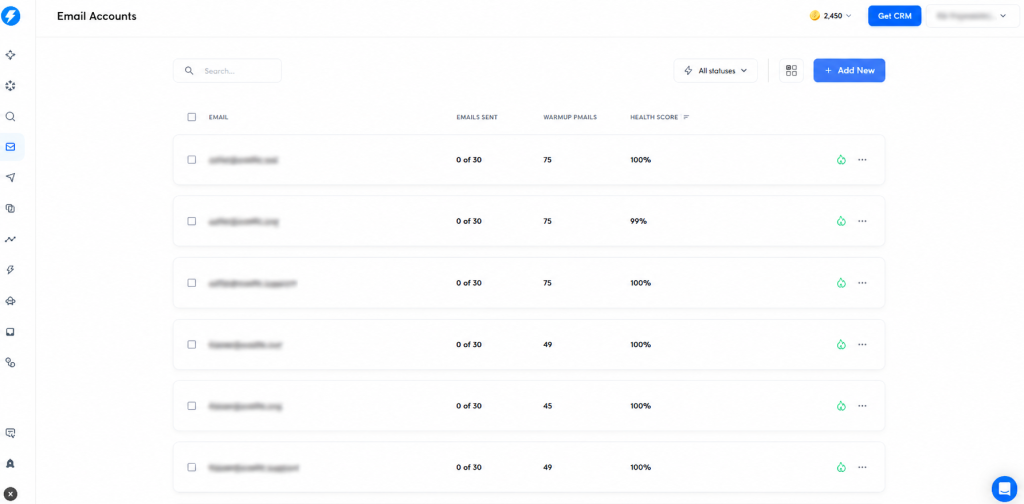
What we focus on in this step:
- Connect the email accounts to Instantly
- Check that the inboxes are active and stable
- Make sure the domain and mailbox setup is clean
- Prepare enough accounts if we plan to scale later
This step matters because bad infrastructure can hurt even a good campaign. If the inbox setup is weak, reply rates and inbox placement usually suffer.
Instantly’s documentation also ties warmup and account readiness to proper account preparation.
Warm Up the Inboxes Before Sending
This is one of the most important parts of the whole process. Instantly explains that warmup improves deliverability by creating a history of positive, human-like inbox activity.
It also recommends waiting at least two weeks before using new accounts for campaigns.
In the same guidance, Instantly says new accounts should stick to the recommended limit of 10 warmup emails per day, and the account should ideally have a health score above 90% before campaign use.
How we handle warmup:
- Turn warmup on as soon as the account is connected
- Let the account warm for at least 2 weeks
- Keep the recommended warmup pace
- Check the health score before launching
- Avoid rushing new accounts into campaigns
At LeadCanal, we consider warmup a required step, not an optional one. A campaign sent from a cold inbox can damage future performance very quickly. We would rather delay a launch than push a weak account too early.
Create the Campaign the Right Way
Once the accounts are ready, we create the campaign. instantly’s campaign setup guide shows that the campaign should be created from the Campaigns dashboard,
then leads are added, then the email sequence is built. We keep campaign names simple and organized so performance tracking stays easy later.
Our campaign setup usually follows this order:
- Create a new campaign
- Give it a clear internal name
- Choose the right sending accounts
- Add the lead source
- Build the sequence
- Review settings before launch
We keep each campaign focused on one audience. That gives us cleaner testing, better messaging, and easier reporting.
Upload and Segment Leads
Lead quality is one of the biggest reasons campaigns succeed or fail. Instantly allows leads to be added through CSV,
Super Search, manual entry, Google Sheets, and CRM integrations such as HubSpot, Salesforce, and Pipedrive.
That flexibility is useful because different teams manage prospect lists in different ways.
What we do before upload:
- Group leads by niche
- Separate prospects by role or title
- Keep one offer for one audience
- Avoid mixing very different businesses in one campaign
- Clean the list before importing.
What we do during upload:
- Map the fields correctly
- Check that first name, company, and email are in the right columns
- Keep custom fields ready for personalization
- Review the list before sending starts
This makes a big difference. A founder list should not get the same message as a local business list.
Segmentation helps the email feel more relevant, and relevance is one of the biggest drivers of response.
Write a Short Email Sequence
We keep the sequence short and easy to read. Instantly ai guide recommends a maximum of 3 to 4 steps for most email cold outreach campaigns.
It also allows users to add variants for testing different subject lines and copy.
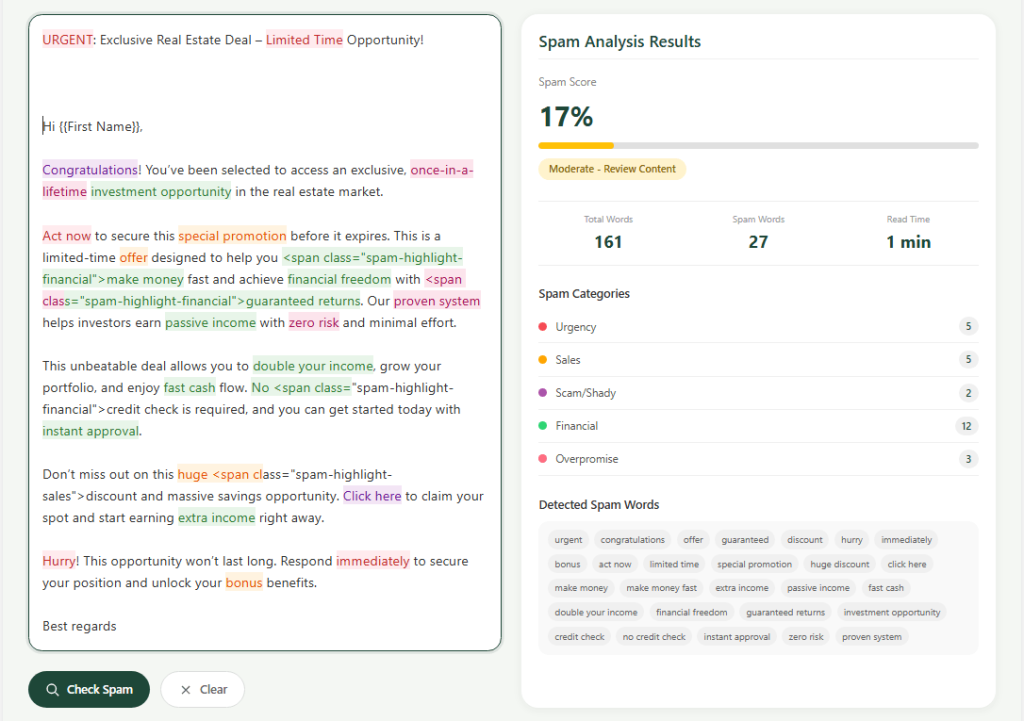
Our basic structure looks like this:
- Email 1: Short intro, who we help, and why we are reaching out
- Email 2: Simple follow-up that brings the first email back to attention
- Email 3: A small nudge with one more angle or benefit
- Email 4: Optional close-out message
We avoid long emails
We also avoid sounding too salesy. The goal is not to impress with big words.
The goal is to make the message clear enough that the reader understands it in a few seconds.
What we try to keep in every email:
- One clear idea
- One simple offer
- One direct call to action
- Natural language
- Short length
That usually performs better than long promotional copy.
Personalize Without Making It Complicated
Personalization matters, but it should stay practical. Instantly supports predefined variables such as email,
first name, last name, job title, company name, phone, website, location, LinkedIn, and other mapped fields
We use personalization in a simple way:
- Add the first name where it feels natural
- Mention the company name if relevant
- Refer to the role or niche when useful
- Use custom fields only if the data is reliable
We do not force personalization into every line. Too much personalization can look fake if the data is weak.
We only use the details that actually improve message relevance.
Why Follow-Ups Are Important
Follow-ups are important because most prospects do not reply to the first email, even when the offer is relevant.
People are busy, inboxes are crowded, and many good emails are simply missed.
Instantly ai campaign guide specifically supports follow-up steps and recommends keeping most cold outreach campaigns to around three to four total steps,
which shows that follow-up is a normal and expected part of the outreach workflow.
A follow-up gives your message another chance to be seen without forcing you to send a completely new pitch.
It also helps keep the conversation organized in the same thread. In Instantly, follow-ups can be added directly in the sequence,
and campaign controls also allow teams to stop further messages automatically once a lead replies.
That makes follow-up useful not only for response rate, but also for cleaner campaign management.
Understand the Cost
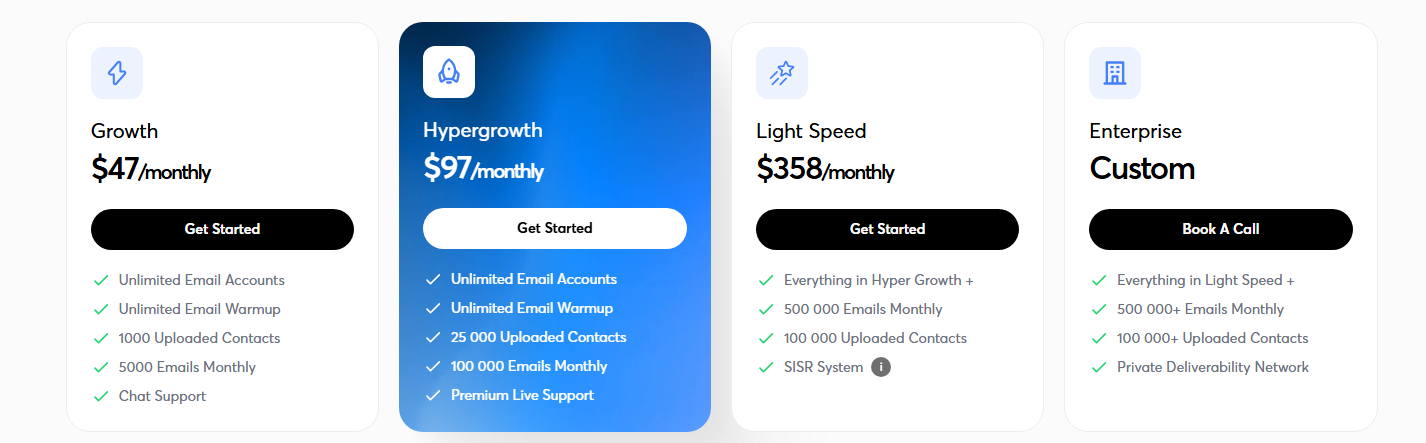
Instantly pricing page currently lists the Outreach Growth plan at $47 per month, including unlimited email accounts,
unlimited email warmup, 1,000 uploaded contacts, and 5,000 emails monthly. The same page lists Hypergrowth at $97 per month,
and Instantly’s pricing overview also mentions that pre-warmed domains cost $15 per year each and pre-warmed email accounts cost $10 per month each.
For many smaller outreach teams, Growth is the entry point. Teams that need larger sending capacity or more contacts may move to Hypergrowth or a higher plan.
The right plan depends on how many leads you want to upload, how many emails you plan to send each month,
and whether you are building a small in-house campaign or a larger outbound system.
Conclusion
At LeadCanal, we use Instantly as more than just an email sender. We use it as a structured outbound platform that supports account preparation, warmup, campaign creation,
lead uploads, personalization, link insertion, follow-ups, and campaign controls. That structure helps us turn cold outreach into a repeatable system instead of a random activity.
In simple terms, our process is this: set up the accounts, warm them up, upload segmented leads, write short personalized sequences,
add the right links, control daily sending, and then optimize based on response quality.
That is the workflow LeadCanal follows to run cold email campaigns through Instantly in a professional way.